> ## Documentation Index
> Fetch the complete documentation index at: https://docs.conduktor.io/llms.txt
> Use this file to discover all available pages before exploring further.
# Kafka multi-tenancy with Virtual Clusters — Gateway
> Create isolated Kafka Virtual Clusters for teams, environments, or partners with Conduktor Gateway.
A Virtual Cluster is a Conduktor Gateway concept that logically represents a Kafka cluster with strict resource segregation. Each Virtual Cluster has its own authentication and authorization layer, dedicated Topics and Consumer Groups that only mapped applications can access, and specific **Interceptors**.
By using Virtual Clusters, you can create multiple environments, or segregated secured namespaces for your partners or projects, while maintaining a single physical Kafka cluster.
The Virtual Clusters are only available on your Conduktor Gateway if it is configured with `GATEWAY_SECURITY_MODE: GATEWAY_MANAGED`. The Gateway needs to manage both the authentication and authorization of clients to work.
**From our blog:** [How to isolate non-prod Kafka with Virtual Clusters](https://conduktor.io/blog/how-to-isolate-non-prod-kafka-with-virtual-clusters) Replace VPC-per-environment sprawl with one physical cluster and virtual isolation that satisfies security teams.
## When to use Virtual Clusters?
### External data sharing
To best support external data sharing use cases, you will most likely need to protect from noisy neighbors, manage ACLs, and monetize the shared data. In such case, we highly recommend using [**Partner Zones**](/guide/use-cases/third-party-data). Partner Zones provide:
* a dedicated management UI
* resource metadata and labels for business tracking
* simplified UX (one API call manages ACLs, Topic Aliases, Service Accounts, and metadata)
* Chargeback capabilities based on throughput
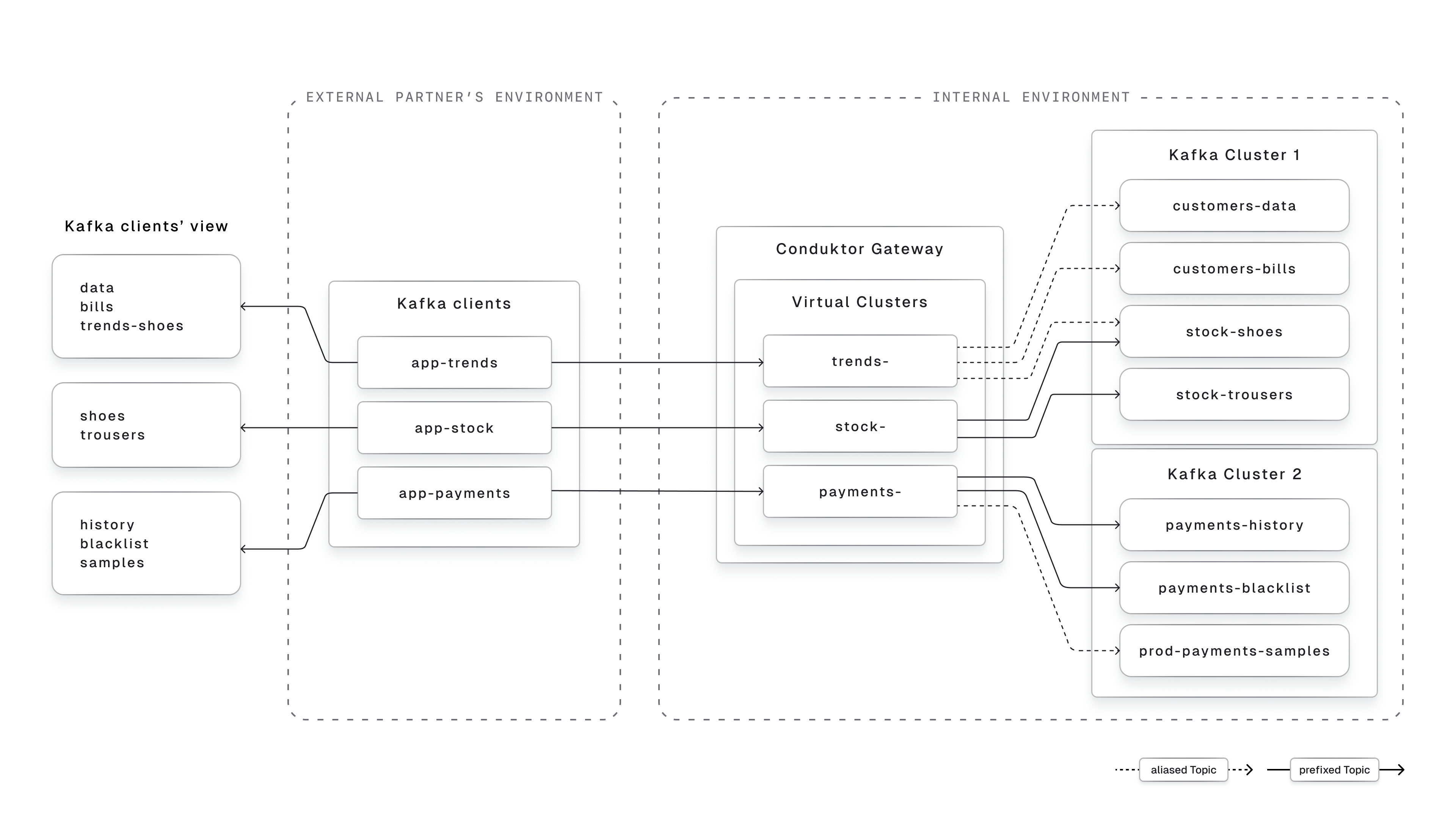
A Virtual Cluster can be used as a **segregated secured namespace for your partners** or **external applications** to connect to. It will allow you to:
* **Isolate the Topics you want to expose** to specific applications, with its related set of **ACLs** to restrict their permissions
* **Prefix the Consumer Groups** they might use, helping with troubleshooting and auditing
* Use it as an **Interceptor** **scope** to easily manage Traffic Control Policy or Encryption at this level
* **Expose internal Topics** to external partners **with business-friendly names** while keeping your internal naming conventions private
* Potentially **expose Topics from multiple physical Kafka clusters**, while hiding this complexity from the client
In this context, we recommend setting the [`spec.type`](/guide/reference/gateway-reference#param-spec-type) to `Partner`.
 ### Internal environments segregation
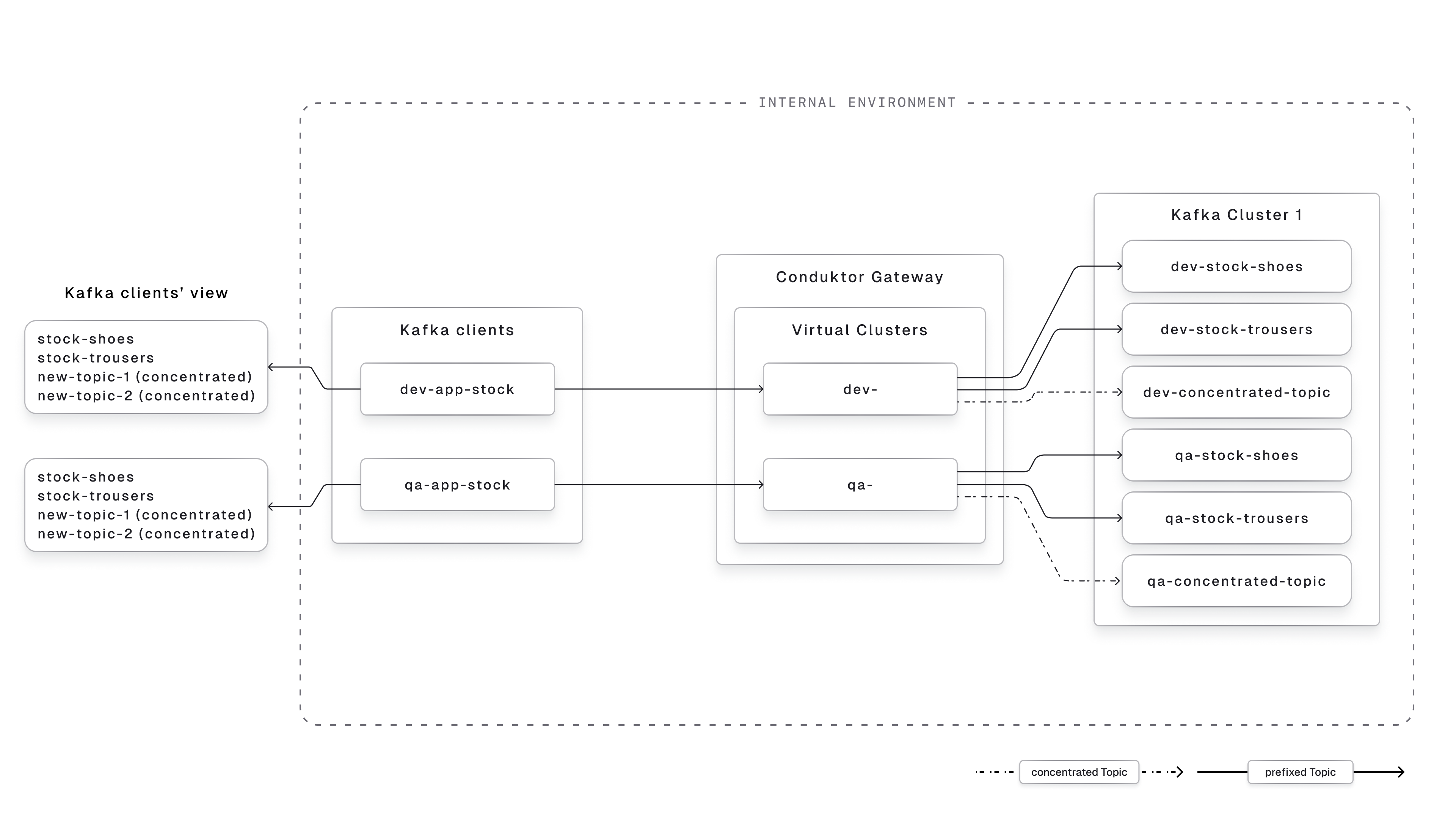
A Virtual Cluster can be used to simulate multiple logical environments on the same physical cluster. That way, you can:
* **Merge your lower environments** (like dev & QA) into the same Kafka cluster, and separate the Topics from each environment in a dedicated Virtual Cluster
* **Strongly isolate the business units** that never interacts with each other and that should be completely separated from each other, like multiple subsidiaries, or different lines of business.
* **Ease the environment upgrade** as the Topics can have the same name in the different Virtual Cluster, as they will exist with different names on the physical Kafka Cluster
* Create as many **developers sandboxes** as you want, with a quick API call
* Use [Topic Concentration](/guide/conduktor-concepts/logical-topics#concentrated-topics) to allow your developers to **create as many topics as they want**, for testing purpose, while storing the data **on the same physical Topic**.
In this context, we recommend setting the [`spec.type`](/guide/reference/gateway-reference#param-spec-type) to `Standard`.
### Internal environments segregation
A Virtual Cluster can be used to simulate multiple logical environments on the same physical cluster. That way, you can:
* **Merge your lower environments** (like dev & QA) into the same Kafka cluster, and separate the Topics from each environment in a dedicated Virtual Cluster
* **Strongly isolate the business units** that never interacts with each other and that should be completely separated from each other, like multiple subsidiaries, or different lines of business.
* **Ease the environment upgrade** as the Topics can have the same name in the different Virtual Cluster, as they will exist with different names on the physical Kafka Cluster
* Create as many **developers sandboxes** as you want, with a quick API call
* Use [Topic Concentration](/guide/conduktor-concepts/logical-topics#concentrated-topics) to allow your developers to **create as many topics as they want**, for testing purpose, while storing the data **on the same physical Topic**.
In this context, we recommend setting the [`spec.type`](/guide/reference/gateway-reference#param-spec-type) to `Standard`.
 Virtual Clusters are **not** designed for **multi-tenancy** (one Virtual Cluster per internal team). For that, use our Console [**Self-service**](/guide/use-cases/self-service) feature instead.
## Get started with Virtual Clusters
The creation of a Virtual Cluster is done via our [API](/guide/conduktor-in-production/automate/api-automation#gateway-api) / [CLI](/guide/conduktor-in-production/automate/cli-automation) / [Terraform Provider](/guide/conduktor-in-production/automate/terraform-automation). It requires the Gateway to be up and running, and the Gateway API to be accessible.
You can refer to the [Virtual Cluster reference](/guide/reference/gateway-reference#virtualcluster) to customize its name, type, super users, and ACLs.
Once the Virtual Cluster is created, **all the Consumer Groups and Topics prefixed by its name** will be automatically visible in it.
To add Topics that **aren't prefixed by the Virtual Cluster name**, you need to define [Topics Aliases](/guide/reference/gateway-reference#aliastopic) and include them in the Virtual Cluster using the [`metadata.vCluster`](/guide/reference/gateway-reference#param-metadata-v-cluster) field.
An application can have its Service Account attached to only one Virtual Cluster. For that, you need to set its `metadata.vCluster` to the name of your Virtual Cluster.
Once your application has been attached to a Virtual Cluster, it will be able to interact with the Topics attached to this Virtual Cluster.
## Troubleshooting
* Make sure the Topics have been mapped in this Virtual Cluster, either using Topic Aliases or their prefix.
* Try to connect and list Topics using the Virtual Cluster super user defined, to confirm the Topic is in there.
* Confirm the Virtual Cluster has the right Kafka ACLs attached to it
## Related resources
* [Virtual Cluster reference](/guide/reference/gateway-reference#virtualcluster)
* [Give us feedback/request a feature](https://conduktor.io/roadmap)
Virtual Clusters are **not** designed for **multi-tenancy** (one Virtual Cluster per internal team). For that, use our Console [**Self-service**](/guide/use-cases/self-service) feature instead.
## Get started with Virtual Clusters
The creation of a Virtual Cluster is done via our [API](/guide/conduktor-in-production/automate/api-automation#gateway-api) / [CLI](/guide/conduktor-in-production/automate/cli-automation) / [Terraform Provider](/guide/conduktor-in-production/automate/terraform-automation). It requires the Gateway to be up and running, and the Gateway API to be accessible.
You can refer to the [Virtual Cluster reference](/guide/reference/gateway-reference#virtualcluster) to customize its name, type, super users, and ACLs.
Once the Virtual Cluster is created, **all the Consumer Groups and Topics prefixed by its name** will be automatically visible in it.
To add Topics that **aren't prefixed by the Virtual Cluster name**, you need to define [Topics Aliases](/guide/reference/gateway-reference#aliastopic) and include them in the Virtual Cluster using the [`metadata.vCluster`](/guide/reference/gateway-reference#param-metadata-v-cluster) field.
An application can have its Service Account attached to only one Virtual Cluster. For that, you need to set its `metadata.vCluster` to the name of your Virtual Cluster.
Once your application has been attached to a Virtual Cluster, it will be able to interact with the Topics attached to this Virtual Cluster.
## Troubleshooting
* Make sure the Topics have been mapped in this Virtual Cluster, either using Topic Aliases or their prefix.
* Try to connect and list Topics using the Virtual Cluster super user defined, to confirm the Topic is in there.
* Confirm the Virtual Cluster has the right Kafka ACLs attached to it
## Related resources
* [Virtual Cluster reference](/guide/reference/gateway-reference#virtualcluster)
* [Give us feedback/request a feature](https://conduktor.io/roadmap)