> ## Documentation Index
> Fetch the complete documentation index at: https://docs.conduktor.io/llms.txt
> Use this file to discover all available pages before exploring further.
# Kafka data masking and PII protection
> Define Kafka data masking policies in Conduktor Console to protect PII and sensitive fields. Control who sees unmasked values based on RBAC permissions.
## Overview
In order to meet **compliance regulations**, Conduktor Console provides a Data Masking feature that enables you to **obfuscate personal and sensitive data** within the Console.
As a Console administrator, you can **secure and govern** such data by creating Data Masking policies, so that users can't see them.
Data masking **does not impact how the underlying data is stored**. The data will only be masked **within Console** at runtime for specified users/groups only, the underlying Kafka data remains unchanged. To mask or encrypt the underlying Kafka data, use [Conduktor Gateway](/guide/conduktor-in-production/deploy-artifacts/deploy-gateway).
Policies will be applied when **consuming Kafka messages in the Console**, as shown below. We can see that the phone number, the IBAN, and the card number, have been masked with some \*\*\*\*\*.
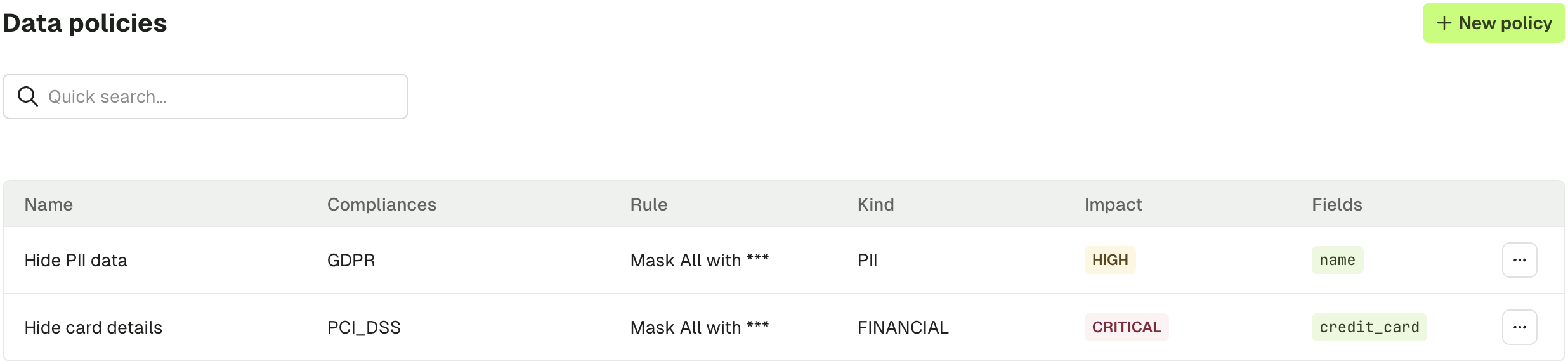
 Here is the list of policies applied in this case.
 ## Create a data masking policy
In order to create a Data Masking policy and protect your data, go to **Settings** > **Data Policies**.
Click **New Policy** and fill in the required details:
| Policy detail | Description |
| ----------------------------------- | ----------------------------------------------------------------------------------------------------------------------------------------------------------------------------------------------------------------------------------------------------------------- |
| Policy Name | Unique name for identifying your policy |
| Compliance | The compliance regulation the policy adheres to (e.g. GDPR, PCI-DSS) |
| Information Kind | The kind of information for obfuscation (e.g. PII, Financial) |
| Masking Rule | How the obfuscation should be implemented (e.g. hide-all, hide-last-3) |
| Risk Level | Categorization for the risk level associated with the policy |
| Mask all fields | When enabled, every field Console can find in the message is masked with the chosen masking rule. See [Mask all fields](#mask-all-fields). |
| Fields | List of fields that should be obfuscated, specified as dot-separated JSON paths. See [Field path syntax](#field-path-syntax) for details. If you want to hide multiple fields, you can click on **Add field**. Not available when **Mask all fields** is enabled. |
| Resources | List of resources where the policy must be applied, like clusters or topics. To add new resources, you can click on **Add resource**. |
| Exclude Users or Groups from policy | In case you want some users or groups to see the data, you can exclude them from the policy. |
## Create a data masking policy
In order to create a Data Masking policy and protect your data, go to **Settings** > **Data Policies**.
Click **New Policy** and fill in the required details:
| Policy detail | Description |
| ----------------------------------- | ----------------------------------------------------------------------------------------------------------------------------------------------------------------------------------------------------------------------------------------------------------------- |
| Policy Name | Unique name for identifying your policy |
| Compliance | The compliance regulation the policy adheres to (e.g. GDPR, PCI-DSS) |
| Information Kind | The kind of information for obfuscation (e.g. PII, Financial) |
| Masking Rule | How the obfuscation should be implemented (e.g. hide-all, hide-last-3) |
| Risk Level | Categorization for the risk level associated with the policy |
| Mask all fields | When enabled, every field Console can find in the message is masked with the chosen masking rule. See [Mask all fields](#mask-all-fields). |
| Fields | List of fields that should be obfuscated, specified as dot-separated JSON paths. See [Field path syntax](#field-path-syntax) for details. If you want to hide multiple fields, you can click on **Add field**. Not available when **Mask all fields** is enabled. |
| Resources | List of resources where the policy must be applied, like clusters or topics. To add new resources, you can click on **Add resource**. |
| Exclude Users or Groups from policy | In case you want some users or groups to see the data, you can exclude them from the policy. |
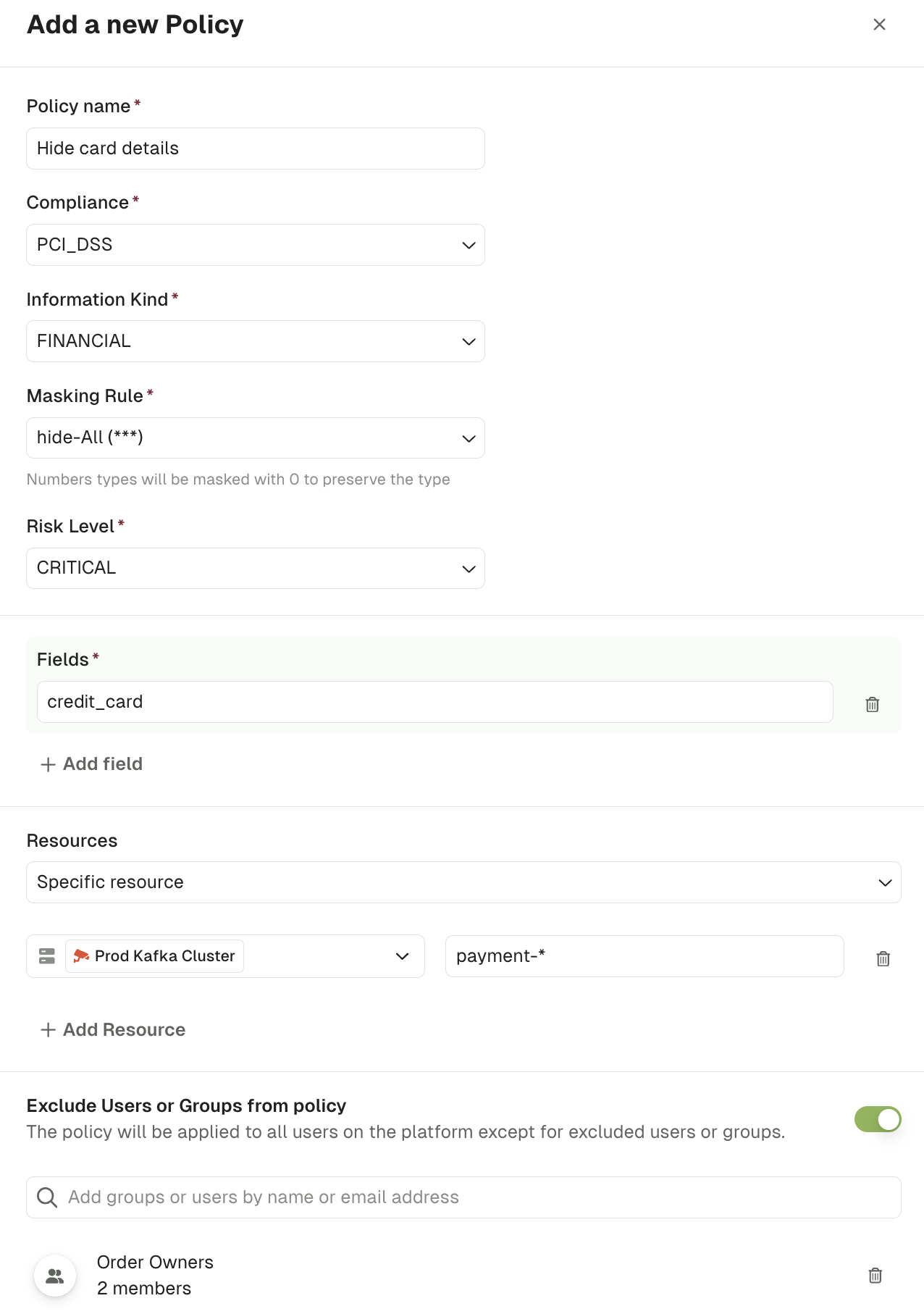 In the case above, the policy will mask the field `credit_card`, for all the users **except people from the group "Order Owners"**, on the topic prefixed by `payment-` of the `Prod Kafka Cluster`.
## Mask all fields
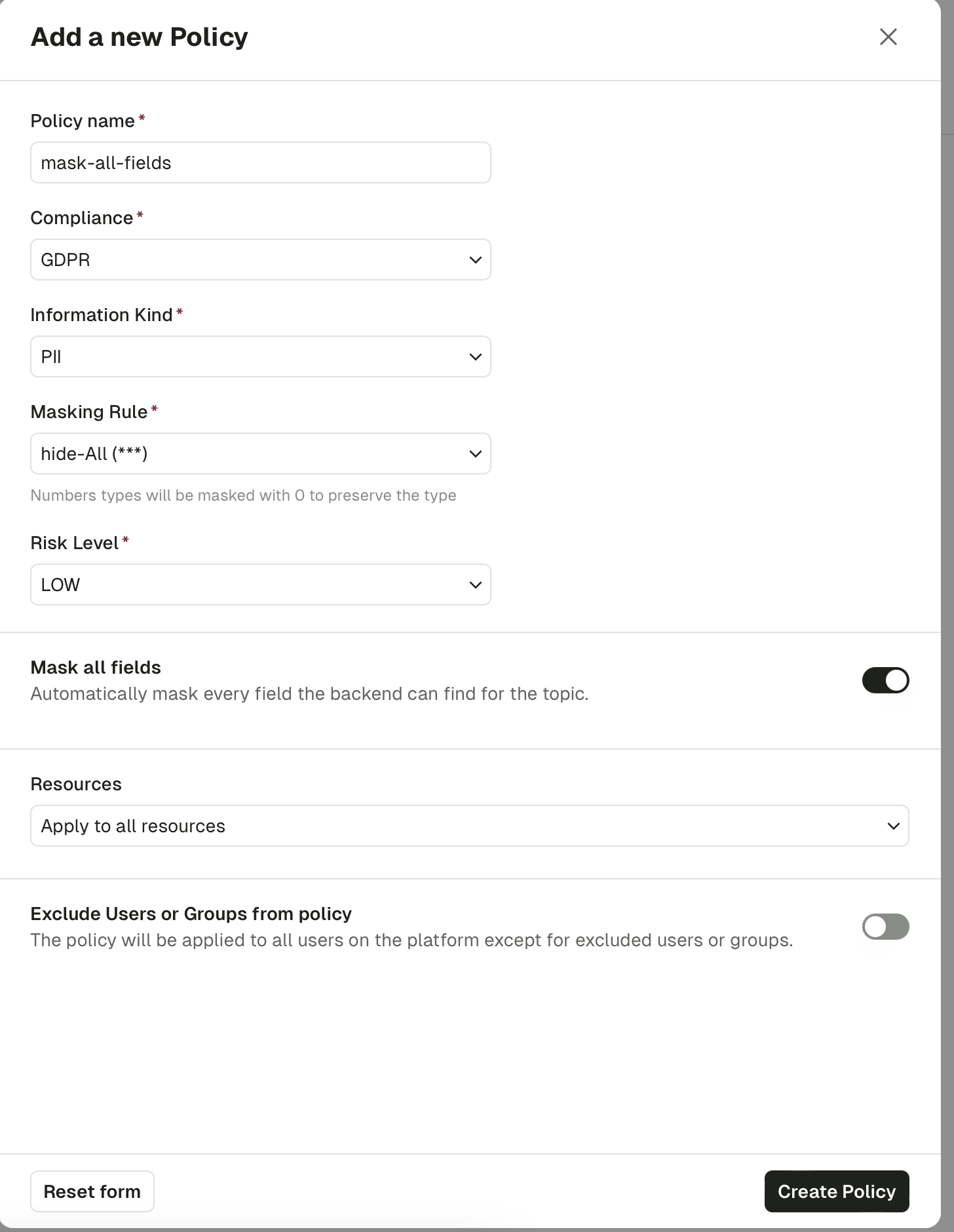
When you don't know the message structure ahead of time, or want to mask everything by default and grant exceptions through RBAC, turn on **Mask all fields**. Console then applies the masking rule to every scalar value it finds in the message — strings, numbers, and booleans — at every nesting depth, including inside arrays.
In the case above, the policy will mask the field `credit_card`, for all the users **except people from the group "Order Owners"**, on the topic prefixed by `payment-` of the `Prod Kafka Cluster`.
## Mask all fields
When you don't know the message structure ahead of time, or want to mask everything by default and grant exceptions through RBAC, turn on **Mask all fields**. Console then applies the masking rule to every scalar value it finds in the message — strings, numbers, and booleans — at every nesting depth, including inside arrays.
 A few things to know:
* **Type preservation.** Strings are replaced using the masking rule's string (for example `***`). Numbers are masked to `0` and booleans to `false`, so message schemas stay valid.
* **Per-field rules win.** If another policy already targets a specific field with its own masking rule, that rule still applies; **Mask all fields** only fills in the unmasked gaps.
* **Conflict detection.** A **Mask all fields** policy conflicts with any existing policy whose scope overlaps and that targets specific fields. Two **Mask all fields** policies can coexist as long as their resource scopes are disjoint.
* **Fields list.** You can't combine **Mask all fields** with an explicit fields list on the same policy — Console rejects the request if both are set.
## Field path syntax
Fields are specified using **dot-separated paths** that match the structure of your JSON messages. The masking engine traverses your message and applies the rule when the path matches.
### Examples
Given the following message:
```json theme={null}
{
"name": "Alice",
"address": {
"city": "Paris",
"zip": "75001"
},
"orders": [
{ "id": 1, "total": 99.90 },
{ "id": 2, "total": 45.00 }
],
"metadata": {
"tags": ["vip", "eu"],
"audit.source": "web"
}
}
```
| Field path | What gets masked | Explanation |
| ----------------------------- | ------------------- | ---------------------------------------------------- |
| `name` | `"Alice"` | Top-level field |
| `address.city` | `"Paris"` | Nested field using dot notation |
| `address.zip` | `"75001"` | Another nested field |
| `orders.total` | `99.90` and `45.00` | Field inside **every** element of the `orders` array |
| `orders.id` | `1` and `2` | Another field across all array elements |
| `metadata.tags` | `"vip"` and `"eu"` | Every element of a primitive array |
| `` metadata.`audit.source` `` | `"web"` | Field name containing a dot, escaped with backticks |
### Key rules
* Use **dot notation** to traverse nested objects (e.g. `address.city`).
* **Arrays are traversed automatically** — you do not need to specify indices. A path like `orders.total` applies to the `total` field in every element of the `orders` array.
* If a field name itself contains a dot, wrap it in **backticks** (e.g. `` `audit.source` `` or `` metadata.`audit.source` ``).
* Paths must match exactly — wildcard or prefix patterns (e.g. `data_order*`) are not supported.
## Validate a policy
Once you have created a policy, you should validate it through the Conduktor Console.
* Navigate to a topic that contains data where your policy should be applied
* Check that the expected fields are obfuscated using the appropriate masking rule
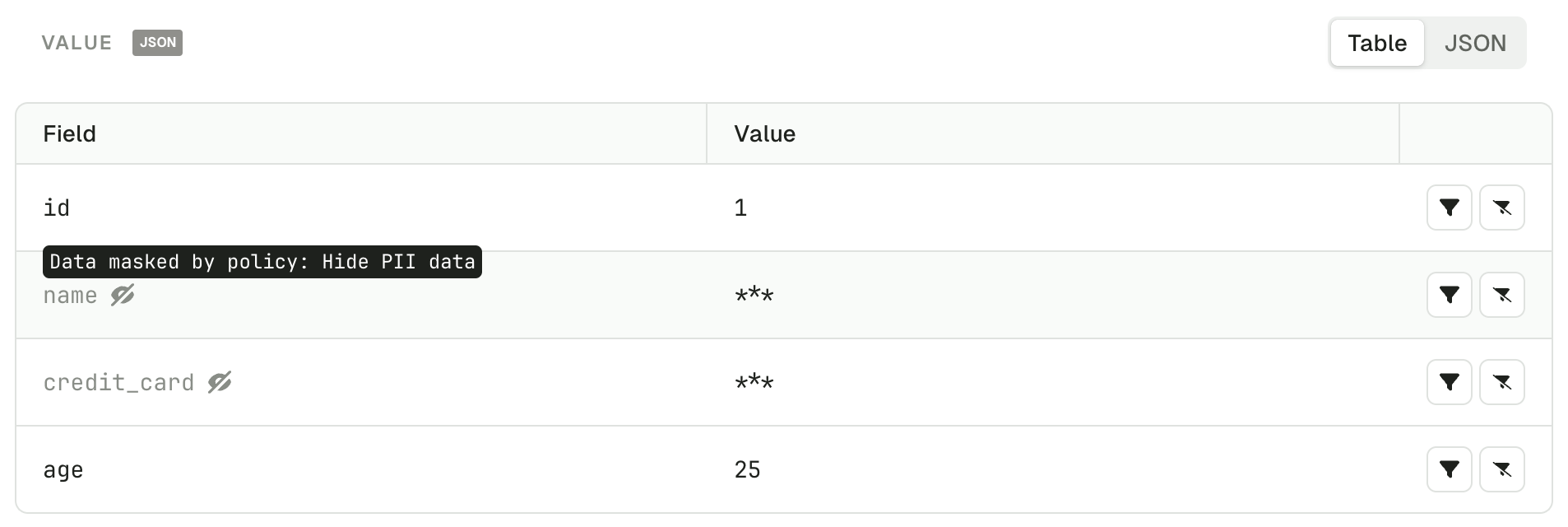
We can see that the name and the credit\_card are completely hidden, as we defined in the masking rules.
When the message key or value can't be transformed into a JSON-like structure, the whole message won't be displayed.
## Related resources
* [Configure field-level encryption in Gateway](/guide/tutorials/configure-encryption)
* [Set up RBAC](/guide/conduktor-in-production/admin/set-up-rbac)
* [Give us feedback/request a feature](https://conduktor.io/roadmap)
A few things to know:
* **Type preservation.** Strings are replaced using the masking rule's string (for example `***`). Numbers are masked to `0` and booleans to `false`, so message schemas stay valid.
* **Per-field rules win.** If another policy already targets a specific field with its own masking rule, that rule still applies; **Mask all fields** only fills in the unmasked gaps.
* **Conflict detection.** A **Mask all fields** policy conflicts with any existing policy whose scope overlaps and that targets specific fields. Two **Mask all fields** policies can coexist as long as their resource scopes are disjoint.
* **Fields list.** You can't combine **Mask all fields** with an explicit fields list on the same policy — Console rejects the request if both are set.
## Field path syntax
Fields are specified using **dot-separated paths** that match the structure of your JSON messages. The masking engine traverses your message and applies the rule when the path matches.
### Examples
Given the following message:
```json theme={null}
{
"name": "Alice",
"address": {
"city": "Paris",
"zip": "75001"
},
"orders": [
{ "id": 1, "total": 99.90 },
{ "id": 2, "total": 45.00 }
],
"metadata": {
"tags": ["vip", "eu"],
"audit.source": "web"
}
}
```
| Field path | What gets masked | Explanation |
| ----------------------------- | ------------------- | ---------------------------------------------------- |
| `name` | `"Alice"` | Top-level field |
| `address.city` | `"Paris"` | Nested field using dot notation |
| `address.zip` | `"75001"` | Another nested field |
| `orders.total` | `99.90` and `45.00` | Field inside **every** element of the `orders` array |
| `orders.id` | `1` and `2` | Another field across all array elements |
| `metadata.tags` | `"vip"` and `"eu"` | Every element of a primitive array |
| `` metadata.`audit.source` `` | `"web"` | Field name containing a dot, escaped with backticks |
### Key rules
* Use **dot notation** to traverse nested objects (e.g. `address.city`).
* **Arrays are traversed automatically** — you do not need to specify indices. A path like `orders.total` applies to the `total` field in every element of the `orders` array.
* If a field name itself contains a dot, wrap it in **backticks** (e.g. `` `audit.source` `` or `` metadata.`audit.source` ``).
* Paths must match exactly — wildcard or prefix patterns (e.g. `data_order*`) are not supported.
## Validate a policy
Once you have created a policy, you should validate it through the Conduktor Console.
* Navigate to a topic that contains data where your policy should be applied
* Check that the expected fields are obfuscated using the appropriate masking rule
We can see that the name and the credit\_card are completely hidden, as we defined in the masking rules.
When the message key or value can't be transformed into a JSON-like structure, the whole message won't be displayed.
## Related resources
* [Configure field-level encryption in Gateway](/guide/tutorials/configure-encryption)
* [Set up RBAC](/guide/conduktor-in-production/admin/set-up-rbac)
* [Give us feedback/request a feature](https://conduktor.io/roadmap)