> ## Documentation Index
> Fetch the complete documentation index at: https://docs.conduktor.io/llms.txt
> Use this file to discover all available pages before exploring further.
# Delegated JWT authentication
> Configure delegated JWT authentication in Conduktor Console to validate tokens from an external identity provider and grant access via single sign-on.
## Overview
Console allows you to delegate authentication to an external Identity Provider (IP) using JSON web token (JWT).
Users authenticate through their organization's IP in their browser and get access Console via single sign-on (SSO).
Instead of managing authentication directly, Console validates tokens issued by a trusted IP.
You can protect Console by adding an API between Console and its clients.
The authentication flow of the client is performed by the API and the token from the identity provider is sent directly to Console.
In this case, no authentication is performed by Console, it only checks that the token is issued by a trusted identity provider and is valid.
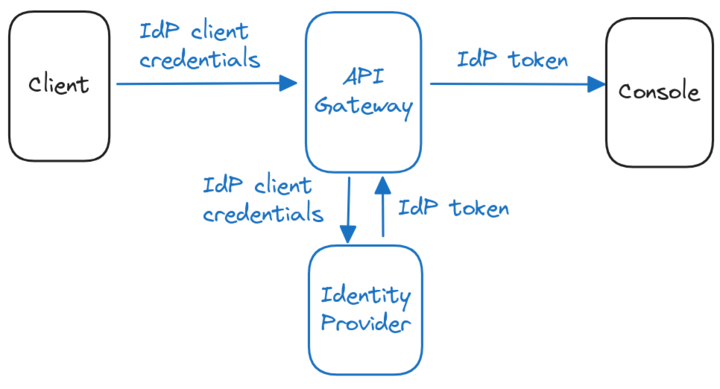 When enabling the delegated authentication mode, tokens issued directly by Console are still accepted.
### How it works
In this authentication flow:
1. The user navigates to Console (e.g., `https://console.mydomain.com`).
2. The user is redirected by the API to their organization's IP for authentication.
3. After successful authentication, the IP issues a JWT token.
4. The API forwards the JWT token in all subsequent requests to Console.
5. Console validates the token against the configured trusted provider.
6. Console maps the token claims to a user account and applies appropriate permissions.
This approach allows organizations to:
* Automatically provision users on first login
* Use existing identity infrastructure (e.g., corporate IdP systems)
* Enforce centralized authentication policies
* Provide single sign-on experience across applications
## Prerequisites
To validate a token, Console will retrieve the issuer configuration and public keys. The issuer has to expose an OIDC discovery endpoint, such as `.well-know/openid-configuration`, to provide this information.
The token of the identity provider has to contain claims with either an API key or an email. These claims allow Console to map the token to a user or an API key and apply its permissions.
## Configuration example
In this example we configure Console to accept any token issued by `https://example.org/keycloak/realms/conduktor`. If a valid API key is defined in the `apikey` claim, it will be used. Otherwise, the email contained in the `email` claim will be mapped to a Console user. If the user doesn't exist, it will be created. The `groups` claim is optional and used for [external group mapping](/guide/conduktor-in-production/admin/user-access/map-external-groups).
```yaml title="platform-config.yaml" theme={null}
sso:
jwt-auth:
issuer: 'https://example.org/keycloak/realms/conduktor'
username-claim: 'email'
groups-claim: 'groups'
api-key-claim: 'apikey'
```
## Conduktor CLI
By default, the Conduktor CLI will try to log in to Console and generate a Conduktor token. With delegated authentication, we want to avoid the generation of a Conduktor token and directly use the one provided by the identity provider. To configure the CLI for this mode, set the `CDK_AUTH_MODE` environment variable to `external`.
If you already have a token from your identity provider, you can configure the CLI like this:
```shell theme={null}
# Bearer token (issued by the identity provider)
export CDK_AUTH_MODE="external"
export CDK_API_KEY=
```
If you use an API in front of Console, you can also send the client ID and secret as basic auth in the authentication header, like this:
```shell theme={null}
# Basic auth
export CDK_AUTH_MODE="external"
export CDK_USER=
export CDK_PASSWORD=
```
## Config properties
| Property | Description | Environment variable | Mandatory | Type | Default |
| ----------------------------- | --------------------------------------------- | ------------------------------- | --------- | ------ | -------- |
| `sso.jwt-auth.issuer` | Issuer of your identity provider | `CDK_SSO_JWTAUTH_ISSUER` | true | string | ∅ |
| `sso.jwt-auth.username-claim` | Email attribute from your identity provider | `CDK_SSO_JWTAUTH_USERNAMECLAIM` | false | string | `email` |
| `sso.jwt-auth.groups-claim` | Group attribute from your identity provider | `CDK_SSO_JWTAUTH_GROUPSCLAIM` | false | string | `groups` |
| `sso.jwt-auth.api-key-claim` | API key attribute from your identity provider | `CDK_SSO_JWTAUTH_APIKEYCLAIM` | false | string | `apikey` |
When enabling the delegated authentication mode, tokens issued directly by Console are still accepted.
### How it works
In this authentication flow:
1. The user navigates to Console (e.g., `https://console.mydomain.com`).
2. The user is redirected by the API to their organization's IP for authentication.
3. After successful authentication, the IP issues a JWT token.
4. The API forwards the JWT token in all subsequent requests to Console.
5. Console validates the token against the configured trusted provider.
6. Console maps the token claims to a user account and applies appropriate permissions.
This approach allows organizations to:
* Automatically provision users on first login
* Use existing identity infrastructure (e.g., corporate IdP systems)
* Enforce centralized authentication policies
* Provide single sign-on experience across applications
## Prerequisites
To validate a token, Console will retrieve the issuer configuration and public keys. The issuer has to expose an OIDC discovery endpoint, such as `.well-know/openid-configuration`, to provide this information.
The token of the identity provider has to contain claims with either an API key or an email. These claims allow Console to map the token to a user or an API key and apply its permissions.
## Configuration example
In this example we configure Console to accept any token issued by `https://example.org/keycloak/realms/conduktor`. If a valid API key is defined in the `apikey` claim, it will be used. Otherwise, the email contained in the `email` claim will be mapped to a Console user. If the user doesn't exist, it will be created. The `groups` claim is optional and used for [external group mapping](/guide/conduktor-in-production/admin/user-access/map-external-groups).
```yaml title="platform-config.yaml" theme={null}
sso:
jwt-auth:
issuer: 'https://example.org/keycloak/realms/conduktor'
username-claim: 'email'
groups-claim: 'groups'
api-key-claim: 'apikey'
```
## Conduktor CLI
By default, the Conduktor CLI will try to log in to Console and generate a Conduktor token. With delegated authentication, we want to avoid the generation of a Conduktor token and directly use the one provided by the identity provider. To configure the CLI for this mode, set the `CDK_AUTH_MODE` environment variable to `external`.
If you already have a token from your identity provider, you can configure the CLI like this:
```shell theme={null}
# Bearer token (issued by the identity provider)
export CDK_AUTH_MODE="external"
export CDK_API_KEY=
```
If you use an API in front of Console, you can also send the client ID and secret as basic auth in the authentication header, like this:
```shell theme={null}
# Basic auth
export CDK_AUTH_MODE="external"
export CDK_USER=
export CDK_PASSWORD=
```
## Config properties
| Property | Description | Environment variable | Mandatory | Type | Default |
| ----------------------------- | --------------------------------------------- | ------------------------------- | --------- | ------ | -------- |
| `sso.jwt-auth.issuer` | Issuer of your identity provider | `CDK_SSO_JWTAUTH_ISSUER` | true | string | ∅ |
| `sso.jwt-auth.username-claim` | Email attribute from your identity provider | `CDK_SSO_JWTAUTH_USERNAMECLAIM` | false | string | `email` |
| `sso.jwt-auth.groups-claim` | Group attribute from your identity provider | `CDK_SSO_JWTAUTH_GROUPSCLAIM` | false | string | `groups` |
| `sso.jwt-auth.api-key-claim` | API key attribute from your identity provider | `CDK_SSO_JWTAUTH_APIKEYCLAIM` | false | string | `apikey` |