> ## Documentation Index
> Fetch the complete documentation index at: https://docs.conduktor.io/llms.txt
> Use this file to discover all available pages before exploring further.
# Configure Gateway load balancing
> Configure load balancing for Conduktor Gateway nodes. Choose between internal Gateway load balancing or an external load balancer for Kafka client connections.
To map the different Gateway nodes sharing the same cluster and your Kafka brokers, you can either use:
* Gateway **internal load balancing** or
* an **external load balancing**
These options are only for the Kafka protocol, as any of the Gateway nodes can manage HTTP calls to their API.
## Internal load balancing
Gateway's ability to distribute the client connections between the different Gateway nodes in the same cluster is what we refer to as internal load balancing. This is done automatically by Gateway and is the default behavior.
To deploy multiple Gateway nodes as part of the same Gateway cluster, you have to set the same `GATEWAY_CLUSTER_ID` in each node's deployment configuration. This configuration ensures that all nodes join the same consumer group, enabling them to consume an internal topic from your Kafka cluster. This is how the nodes recognize each other as members of the same Gateway cluster.
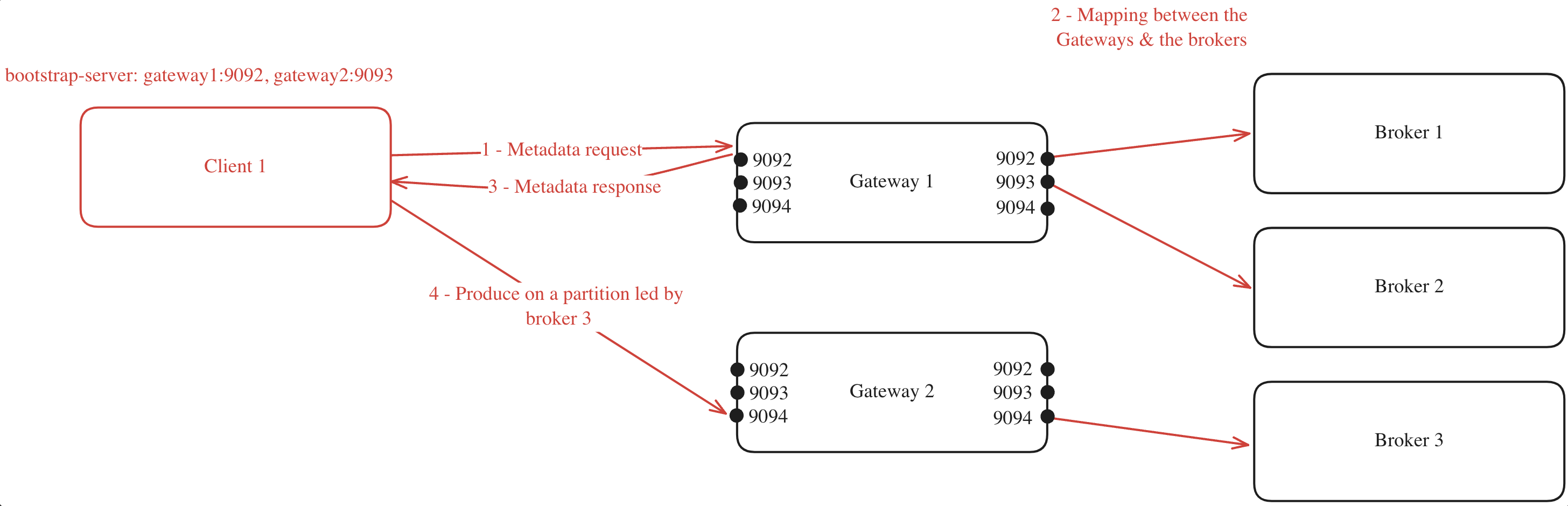
When a client connects to one of the Gateway nodes to request metadata, the following process occurs (assuming `GATEWAY_FEATURE_FLAGS_INTERNAL_LOAD_BALANCING` is set to `true`, which is the default setting):
1. The client chooses one of the bootstrap servers to ask for metadata.
2. The Gateway node generates a mapping between its cluster nodes and the Kafka brokers.
3. The Gateway node returns this mapping to the client.
4. With the mapping in hand, the client can efficiently route its requests. For instance, if the client needs to produce to a partition where broker 3 is the leader, it knows to forward the request to Gateway 2 on port 9094.
If multiple Gateway cluster nodes are mapped to one Kafka broker, the nodes are selected in a round-robin fashion for each metadata request. This is to ensure the load is balanced among Gateway cluster nodes.
For example, you have a Gateway cluster composed of two Gateway nodes, connected to a Kafka cluster with three brokers. The client's metadata discovery process might look like this:
 This mapping will be made again for every client asking for metadata, and will be made again as soon as a Gateway node is added or removed from the Gateway cluster.
If you have specified a `GATEWAY_RACK_ID`, then the mapping will take this into consideration and a Gateway node in the same rack as the Kafka broker will be assigned.
Here's the same example but with multiple clients:
This mapping will be made again for every client asking for metadata, and will be made again as soon as a Gateway node is added or removed from the Gateway cluster.
If you have specified a `GATEWAY_RACK_ID`, then the mapping will take this into consideration and a Gateway node in the same rack as the Kafka broker will be assigned.
Here's the same example but with multiple clients:
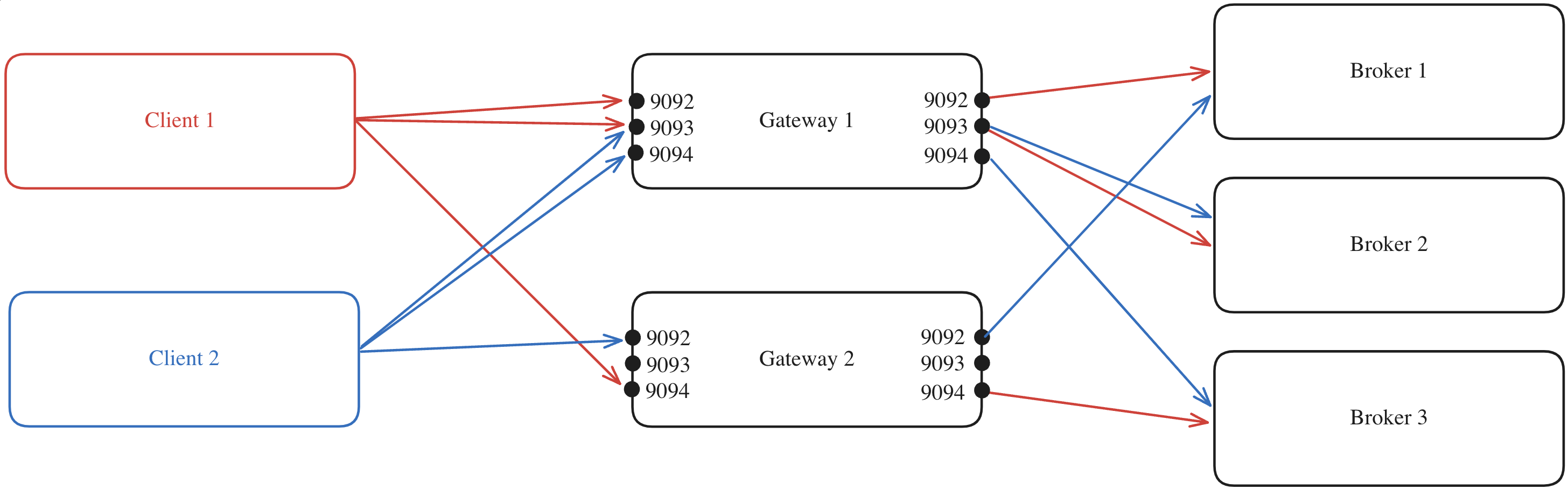 The process is repeated but will likely result in a different mapping compared to that of Client 1 due to the round-robin node assignment of Gateway nodes for the client.
### Internal load balancing limitations
In a Kubernetes environment, your ingress must point at a single service, which could be an external load balancer as detailed below.
## External load balancing
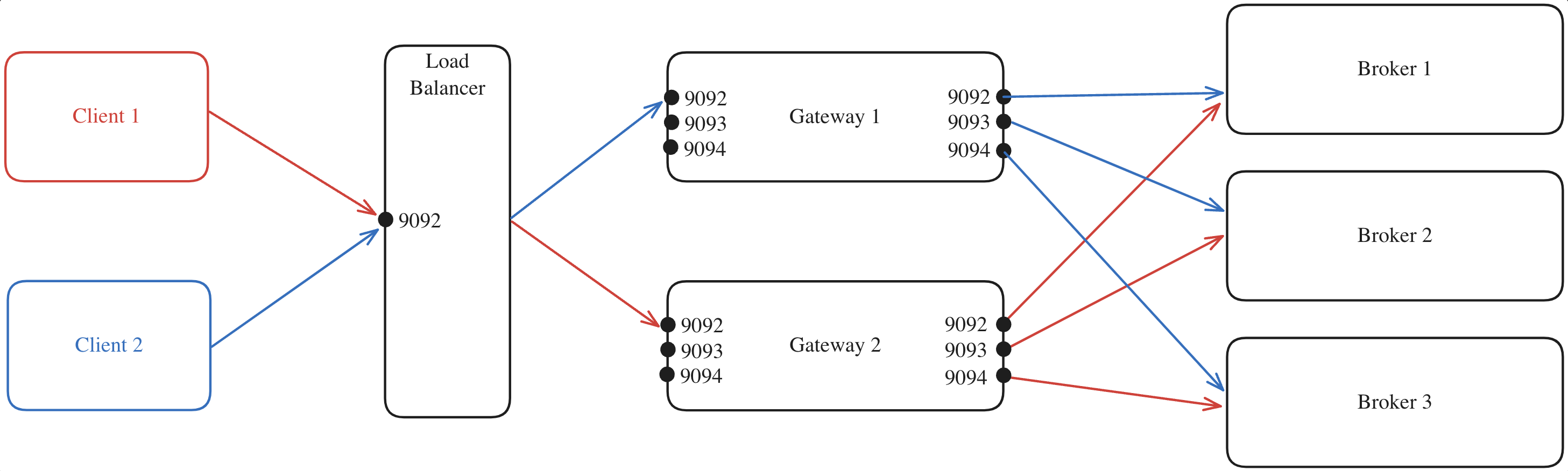
Alternatively, you can disable the internal load balancing by setting `GATEWAY_FEATURE_FLAGS_INTERNAL_LOAD_BALANCING: false`.
Here's an example where:
1. All client requests are directed to the external load balancer which acts as the entry point to your Gateway cluster.
2. The load balancer forwards each request to one of the Gateway nodes, regardless of the port.
3. The selected Gateway node, which knows which broker is the leader of each partition, forwards the request to the appropriate Kafka broker.
The process is repeated but will likely result in a different mapping compared to that of Client 1 due to the round-robin node assignment of Gateway nodes for the client.
### Internal load balancing limitations
In a Kubernetes environment, your ingress must point at a single service, which could be an external load balancer as detailed below.
## External load balancing
Alternatively, you can disable the internal load balancing by setting `GATEWAY_FEATURE_FLAGS_INTERNAL_LOAD_BALANCING: false`.
Here's an example where:
1. All client requests are directed to the external load balancer which acts as the entry point to your Gateway cluster.
2. The load balancer forwards each request to one of the Gateway nodes, regardless of the port.
3. The selected Gateway node, which knows which broker is the leader of each partition, forwards the request to the appropriate Kafka broker.
 When using an external load balancer, configure each listener's advertised host (`GATEWAY_LISTENER__ADVERTISED_HOST` or `GATEWAY_LISTENER__ADVERTISED_HOST_PATTERN` for SNI routing) to the load balancer's hostname. If this isn't done, applications will attempt to connect directly to Gateway, bypassing the load balancer.
The advertised host is set per listener from Gateway 3.20.0. On earlier versions, the global `GATEWAY_ADVERTISED_HOST` serves the same purpose — see [Legacy network configuration](/guide/conduktor-in-production/deploy-artifacts/deploy-gateway/legacy-network-configuration).
### Capturing the client IP address
This section only applies if you configure external load balancer yourself, whether a HA Proxy or an AWS load balancer. If your external load balancer is configured by Kubernetes service, see [preserving client IP address](/guide/conduktor-in-production/deploy-artifacts/deploy-gateway/kubernetes#preserving-client-ip-address) in the Kubernetes section.
When running Conduktor Gateway behind an external load balancer, the load balancer replaces the client IP address with its own, therefore audit log and error messages do not report the actual client IP address. This makes it difficult to identify the actual client IP address if there is an issue, for example, when a client fails during SSL handshake.
In order to capture the original client IP address behind an external load balancer, Conduktor Gateway supports [HAProxy Protocol](https://www.haproxy.org/download/1.8/doc/proxy-protocol.txt).
To enable HAProxy Protocol support, set [`GATEWAY_FEATURE_FLAGS_HAPROXY_PROTOCOL`](/guide/conduktor-in-production/deploy-artifacts/deploy-gateway/environment-variables#feature-flags) to `true`. At the same time, you must also configure the external load balancer to send HAProxy Protocol header to Conduktor Gateway.
If HAProxy Protocol is enabled, Conduktor Gateway reads the client IP address from the HAProxy Protocol header then add it to `CONNECTION` audit log entry as `proxySourceAddress` and `proxyDestinationAddress`. The connection error messages will also include `(original source: [IP:PORT], original destination: [IP:PORT])`.
For reference, this is the external documentation on enabling HAProxy Protocol header:
* [HAProxy](https://www.haproxy.com/documentation/haproxy-configuration-tutorials/proxying-essentials/client-ip-preservation/enable-proxy-protocol/)
* [Nginx](https://nginx.org/en/docs/stream/ngx_stream_proxy_module.html#proxy_protocol)
* [AWS load balancer](https://docs.aws.amazon.com/elasticloadbalancing/latest/classic/enable-proxy-protocol.html)
* [Azure private link](https://learn.microsoft.com/en-us/azure/private-link/private-link-service-overview#getting-connection-information-using-tcp-proxy-v2)
### External load balancing limitations
This requires you to handle load balancing manually, as you won't have the advantage of the automatic load balancing offered by Gateway's internal load balancing feature.
No. Gateway is not a Single Point of Failure (SPOF).
It works the same way that Kafka does: deploy many instances, spread the load, restart them - clients continue without impact.
**Stateless**
Gateway doesn't store local data, so a restart never affects traffic. The backing Kafka cluster stores all the states.
**Kafka-aware**
Clients use their normal retry and metadata refresh flows (same as with brokers). When a Gateway instance becomes unavailable, clients re-connect to another instance using standard Kafka client behavior.
**Scale horizontally**
Run several pods to handle load and keep latency steady. You can add or remove instances based on throughput needs as [Gateway scales horizontally](/guide/conduktor-in-production/system-requirements#scaling-gateway).
**Safe restarts**
Roll restart any pod and clients re-connect on their own. Standard Kafka client retry mechanisms handle temporary unavailability, which makes Gateway restarts transparent to applications.
For production deployments, we recommend at least three Gateway instances to ensure an effective load distribution handling and availability during restarts.
## Related resources
* [Gateway system requirements](/guide/conduktor-in-production/system-requirements#scaling-gateway)
* [Deploy Gateway on Kubernetes](/guide/conduktor-in-production/deploy-artifacts/deploy-gateway/kubernetes)
* [Define Gateway environment variables](/guide/conduktor-in-production/deploy-artifacts/deploy-gateway/environment-variables)
When using an external load balancer, configure each listener's advertised host (`GATEWAY_LISTENER__ADVERTISED_HOST` or `GATEWAY_LISTENER__ADVERTISED_HOST_PATTERN` for SNI routing) to the load balancer's hostname. If this isn't done, applications will attempt to connect directly to Gateway, bypassing the load balancer.
The advertised host is set per listener from Gateway 3.20.0. On earlier versions, the global `GATEWAY_ADVERTISED_HOST` serves the same purpose — see [Legacy network configuration](/guide/conduktor-in-production/deploy-artifacts/deploy-gateway/legacy-network-configuration).
### Capturing the client IP address
This section only applies if you configure external load balancer yourself, whether a HA Proxy or an AWS load balancer. If your external load balancer is configured by Kubernetes service, see [preserving client IP address](/guide/conduktor-in-production/deploy-artifacts/deploy-gateway/kubernetes#preserving-client-ip-address) in the Kubernetes section.
When running Conduktor Gateway behind an external load balancer, the load balancer replaces the client IP address with its own, therefore audit log and error messages do not report the actual client IP address. This makes it difficult to identify the actual client IP address if there is an issue, for example, when a client fails during SSL handshake.
In order to capture the original client IP address behind an external load balancer, Conduktor Gateway supports [HAProxy Protocol](https://www.haproxy.org/download/1.8/doc/proxy-protocol.txt).
To enable HAProxy Protocol support, set [`GATEWAY_FEATURE_FLAGS_HAPROXY_PROTOCOL`](/guide/conduktor-in-production/deploy-artifacts/deploy-gateway/environment-variables#feature-flags) to `true`. At the same time, you must also configure the external load balancer to send HAProxy Protocol header to Conduktor Gateway.
If HAProxy Protocol is enabled, Conduktor Gateway reads the client IP address from the HAProxy Protocol header then add it to `CONNECTION` audit log entry as `proxySourceAddress` and `proxyDestinationAddress`. The connection error messages will also include `(original source: [IP:PORT], original destination: [IP:PORT])`.
For reference, this is the external documentation on enabling HAProxy Protocol header:
* [HAProxy](https://www.haproxy.com/documentation/haproxy-configuration-tutorials/proxying-essentials/client-ip-preservation/enable-proxy-protocol/)
* [Nginx](https://nginx.org/en/docs/stream/ngx_stream_proxy_module.html#proxy_protocol)
* [AWS load balancer](https://docs.aws.amazon.com/elasticloadbalancing/latest/classic/enable-proxy-protocol.html)
* [Azure private link](https://learn.microsoft.com/en-us/azure/private-link/private-link-service-overview#getting-connection-information-using-tcp-proxy-v2)
### External load balancing limitations
This requires you to handle load balancing manually, as you won't have the advantage of the automatic load balancing offered by Gateway's internal load balancing feature.
No. Gateway is not a Single Point of Failure (SPOF).
It works the same way that Kafka does: deploy many instances, spread the load, restart them - clients continue without impact.
**Stateless**
Gateway doesn't store local data, so a restart never affects traffic. The backing Kafka cluster stores all the states.
**Kafka-aware**
Clients use their normal retry and metadata refresh flows (same as with brokers). When a Gateway instance becomes unavailable, clients re-connect to another instance using standard Kafka client behavior.
**Scale horizontally**
Run several pods to handle load and keep latency steady. You can add or remove instances based on throughput needs as [Gateway scales horizontally](/guide/conduktor-in-production/system-requirements#scaling-gateway).
**Safe restarts**
Roll restart any pod and clients re-connect on their own. Standard Kafka client retry mechanisms handle temporary unavailability, which makes Gateway restarts transparent to applications.
For production deployments, we recommend at least three Gateway instances to ensure an effective load distribution handling and availability during restarts.
## Related resources
* [Gateway system requirements](/guide/conduktor-in-production/system-requirements#scaling-gateway)
* [Deploy Gateway on Kubernetes](/guide/conduktor-in-production/deploy-artifacts/deploy-gateway/kubernetes)
* [Define Gateway environment variables](/guide/conduktor-in-production/deploy-artifacts/deploy-gateway/environment-variables)