> ## Documentation Index
> Fetch the complete documentation index at: https://docs.conduktor.io/llms.txt
> Use this file to discover all available pages before exploring further.
# Enable Virtual Clusters in Gateway
> Enable Virtual Clusters in Conduktor Gateway to create isolated logical Kafka environments on a single physical cluster.
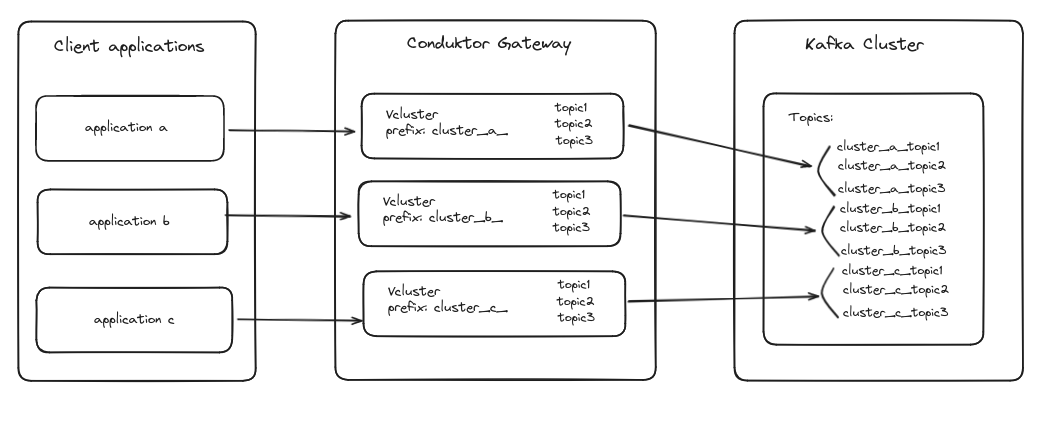
A Virtual Cluster in Conduktor Gateway is a logical representation of a Kafka cluster.
This allows you to create multiple virtual clusters while maintaining a single physical Kafka cluster, enabling the simulation of multiple Kafka environments on a single physical infrastructure.
 Virtual Clusters are entirely optional. If you choose to not configure any, Conduktor Gateway will act as a transparent proxy for your backing Kafka Cluster. This is the default mode and all topics/resources will be visible and accessible as usual, without any additional configuration.
**From our blog:** [How to isolate non-prod Kafka with Virtual Clusters](https://conduktor.io/blog/how-to-isolate-non-prod-kafka-with-virtual-clusters) Replace VPC-per-environment sprawl with one physical cluster and virtual isolation that satisfies security teams.
## Virtual cluster benefits
**Flexibility and scalability**: Virtual Clusters provide the flexibility to simulate multiple independent Kafka clusters without the need for additional physical resources. This is particularly useful for environments where different teams or applications require separate Kafka instances but maintaining multiple physical clusters would be cost-prohibitive or complex.
**Isolation and multi-tenancy**: By using Virtual Clusters, you can ensure isolation between different logical clusters, similar to enabling multitenancy in Kafka. Each Virtual Cluster can have its own set of topics and consumer groups, and these are managed independently even though they reside on the same physical cluster.
**Resource efficiency**: Instead of deploying and managing multiple physical clusters, which can be resource-intensive and expensive, Virtual Clusters allow you to maximize the utilization of a single physical Kafka cluster. This leads to better resource management and operational efficiency.
## Example
When you create a Virtual Cluster in Conduktor Gateway, it prefixes all resources (such as topics and consumer groups) associated with that Virtual Cluster on the backing physical Kafka cluster.
This prefixing ensures that there's no overlap or conflict between resources belonging to different Virtual Clusters, thereby maintaining their isolation.
In the example below, we assume a topic `order` has been created on Virtual Cluster `vc-alice`. Let's see how other Virtual Clusters and Backing cluster perceive this:
```shell theme={null}
# Listing topics on Virtual Cluster vc-alice
$ kafka-topics --bootstrap-server=gateway:6969 --command-config vc-alice.properties --list
orders
# As expected, Alice sees its topic normally.
# Now let's check what happens if we list the topics with Bob
$ kafka-topics --bootstrap-server=gateway:6969 --command-config vc-bob.properties --list
[]
# Bob doesn't see Alice's topics.
# Let's try to create the same topic for Bob
$ kafka-topics --bootstrap-server=gateway:6969 --command-config vc-bob.properties --create --topic orders
$ kafka-topics --bootstrap-server=gateway:6969 --command-config vc-bob.properties --list
orders
# If we contact directly the backing cluster instead of Gateway,
# we can see both topics under a different name. This is the actual topic name on the Kafka cluster, which is observed when not interacting through Gateway.
$ kafka-topics.sh --bootstrap-server=backing-kafka:9092 --list
vc-alice.orders
vc-bob.orders
```
## Related resources
* [Resource reference](/guide/reference/gateway-reference)
* [Manage service accounts](/guide/tutorials/manage-gateway-service-accounts)
* [Set up Gateway for multi-clusters](/guide/conduktor-in-production/deploy-artifacts/deploy-gateway/multi-clusters)
Virtual Clusters are entirely optional. If you choose to not configure any, Conduktor Gateway will act as a transparent proxy for your backing Kafka Cluster. This is the default mode and all topics/resources will be visible and accessible as usual, without any additional configuration.
**From our blog:** [How to isolate non-prod Kafka with Virtual Clusters](https://conduktor.io/blog/how-to-isolate-non-prod-kafka-with-virtual-clusters) Replace VPC-per-environment sprawl with one physical cluster and virtual isolation that satisfies security teams.
## Virtual cluster benefits
**Flexibility and scalability**: Virtual Clusters provide the flexibility to simulate multiple independent Kafka clusters without the need for additional physical resources. This is particularly useful for environments where different teams or applications require separate Kafka instances but maintaining multiple physical clusters would be cost-prohibitive or complex.
**Isolation and multi-tenancy**: By using Virtual Clusters, you can ensure isolation between different logical clusters, similar to enabling multitenancy in Kafka. Each Virtual Cluster can have its own set of topics and consumer groups, and these are managed independently even though they reside on the same physical cluster.
**Resource efficiency**: Instead of deploying and managing multiple physical clusters, which can be resource-intensive and expensive, Virtual Clusters allow you to maximize the utilization of a single physical Kafka cluster. This leads to better resource management and operational efficiency.
## Example
When you create a Virtual Cluster in Conduktor Gateway, it prefixes all resources (such as topics and consumer groups) associated with that Virtual Cluster on the backing physical Kafka cluster.
This prefixing ensures that there's no overlap or conflict between resources belonging to different Virtual Clusters, thereby maintaining their isolation.
In the example below, we assume a topic `order` has been created on Virtual Cluster `vc-alice`. Let's see how other Virtual Clusters and Backing cluster perceive this:
```shell theme={null}
# Listing topics on Virtual Cluster vc-alice
$ kafka-topics --bootstrap-server=gateway:6969 --command-config vc-alice.properties --list
orders
# As expected, Alice sees its topic normally.
# Now let's check what happens if we list the topics with Bob
$ kafka-topics --bootstrap-server=gateway:6969 --command-config vc-bob.properties --list
[]
# Bob doesn't see Alice's topics.
# Let's try to create the same topic for Bob
$ kafka-topics --bootstrap-server=gateway:6969 --command-config vc-bob.properties --create --topic orders
$ kafka-topics --bootstrap-server=gateway:6969 --command-config vc-bob.properties --list
orders
# If we contact directly the backing cluster instead of Gateway,
# we can see both topics under a different name. This is the actual topic name on the Kafka cluster, which is observed when not interacting through Gateway.
$ kafka-topics.sh --bootstrap-server=backing-kafka:9092 --list
vc-alice.orders
vc-bob.orders
```
## Related resources
* [Resource reference](/guide/reference/gateway-reference)
* [Manage service accounts](/guide/tutorials/manage-gateway-service-accounts)
* [Set up Gateway for multi-clusters](/guide/conduktor-in-production/deploy-artifacts/deploy-gateway/multi-clusters)