> ## Documentation Index
> Fetch the complete documentation index at: https://docs.conduktor.io/llms.txt
> Use this file to discover all available pages before exploring further.
# Conduktor quick start — deploy Console with Docker Compose
> Get Conduktor Console running in minutes with Docker Compose. Includes a full Kafka stack (Redpanda, PostgreSQL) for testing features before a production.
Pre-requisite [Docker Compose](https://docs.docker.com/compose/install)
[Get started with Conduktor](https://www.conduktor.io/get-started) in just a few minutes.
This get started bundle builds a **complete Conduktor deployment** consisting of a modern web UI (Console), a PostgreSQL database, a Redpanda cluster and other supporting services.
## Overview
Once deployed, you’ll have access to a fully functional Kafka stack integrated with Conduktor’s UI and backend services. This environment is ideal for trying out Conduktor’s features before deploying to a production environment.
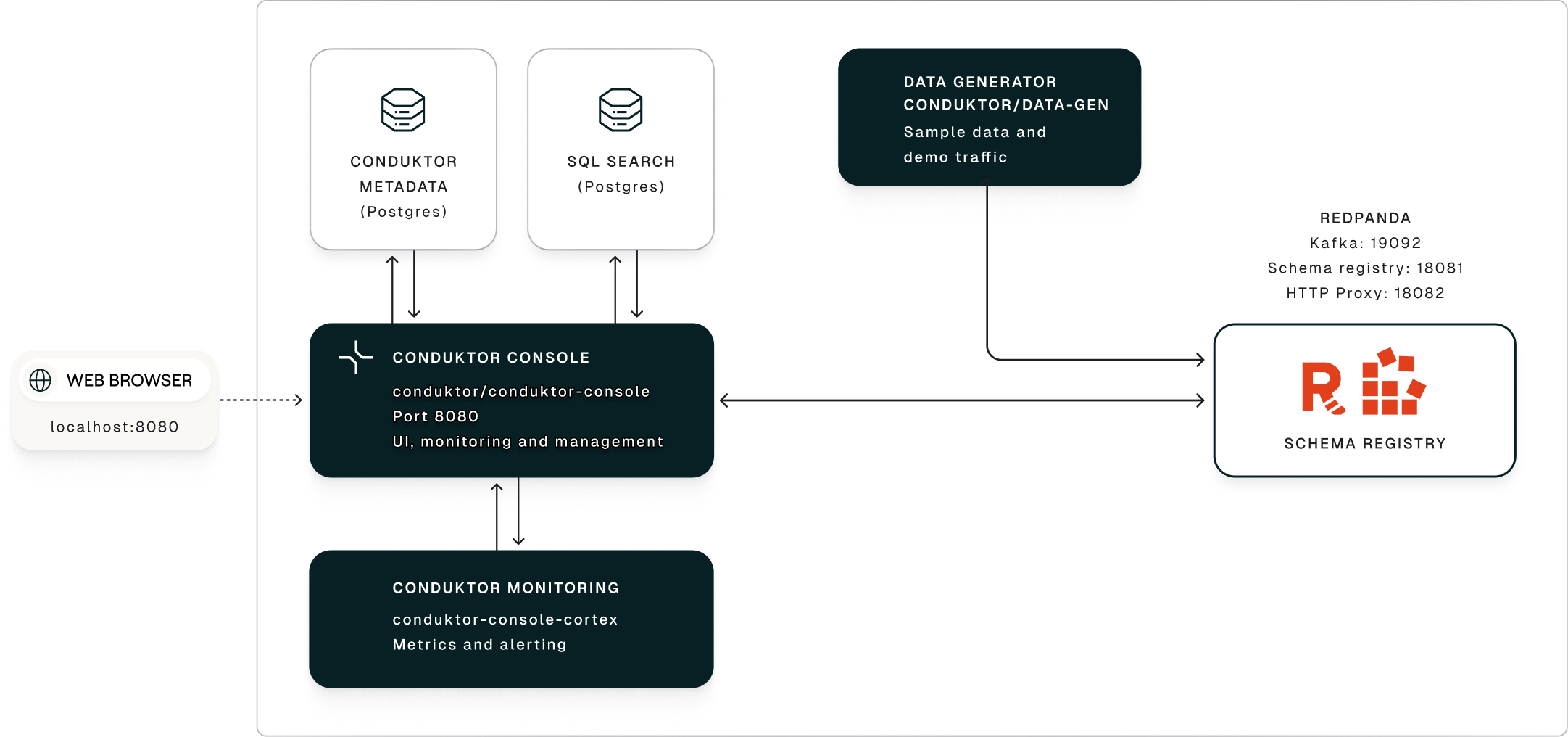 The **data generation service** publishes a continuous stream of synthetic events that *simulate an e-commerce business*.
The generated **data lands in a Redpanda Kafka cluster** with a *schema registry* enforcing structure and compatibility across topics.
Conduktor [Console](/guide/conduktor-in-production/deploy-artifacts/deploy-console) provides a **centralized UI-based control plane** to manage the Redpanda Kafka cluster, allowing you to:
* monitor topics, schemas, consumer groups and connectors
* trace message flows
* audit activity across the entire stack
## Run Conduktor
```bash theme={null}
curl -L https://releases.conduktor.io/quick-start -o docker-compose.yml && docker compose up -d --wait && echo "Conduktor started on http://localhost:8080"
```
## Reset and start fresh
To reset your local Conduktor environment and remove all data:
```bash theme={null}
docker compose down -v
```
This removes all containers and volumes, including the PostgreSQL database. When you restart Conduktor, it will be a fresh installation with default credentials.
## Related resources
* [Arrange a technical demo](https://www.conduktor.io/contact/demo)
* [Conduktor in production deployment overview](/guide/conduktor-in-production)
* [Give us feedback/request a feature](https://conduktor.io/roadmap)
The **data generation service** publishes a continuous stream of synthetic events that *simulate an e-commerce business*.
The generated **data lands in a Redpanda Kafka cluster** with a *schema registry* enforcing structure and compatibility across topics.
Conduktor [Console](/guide/conduktor-in-production/deploy-artifacts/deploy-console) provides a **centralized UI-based control plane** to manage the Redpanda Kafka cluster, allowing you to:
* monitor topics, schemas, consumer groups and connectors
* trace message flows
* audit activity across the entire stack
## Run Conduktor
```bash theme={null}
curl -L https://releases.conduktor.io/quick-start -o docker-compose.yml && docker compose up -d --wait && echo "Conduktor started on http://localhost:8080"
```
## Reset and start fresh
To reset your local Conduktor environment and remove all data:
```bash theme={null}
docker compose down -v
```
This removes all containers and volumes, including the PostgreSQL database. When you restart Conduktor, it will be a fresh installation with default credentials.
## Related resources
* [Arrange a technical demo](https://www.conduktor.io/contact/demo)
* [Conduktor in production deployment overview](/guide/conduktor-in-production)
* [Give us feedback/request a feature](https://conduktor.io/roadmap)