> ## Documentation Index
> Fetch the complete documentation index at: https://docs.conduktor.io/llms.txt
> Use this file to discover all available pages before exploring further.
# Monitor VIP Kafka topics
> Identify business-critical Kafka topics in Conduktor Insights VIP Topics. Surface your highest-traffic topics by consumer group count and message volume.
VIP topics is one of the sections in the [Insights dashboard](/guide/insights). It helps you focus attention and resources on the most utilized topics for maximum impact.
 ## Overview
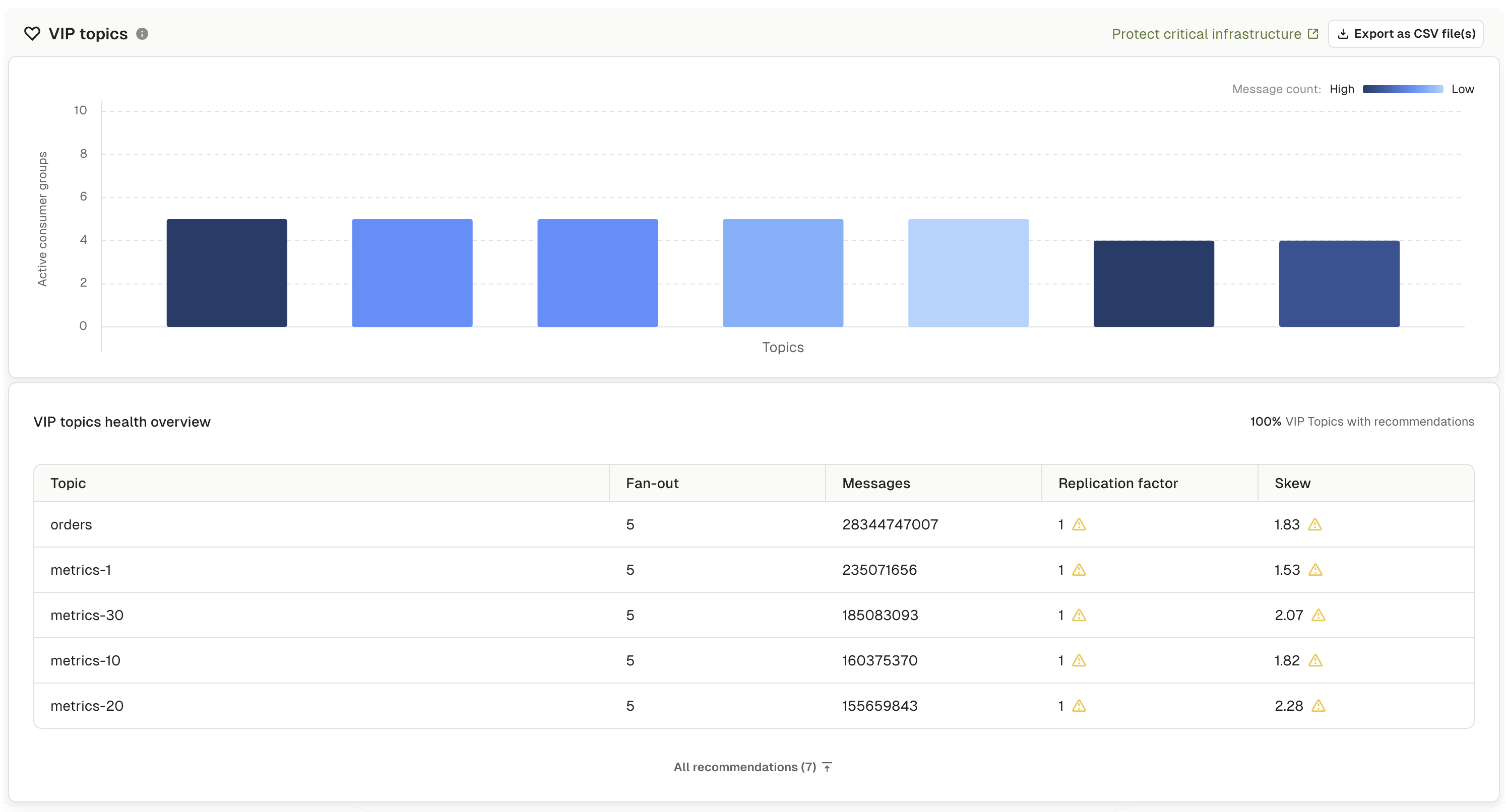
The VIP topics section displays a health overview graph showing topics identified as important to your infrastructure. VIP topics are determined by two key metrics:
* **Consumer group count** - topics with many subscribing consumer groups (shown by bar height)
* **Message volume** - topics with high throughput and data volume (shown by color intensity)
The combination of these metrics identifies topics that are both widely used and heavily trafficked, indicating business criticality. Topics with many consumers and high message volumes represent critical data pipelines that multiple applications depend on, making them prime candidates for elevated monitoring and careful management.
High traffic makes VIP topics susceptible to performance problems, while configuration issues create data loss risk. Changes require coordination across teams and careful testing.
Issues with VIP topics have multiplied impact. A single misconfiguration or outage can affect dozens of applications and business processes simultaneously.
VIP topics are automatically identified based on cluster-wide analysis of consumer patterns and message throughput. Use this data-driven approach to prioritize operational focus and monitoring resources.
You can switch the view of data on the page between a graphs view and a table view using the "Graphs" toggle found at the top right of the page.
## What the page shows
Firstly, an overview of [how well governed](/guide/insights/governance) the VIP topics are is shown.
The bar graph visualizes your most important topics using two dimensions.
**Bar height** represents the number of consumer groups subscribed to each topic:
* Taller bars indicate more consumer groups depend on the topic
* Many consumers suggest the topic provides data critical to multiple applications
* Wide usage indicates potential for widespread impact if issues occur
**Color intensity** represents message volume and throughput:
* Darker blue indicates higher message volume and throughput
* Lighter blue indicates lower message volume
* Message volume combined with consumer count identifies truly critical topics
Hover over any bar to see detailed metrics including the exact message count for the topic.
#### How to interpret the graph
**Tall, dark bars** - topics with many consumers and high message volume are your most business-critical data pipelines requiring highest priority for monitoring and careful change management.
**Tall, light bars** - topics with many consumers but lower message volume may represent configuration or control topics that still require careful management despite lower throughput.
**Short, dark bars** - topics with high message volume but fewer consumers represent specialized high-throughput pipelines requiring performance optimization and capacity planning.
## What the table shows
Below the graph, an expandable **VIP topic health overview** table provides detailed metrics for topics with recommendations. The table header shows the percentage of VIP topics that have recommendations requiring attention.
* **Topic**: topic name with topic type label (internal, streams, or user) and any custom labels
* **Fan-out**: number of consumer groups subscribed to the topic
* **Messages**: total message count showing volume
* **Replication factor**: number of replicas for fault tolerance
* **Skew**: partition imbalance percentage
Use the search box to filter topics by name. Click any column header to sort the table by that column in ascending or descending order.
Clicking a topic type or label in the table applies it as a global filter across all Insights sections.
## Our recommendations
For each VIP topic identified in the dashboard, verify and optimize configurations across multiple areas. Expand each section to review specific actions and guidance.
Validate that VIP topics have production-grade settings:
Go to **Topics** from the main menu and select a VIP topic identified from the Insights dashboard.
Click the **Configuration** tab to review current settings.
Check the following configurations:
**Replication factor:**
* Has to be at least **3** for production VIP topics
* Provides fault tolerance for broker failures
* Ensures data durability and availability
* Check the data loss risk graph in risk analysis for topics with insufficient replication
**Retention policy:**
* `retention.ms` - Time-based retention appropriate for business needs
* `retention.bytes` - Size-based retention per partition if applicable
* Consider longer retention for VIP topics to support late-arriving consumers
**Partition count:**
* Sufficient partitions for current and projected throughput
* Ideally a multiple of broker count for even distribution
* Adequate parallelism for all consumer groups
**Cleanup policy:**
* `delete` - For time-series or event data
* `compact` - For state or changelog topics
* Appropriate for the data model and consumption patterns
VIP topics should never have replication factor of 1 or 2 in production environments. If the [Risk Analysis](/guide/insights/risk-analysis) section identifies data loss risk for VIP topics, address these immediately.
Implement proactive monitoring to detect issues before they impact consuming applications:
Go to **Topics** and select the VIP topic you want to monitor. Click the **Alerts** tab on the topic detail page.
Set up alerts for consumer group lag thresholds:
* Define acceptable lag limits based on business requirements
* Use stricter thresholds for VIP topics than standard topics
* Alert on both absolute lag (message count) and time-based lag
For VIP topics, consider alerting when any consumer group exceeds 1000 messages of lag or 5 minutes of time-based lag, rather than the default thresholds used for standard topics.
Configure alerts for replication issues:
* Alert immediately if any partitions become under-replicated
* Under-replicated partitions indicate broker issues or failures
* Critical for VIP topics where data loss risk is unacceptable
Monitor storage consumption for VIP topics:
* Alert on rapid growth that could cause disk space issues
* Track retention effectiveness
* Plan capacity expansions before reaching limits
Track unusual traffic patterns:
* Alert on sudden drops in produce rate (possible producer failure)
* Alert on unexpected spikes that could cause performance issues
* Baseline normal throughput to detect anomalies
[Set up alerts for topic monitoring](/guide/monitor-brokers-apps/alerts)
Ensure VIP topics have clear ownership and governance from the start through self-service workflows rather than manual tracking.
**Use self-service for automatic ownership**
Conduktor's self-service framework provides a GitOps approach to topic lifecycle management where Applications dictate ownership of Kafka resources. When VIP topics are managed through self-service:
* **Automatic ownership tracking** - applications define owners and business context at topic creation
* **Clear accountability** - Console automatically assigns ownership to application teams
* **Governance enforcement** - policies ensure VIP topics meet configuration standards (RF=3, appropriate retention)
* **Business context preserved** - application definitions maintain documentation about purpose, dependencies and SLAs
**Benefits for VIP topics:**
* When issues occur, the right teams are contacted immediately through defined ownership
* Configuration changes follow approval workflows specific to business-critical topics
* Governance policies prevent VIP topics from being created with suboptimal settings
* Topic purpose and dependencies are documented in application definitions
[Implement self-service for governed topic creation](/guide/use-cases/self-service)
[Learn about self-service concepts and applications](/guide/conduktor-concepts/self-service)
Ensure VIP topics have appropriate security configurations:
Navigate to **Settings** > **RBAC** and review permissions for the VIP topic:
* Limit producer permissions to authorized applications only
* Restrict consumer access to approved teams and services
* Require elevated permissions for configuration changes
* Audit permissions regularly for VIP topics
[Learn more about RBAC](/guide/conduktor-in-production/admin/set-up-rbac)
For VIP topics containing sensitive data:
* Verify encryption in transit (SSL/TLS) is enforced
* Confirm ACLs or RBAC rules restrict access appropriately
* Check for data masking or encryption requirements
* Ensure compliance with organizational security policies
Track all consumer groups subscribed to VIP topics:
Go to **Topics** and select the VIP topic you want to analyze. Click the **Consumer Groups** tab on the topic detail page.
For each consumer group, examine:
* **Lag** - Current lag per partition and total lag
* **State** - Active consumers or empty groups
* **Members** - Number of active consumer instances
* **Commit frequency** - How often consumers commit offsets
Consumer lag on VIP topics requires immediate investigation. High lag indicates consumers cannot keep up with message volume, which may lead to processing delays, memory issues or timeout errors.
Look for warning signs:
* Consistently high or growing lag
* Consumers that frequently rebalance
* Groups with zero active members but uncommitted messages
* Uneven lag distribution across partitions
Contact the owning teams for consumer groups with persistent issues.
Ensure optimal partition allocation across brokers:
Go to **Topics** and select the VIP topic you want to review. Click the **Partitions** tab on the topic detail page.
Review the **Per broker** view to verify:
* Partitions are evenly distributed across all brokers
* Leadership is balanced (no single broker leads most partitions)
* No brokers are excluded from the topic
* Replica assignments provide proper fault tolerance
The cluster efficiency graph in [risk analysis](/guide/insights/risk-analysis) identifies partition distribution issues. For VIP topics, prioritize resolving distribution problems to avoid broker hotspots and performance bottlenecks.
Switch to **Per partition** view and compare:
* Partition sizes across all partitions
* Message counts per partition
* Offset ranges (begin offset to end offset)
Significant differences indicate load imbalance, which can cause uneven consumer load and processing delays.
[Learn how to address load imbalance](/guide/insights/risk-analysis#load-imbalance-risk)
Monitor VIP topic performance over time:
Go to **Topics** and select the VIP topic you want to monitor. Click the **Monitoring** tab on the topic detail page.
Analyze produce patterns:
* **Messages in per second** - Produce rate over time
* **Bytes in per second** - Data volume throughput
* Look for unusual spikes, drops or patterns
* Establish baseline performance for capacity planning
Analyze consume patterns:
* **Messages out per second** - Consume rate across all consumer groups
* **Bytes out per second** - Data volume being consumed
* Compare consume rate to produce rate to identify accumulation
Use the metrics to:
* Detect gradual throughput increases requiring capacity planning
* Identify time-of-day or day-of-week patterns
* Spot sudden changes that may indicate application issues
* Plan for peak traffic periods and scaling needs
## Troubleshoot
VIP topic identification is based on both message volume (over 500) and consumer count (more than 3). A topic may appear as VIP due to high consumer count (configuration topics read by many applications, control plane topics, event notification topics) or because it's business-critical despite lower volume (compliance, regulatory or SLA requirements).
Review the specific topic context to verify the VIP designation is appropriate for your organization's needs.
No. VIP topics should share minimum standards (replication factor of 3, configured alerting, documented ownership, proper RBAC permissions) but configurations should be tailored to each topic's requirements.
Partition count, retention, cleanup policy, compression and security settings should be based on specific throughput needs, data lifecycle requirements and sensitivity classification. For example, a high-volume transaction topic may need 50 partitions and 7-day retention, while a configuration topic may need 3 partitions and 90-day retention.
Document organization-wide minimum standards for VIP topics while allowing flexibility for topic-specific optimizations.
A poor health score indicates configuration or operational issues. Address systematically:
1. **Identify issues** - check all recommendations in the VIP topics section and review the [risk analysis](/guide/insights/risk-analysis).
2. **Prioritize by impact** - critical (data loss risk with RF \< 3); high (under-replicated partitions); medium (load imbalance); low (cluster efficiency issues).
3. **Take action** - for risk of data loss, [follow the replication remediation steps](/guide/insights/risk-analysis#data-loss-risk). For cluster efficiency, [follow partition troubleshooting steps](/guide/insights/risk-analysis#cluster-efficiency). For load imbalance, [resolve issues with partition skew](/guide/insights/risk-analysis#load-imbalance-risk).
4. **Verify improvement** - Monitor the health score after remediation to confirm resolution
Poor health scores on VIP topics require immediate investigation and remediation.
## Related resources
* [View Insights overview](/guide/insights)
* [Configure and manage topics](/guide/manage-kafka/kafka-resources/topics)
* [Set up monitoring and alerts](/guide/monitor-brokers-apps)
* [Monitor and manage brokers](/guide/manage-kafka/kafka-resources/brokers)
* [Set up RBAC](/guide/conduktor-in-production/admin/set-up-rbac)
* [Learn about Self-service topic management](/guide/conduktor-concepts/self-service)
* [Give us feedback or request a feature](https://conduktor.io/roadmap)
## Overview
The VIP topics section displays a health overview graph showing topics identified as important to your infrastructure. VIP topics are determined by two key metrics:
* **Consumer group count** - topics with many subscribing consumer groups (shown by bar height)
* **Message volume** - topics with high throughput and data volume (shown by color intensity)
The combination of these metrics identifies topics that are both widely used and heavily trafficked, indicating business criticality. Topics with many consumers and high message volumes represent critical data pipelines that multiple applications depend on, making them prime candidates for elevated monitoring and careful management.
High traffic makes VIP topics susceptible to performance problems, while configuration issues create data loss risk. Changes require coordination across teams and careful testing.
Issues with VIP topics have multiplied impact. A single misconfiguration or outage can affect dozens of applications and business processes simultaneously.
VIP topics are automatically identified based on cluster-wide analysis of consumer patterns and message throughput. Use this data-driven approach to prioritize operational focus and monitoring resources.
You can switch the view of data on the page between a graphs view and a table view using the "Graphs" toggle found at the top right of the page.
## What the page shows
Firstly, an overview of [how well governed](/guide/insights/governance) the VIP topics are is shown.
The bar graph visualizes your most important topics using two dimensions.
**Bar height** represents the number of consumer groups subscribed to each topic:
* Taller bars indicate more consumer groups depend on the topic
* Many consumers suggest the topic provides data critical to multiple applications
* Wide usage indicates potential for widespread impact if issues occur
**Color intensity** represents message volume and throughput:
* Darker blue indicates higher message volume and throughput
* Lighter blue indicates lower message volume
* Message volume combined with consumer count identifies truly critical topics
Hover over any bar to see detailed metrics including the exact message count for the topic.
#### How to interpret the graph
**Tall, dark bars** - topics with many consumers and high message volume are your most business-critical data pipelines requiring highest priority for monitoring and careful change management.
**Tall, light bars** - topics with many consumers but lower message volume may represent configuration or control topics that still require careful management despite lower throughput.
**Short, dark bars** - topics with high message volume but fewer consumers represent specialized high-throughput pipelines requiring performance optimization and capacity planning.
## What the table shows
Below the graph, an expandable **VIP topic health overview** table provides detailed metrics for topics with recommendations. The table header shows the percentage of VIP topics that have recommendations requiring attention.
* **Topic**: topic name with topic type label (internal, streams, or user) and any custom labels
* **Fan-out**: number of consumer groups subscribed to the topic
* **Messages**: total message count showing volume
* **Replication factor**: number of replicas for fault tolerance
* **Skew**: partition imbalance percentage
Use the search box to filter topics by name. Click any column header to sort the table by that column in ascending or descending order.
Clicking a topic type or label in the table applies it as a global filter across all Insights sections.
## Our recommendations
For each VIP topic identified in the dashboard, verify and optimize configurations across multiple areas. Expand each section to review specific actions and guidance.
Validate that VIP topics have production-grade settings:
Go to **Topics** from the main menu and select a VIP topic identified from the Insights dashboard.
Click the **Configuration** tab to review current settings.
Check the following configurations:
**Replication factor:**
* Has to be at least **3** for production VIP topics
* Provides fault tolerance for broker failures
* Ensures data durability and availability
* Check the data loss risk graph in risk analysis for topics with insufficient replication
**Retention policy:**
* `retention.ms` - Time-based retention appropriate for business needs
* `retention.bytes` - Size-based retention per partition if applicable
* Consider longer retention for VIP topics to support late-arriving consumers
**Partition count:**
* Sufficient partitions for current and projected throughput
* Ideally a multiple of broker count for even distribution
* Adequate parallelism for all consumer groups
**Cleanup policy:**
* `delete` - For time-series or event data
* `compact` - For state or changelog topics
* Appropriate for the data model and consumption patterns
VIP topics should never have replication factor of 1 or 2 in production environments. If the [Risk Analysis](/guide/insights/risk-analysis) section identifies data loss risk for VIP topics, address these immediately.
Implement proactive monitoring to detect issues before they impact consuming applications:
Go to **Topics** and select the VIP topic you want to monitor. Click the **Alerts** tab on the topic detail page.
Set up alerts for consumer group lag thresholds:
* Define acceptable lag limits based on business requirements
* Use stricter thresholds for VIP topics than standard topics
* Alert on both absolute lag (message count) and time-based lag
For VIP topics, consider alerting when any consumer group exceeds 1000 messages of lag or 5 minutes of time-based lag, rather than the default thresholds used for standard topics.
Configure alerts for replication issues:
* Alert immediately if any partitions become under-replicated
* Under-replicated partitions indicate broker issues or failures
* Critical for VIP topics where data loss risk is unacceptable
Monitor storage consumption for VIP topics:
* Alert on rapid growth that could cause disk space issues
* Track retention effectiveness
* Plan capacity expansions before reaching limits
Track unusual traffic patterns:
* Alert on sudden drops in produce rate (possible producer failure)
* Alert on unexpected spikes that could cause performance issues
* Baseline normal throughput to detect anomalies
[Set up alerts for topic monitoring](/guide/monitor-brokers-apps/alerts)
Ensure VIP topics have clear ownership and governance from the start through self-service workflows rather than manual tracking.
**Use self-service for automatic ownership**
Conduktor's self-service framework provides a GitOps approach to topic lifecycle management where Applications dictate ownership of Kafka resources. When VIP topics are managed through self-service:
* **Automatic ownership tracking** - applications define owners and business context at topic creation
* **Clear accountability** - Console automatically assigns ownership to application teams
* **Governance enforcement** - policies ensure VIP topics meet configuration standards (RF=3, appropriate retention)
* **Business context preserved** - application definitions maintain documentation about purpose, dependencies and SLAs
**Benefits for VIP topics:**
* When issues occur, the right teams are contacted immediately through defined ownership
* Configuration changes follow approval workflows specific to business-critical topics
* Governance policies prevent VIP topics from being created with suboptimal settings
* Topic purpose and dependencies are documented in application definitions
[Implement self-service for governed topic creation](/guide/use-cases/self-service)
[Learn about self-service concepts and applications](/guide/conduktor-concepts/self-service)
Ensure VIP topics have appropriate security configurations:
Navigate to **Settings** > **RBAC** and review permissions for the VIP topic:
* Limit producer permissions to authorized applications only
* Restrict consumer access to approved teams and services
* Require elevated permissions for configuration changes
* Audit permissions regularly for VIP topics
[Learn more about RBAC](/guide/conduktor-in-production/admin/set-up-rbac)
For VIP topics containing sensitive data:
* Verify encryption in transit (SSL/TLS) is enforced
* Confirm ACLs or RBAC rules restrict access appropriately
* Check for data masking or encryption requirements
* Ensure compliance with organizational security policies
Track all consumer groups subscribed to VIP topics:
Go to **Topics** and select the VIP topic you want to analyze. Click the **Consumer Groups** tab on the topic detail page.
For each consumer group, examine:
* **Lag** - Current lag per partition and total lag
* **State** - Active consumers or empty groups
* **Members** - Number of active consumer instances
* **Commit frequency** - How often consumers commit offsets
Consumer lag on VIP topics requires immediate investigation. High lag indicates consumers cannot keep up with message volume, which may lead to processing delays, memory issues or timeout errors.
Look for warning signs:
* Consistently high or growing lag
* Consumers that frequently rebalance
* Groups with zero active members but uncommitted messages
* Uneven lag distribution across partitions
Contact the owning teams for consumer groups with persistent issues.
Ensure optimal partition allocation across brokers:
Go to **Topics** and select the VIP topic you want to review. Click the **Partitions** tab on the topic detail page.
Review the **Per broker** view to verify:
* Partitions are evenly distributed across all brokers
* Leadership is balanced (no single broker leads most partitions)
* No brokers are excluded from the topic
* Replica assignments provide proper fault tolerance
The cluster efficiency graph in [risk analysis](/guide/insights/risk-analysis) identifies partition distribution issues. For VIP topics, prioritize resolving distribution problems to avoid broker hotspots and performance bottlenecks.
Switch to **Per partition** view and compare:
* Partition sizes across all partitions
* Message counts per partition
* Offset ranges (begin offset to end offset)
Significant differences indicate load imbalance, which can cause uneven consumer load and processing delays.
[Learn how to address load imbalance](/guide/insights/risk-analysis#load-imbalance-risk)
Monitor VIP topic performance over time:
Go to **Topics** and select the VIP topic you want to monitor. Click the **Monitoring** tab on the topic detail page.
Analyze produce patterns:
* **Messages in per second** - Produce rate over time
* **Bytes in per second** - Data volume throughput
* Look for unusual spikes, drops or patterns
* Establish baseline performance for capacity planning
Analyze consume patterns:
* **Messages out per second** - Consume rate across all consumer groups
* **Bytes out per second** - Data volume being consumed
* Compare consume rate to produce rate to identify accumulation
Use the metrics to:
* Detect gradual throughput increases requiring capacity planning
* Identify time-of-day or day-of-week patterns
* Spot sudden changes that may indicate application issues
* Plan for peak traffic periods and scaling needs
## Troubleshoot
VIP topic identification is based on both message volume (over 500) and consumer count (more than 3). A topic may appear as VIP due to high consumer count (configuration topics read by many applications, control plane topics, event notification topics) or because it's business-critical despite lower volume (compliance, regulatory or SLA requirements).
Review the specific topic context to verify the VIP designation is appropriate for your organization's needs.
No. VIP topics should share minimum standards (replication factor of 3, configured alerting, documented ownership, proper RBAC permissions) but configurations should be tailored to each topic's requirements.
Partition count, retention, cleanup policy, compression and security settings should be based on specific throughput needs, data lifecycle requirements and sensitivity classification. For example, a high-volume transaction topic may need 50 partitions and 7-day retention, while a configuration topic may need 3 partitions and 90-day retention.
Document organization-wide minimum standards for VIP topics while allowing flexibility for topic-specific optimizations.
A poor health score indicates configuration or operational issues. Address systematically:
1. **Identify issues** - check all recommendations in the VIP topics section and review the [risk analysis](/guide/insights/risk-analysis).
2. **Prioritize by impact** - critical (data loss risk with RF \< 3); high (under-replicated partitions); medium (load imbalance); low (cluster efficiency issues).
3. **Take action** - for risk of data loss, [follow the replication remediation steps](/guide/insights/risk-analysis#data-loss-risk). For cluster efficiency, [follow partition troubleshooting steps](/guide/insights/risk-analysis#cluster-efficiency). For load imbalance, [resolve issues with partition skew](/guide/insights/risk-analysis#load-imbalance-risk).
4. **Verify improvement** - Monitor the health score after remediation to confirm resolution
Poor health scores on VIP topics require immediate investigation and remediation.
## Related resources
* [View Insights overview](/guide/insights)
* [Configure and manage topics](/guide/manage-kafka/kafka-resources/topics)
* [Set up monitoring and alerts](/guide/monitor-brokers-apps)
* [Monitor and manage brokers](/guide/manage-kafka/kafka-resources/brokers)
* [Set up RBAC](/guide/conduktor-in-production/admin/set-up-rbac)
* [Learn about Self-service topic management](/guide/conduktor-concepts/self-service)
* [Give us feedback or request a feature](https://conduktor.io/roadmap)