> ## Documentation Index
> Fetch the complete documentation index at: https://docs.conduktor.io/llms.txt
> Use this file to discover all available pages before exploring further.
# Kafka audit log topic configuration
> Configure a Kafka topic as the destination for Conduktor audit logs. Stream all Console and Gateway audit events to a topic for compliance and analysis.
## Overview
By default, Console's audit log is stored in the connected PostgreSQL database but from [version 1.28.0](/snippets/changelog/Console-1.28.0#publish-auditlog-cloudevents-into-kafka), you can have Console send it to a Kafka topic.
In addition to the export feature, you can easily integrate the Console audit log with your SIEM or log management system.
[See the full list of audit log events](/guide/conduktor-in-production/admin/audit-logs).
Let's see how to configure the audit log to be sent to a Kafka topic and then export it as CSV or JSON.
## Send the Console audit log to a Kafka topic
In the Console deployment configuration, set the following properties:
```yaml theme={null}
CDK_AUDITLOGPUBLISHER_CLUSTER: my-kafka-cluster # Mandatory
CDK_AUDITLOGPUBLISHER_TOPICNAME: _conduktor_console_audit_log # Mandatory
CDK_AUDITLOGPUBLISHER_TOPICCONFIG_PARTITION: 1 # Optional, default is 1
CDK_AUDITLOGPUBLISHER_TOPICCONFIG_REPLICATIONFACTOR: 1 # Optional, default is 1
```
Once you've added these properties in your Console deployment configuration, simply restart it.
This will create a new topic (if it doesn't exist) in the cluster named `my-kafka-cluster`. This new topic will be named `_conduktor_console_audit_log`, and will have 1 partition and a replication factor of 1.
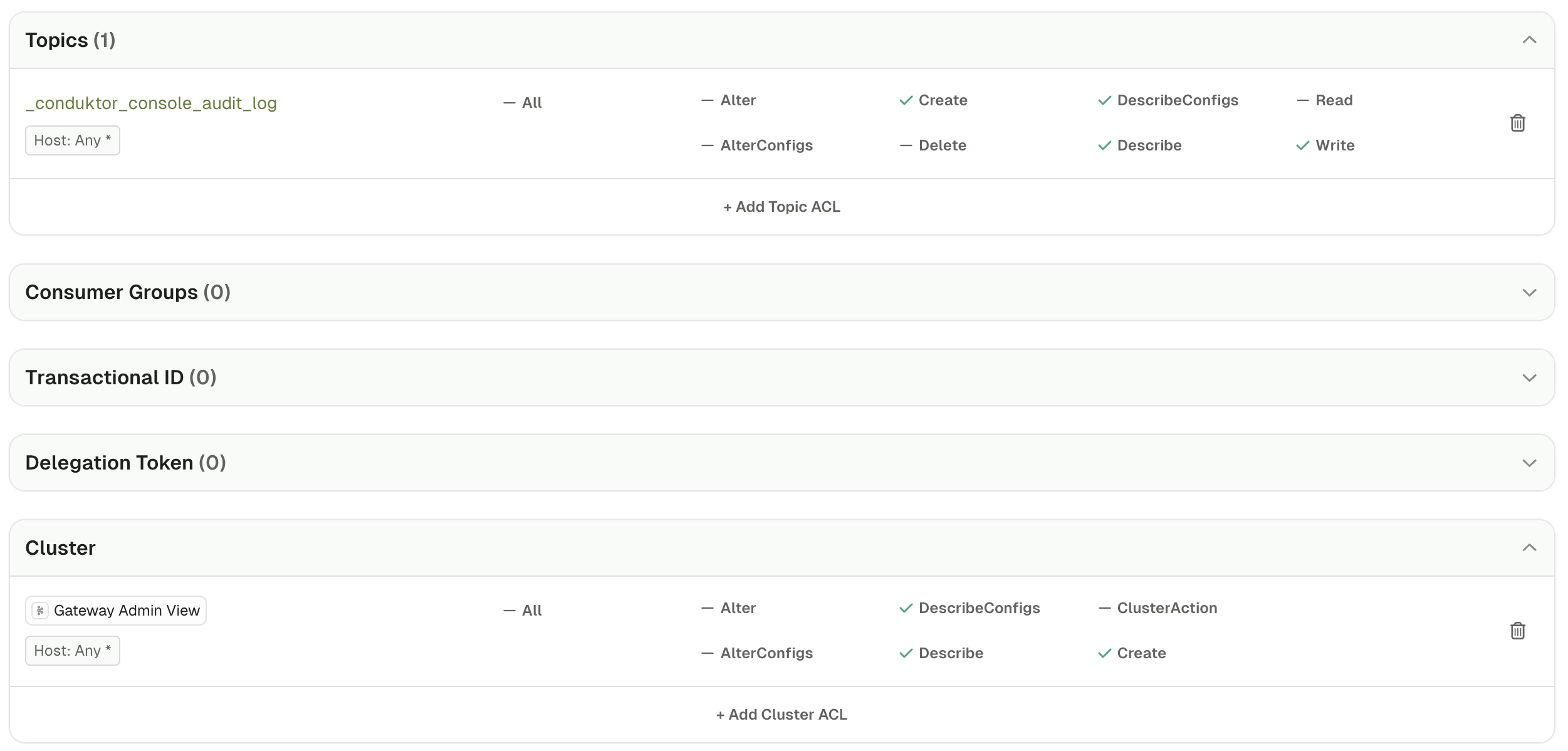
Note that the principal used by Console to connect to your Kafka cluster has to have the following minimum set of permissions:
* Topics: Create, Describe, DescribeConfigs, Write
* Cluster: Create, Describe, DescribeConfigs
 ## Export the audit log
To export the audit log from this Kafka topic, open Console and go to the **Consume** page of this topic.
Here, click on the *...* button at the top right of the records table and select either `Export to CSV` or `Export to JSON`.
You can then import that file in your SIEM or log management system.
## Troubleshoot
Check whether **internal topics are hidden**, if not, check the Console logs for errors.
Otherwise, the issue could be a misconfigured name of the Kafka cluster.
In that's the case, you'll see this message in the logs: *Failed to publish audit log event: Not found. Could not find cluster my-kafka-cluster*.
Make sure that the Kafka **cluster name matches the ID you can see** in the clusters dropdown in Console.
## Export the audit log
To export the audit log from this Kafka topic, open Console and go to the **Consume** page of this topic.
Here, click on the *...* button at the top right of the records table and select either `Export to CSV` or `Export to JSON`.
You can then import that file in your SIEM or log management system.
## Troubleshoot
Check whether **internal topics are hidden**, if not, check the Console logs for errors.
Otherwise, the issue could be a misconfigured name of the Kafka cluster.
In that's the case, you'll see this message in the logs: *Failed to publish audit log event: Not found. Could not find cluster my-kafka-cluster*.
Make sure that the Kafka **cluster name matches the ID you can see** in the clusters dropdown in Console.