> ## Documentation Index
> Fetch the complete documentation index at: https://docs.conduktor.io/llms.txt
> Use this file to discover all available pages before exploring further.
# Migrate to Self-service managed Confluent Platform RBAC role bindings
> Migrate Conduktor Self-service to manage Confluent Platform RBAC role bindings instead of Kafka ACLs. Step-by-step guide for Confluent Platform environments.
## Overview
By default, Self-service creates Kafka ACLs for both application instances and application instance permissions for an associated service account.
For Confluent Platform clusters, as of Console v1.45, you can instead manage service accounts through Confluent Platform Role-Based Access Control (RBAC) role bindings. This provides the added benefit of provisioning permissions for the *subject* resources via schema registry RBAC role bindings.
Console v1.37 introduced the concept of `Child Resources`. This enables the implicit provisioning of a subject permission when a topic permission is created either via ownership in an application instance or through an `ApplicationInstancePermission` (also known as an approved `Topic Request` in the UI).
For example, a topic request that seeks `write` access to another ApplicationInstance's topic will result in the associated application instance's service account receiving a `DeveloperWrite` and `DeveloperRead` role binding.
For application managed service accounts (see the release notes for v1.31.0), role binding support is not currently implemented and Kafka ACLs will continue to be created for these resources.
## Enable role bindings
Go to your Confluent Platform cluster provider's settings.
Confluent Platform role bindings currently support LDAP authentication only. You have to provide the username and password of a user with `SystemAdmin` privileges so that Console can manage role bindings through the Metadata Service (MDS).
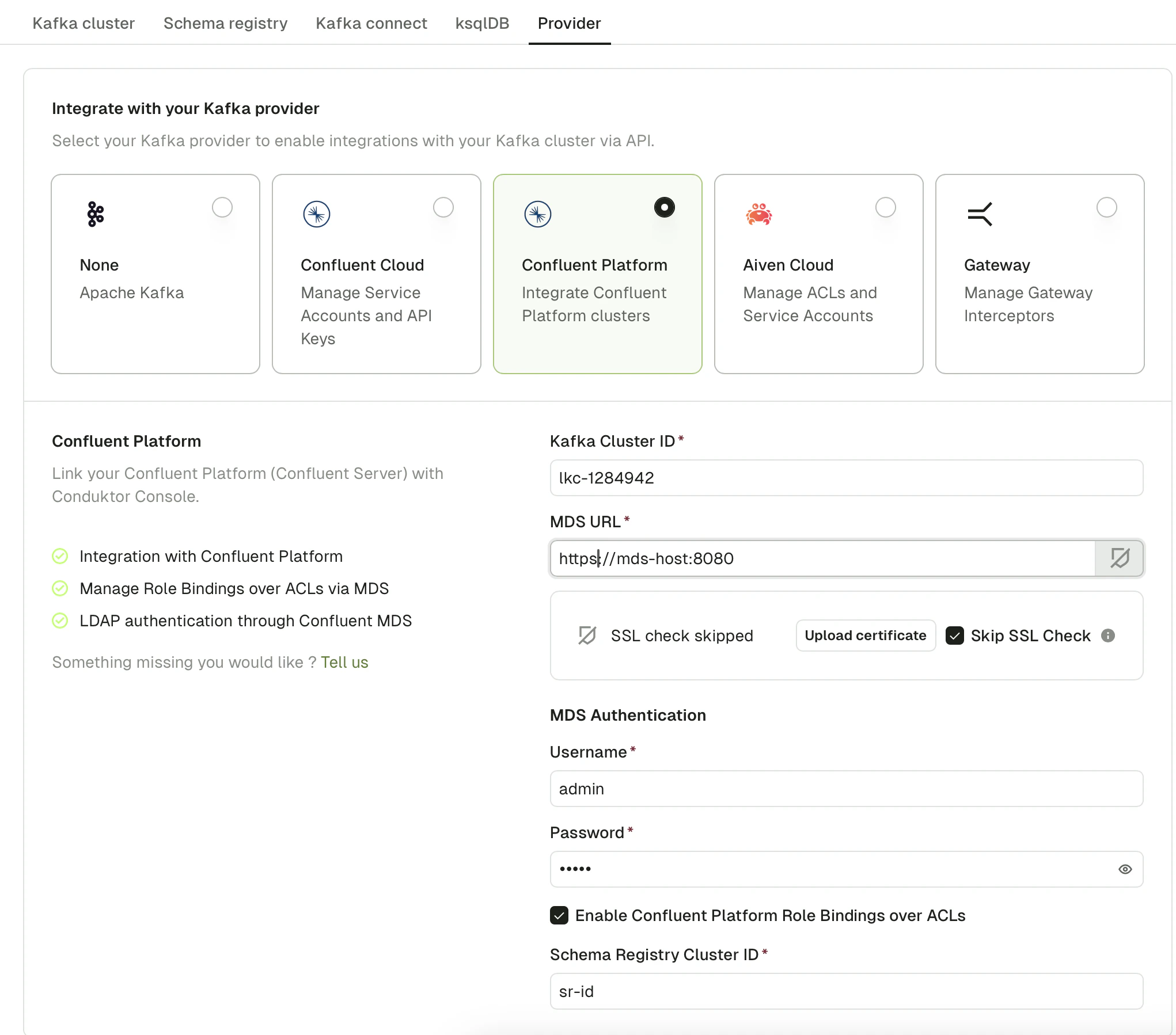 Enter your Kafka Cluster ID and MDS URL, then provide MDS authentication credentials (LDAP username and password for the `SystemAdmin` account).
Tick the **Enable Confluent Platform Role Bindings over ACLs** checkbox, then enter your Schema Registry Cluster ID.
## Validate the migration
After approving a topic request or applying an ApplicationInstance/ApplicationInstancePermission, open Console and go to the **Service account** page. From there, you should see the relevant role bindings that have been created for the relevant resources.
## Troubleshoot
Previously created ACLs will not be deleted when you enable role bindings but future applications of resources will result in only the role bindings being created for the relevant service accounts.
You'll need to fetch all your existing ApplicationInstancePermissions and ApplicationInstances and re-apply them. First, run `conduktor get ApplicationInstance` and `conduktor get ApplicationInstancePermission`, save the output to a `.yaml` file and then run `conduktor apply -f .yaml`.
Enter your Kafka Cluster ID and MDS URL, then provide MDS authentication credentials (LDAP username and password for the `SystemAdmin` account).
Tick the **Enable Confluent Platform Role Bindings over ACLs** checkbox, then enter your Schema Registry Cluster ID.
## Validate the migration
After approving a topic request or applying an ApplicationInstance/ApplicationInstancePermission, open Console and go to the **Service account** page. From there, you should see the relevant role bindings that have been created for the relevant resources.
## Troubleshoot
Previously created ACLs will not be deleted when you enable role bindings but future applications of resources will result in only the role bindings being created for the relevant service accounts.
You'll need to fetch all your existing ApplicationInstancePermissions and ApplicationInstances and re-apply them. First, run `conduktor get ApplicationInstance` and `conduktor get ApplicationInstancePermission`, save the output to a `.yaml` file and then run `conduktor apply -f .yaml`.