

- Console
- Gateway
Console overview
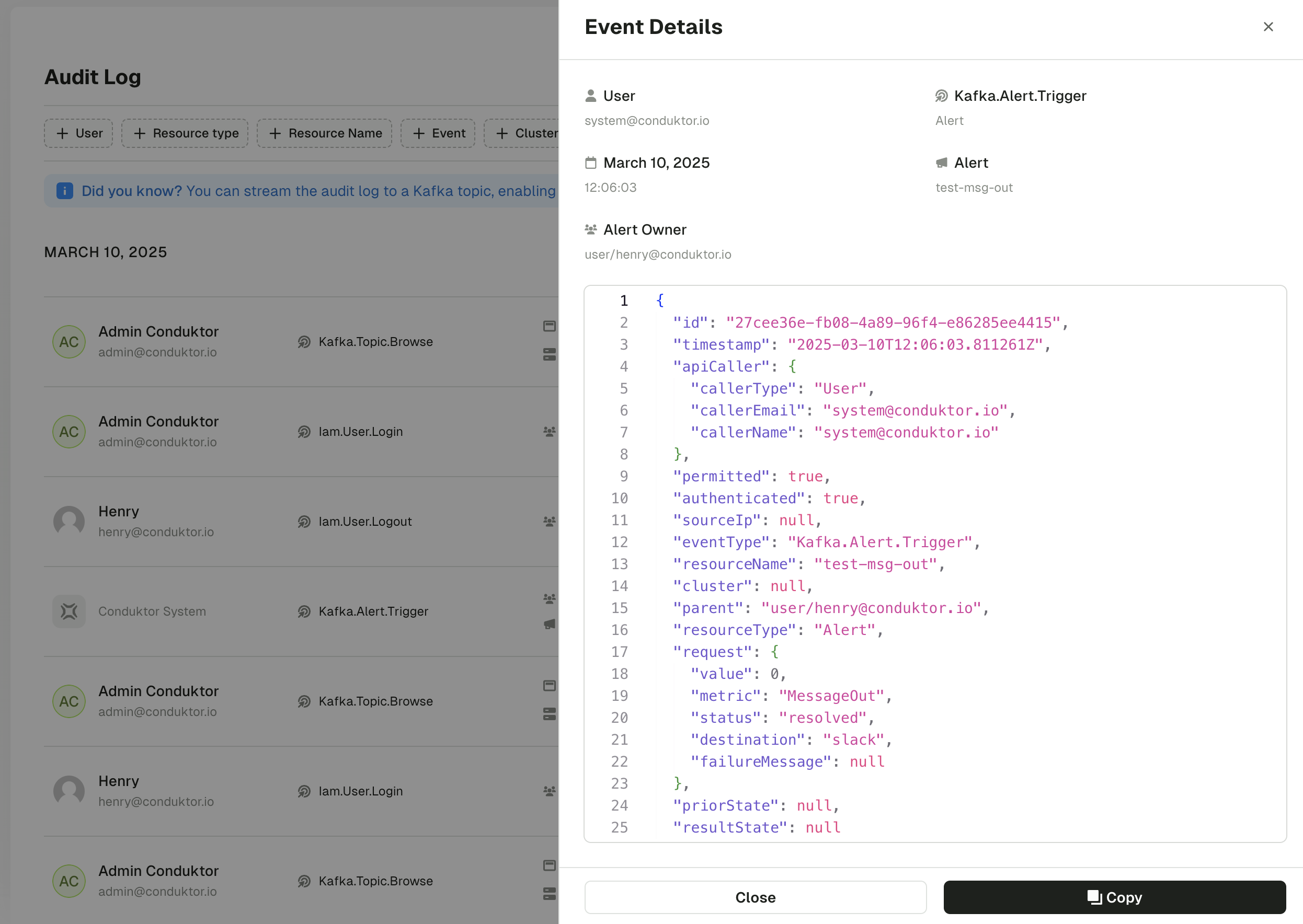
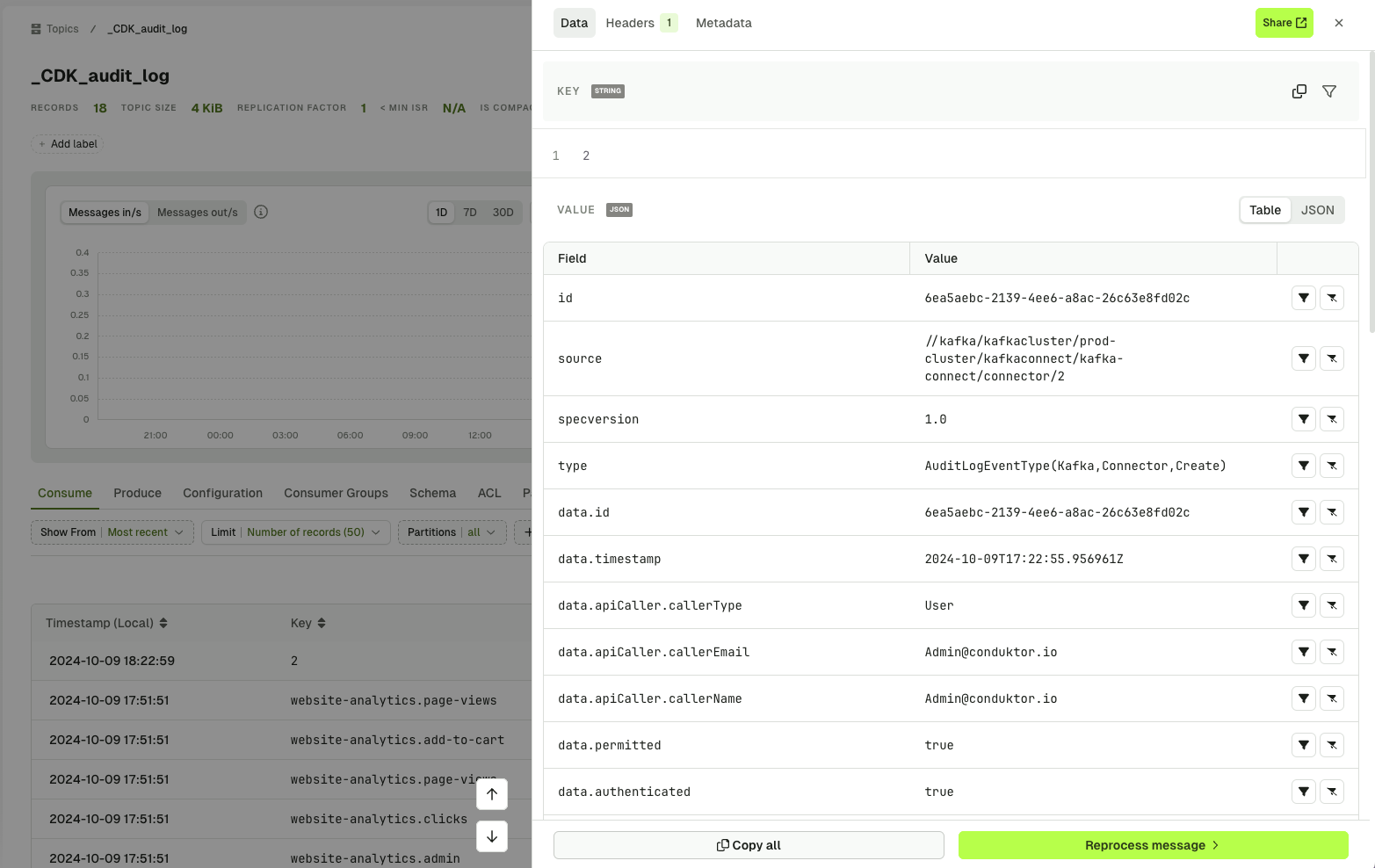
The Console audit log events can be browsed, filtered and searched directly via the UI or exported from a Kafka topic for further use (such as maintaining your own audit trail in other systems).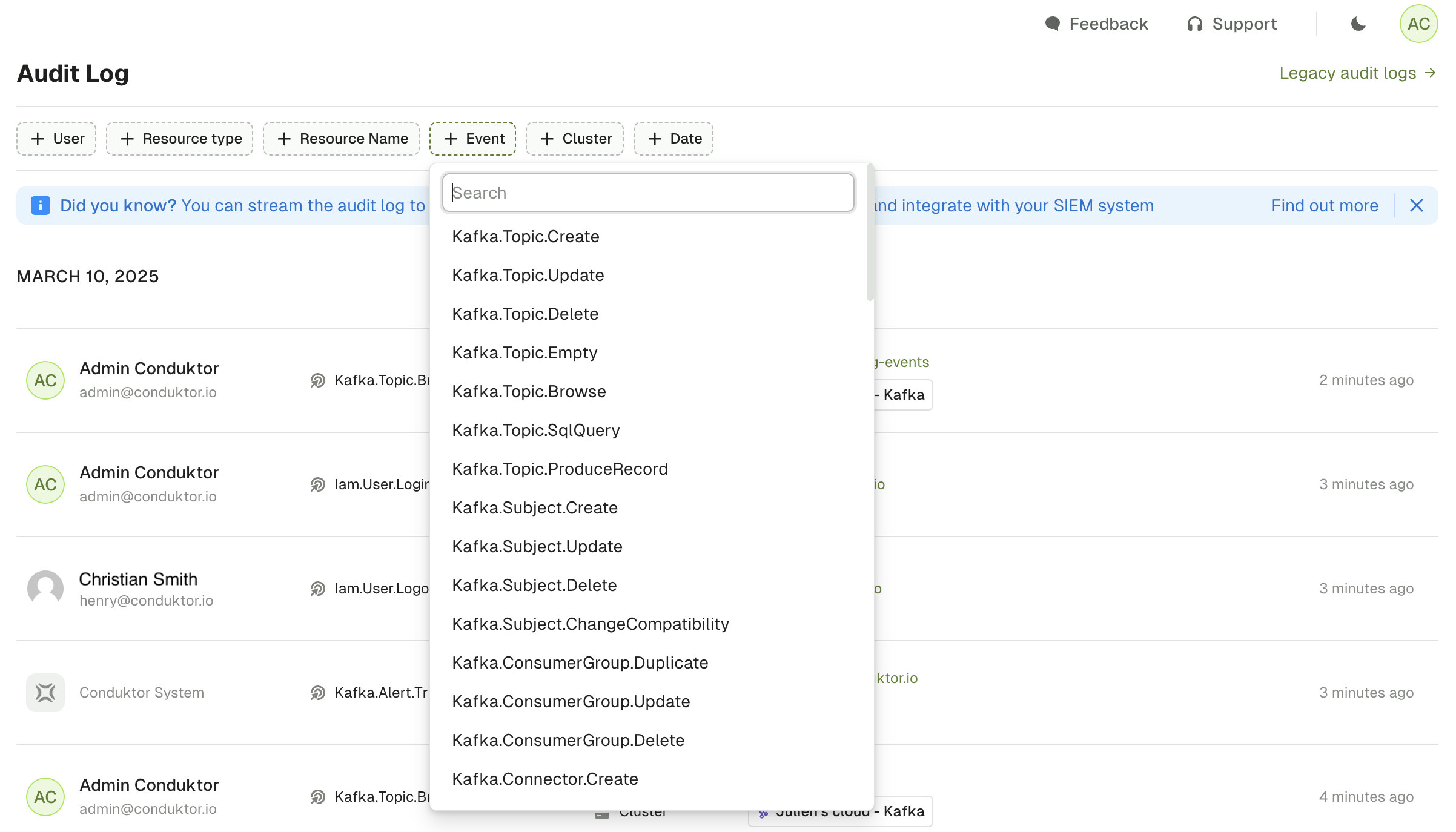
View and export audit logs
- CloudEvents
- Legacy events
Export audit log events
You can export audit log events from a Kafka topic using the Console UI. The exportable events have more detail than the legacy events, providing additional information about the event that has taken place.Learn how to configure audit events for export via configuration properties.The events conform to the CloudEvents specification , a vendor-neutral format that follows the following structure:{
"specversion" : "1.0",
"type" : "com.github.pull_request.opened",
"source" : "https://github.com/cloudevents/spec/pull",
"subject" : "123",
"id" : "A234-1234-1234",
"time" : "2018-04-05T17:31:00Z",
"comexampleextension1" : "value",
"comexampleothervalue" : 5,
"datacontenttype" : "text/xml",
"data" : "<much wow=\"xml\"/>"
}
{
  "source": "//kafka/kafkacluster/production/topic/website-orders",
  "data": {
    "eventType": "Kafka.Topic.Create",
    // Additional event specific data...
    "metadata": {
      "name": "website-orders",
      "cluster": "production"
    }
    // Additional event specific metadata...
  },
  "datacontenttype": "application/json",
  "id": "ad85122c-0041-421e-b04b-6bc2ec901e08",
  "time": "2024-10-10T07:52:07.483140Z",
  "type": "AuditLogEventType(Kafka,Topic,Create)",
  "specversion": "1.0"
}
Kafka related events
| Event type | Description |
|---|---|
| Kafka.Subject.Create | Kafka subject is created. |
| Kafka.Subject.Update | Kafka subject is updated. |
| Kafka.Subject.Delete | Kafka subject is deleted. |
| Kafka.Subject.ChangeCompatibility | Kafka subject compatibility is changed |
| Kafka.Topic.Create | Kafka topic is created. |
| Kafka.Topic.Update | Kafka topic is updated. |
| Kafka.Topic.Delete | Kafka topic is deleted; priorState contains its previous metadata and configuration when available. |
| Kafka.Topic.Empty | Records are deleted from a topic by emptying it, emptying a partition or advancing low watermarks. |
| Kafka.Topic.Browse | Kafka topic is browsed. |
| Kafka.Topic.ProduceRecord | Kafka topic record is produced. |
| Kafka.Topic.SqlQuery | Kafka topic is requested through Console SQL. |
| Kafka.Connector.Create | Kafka connector is created. |
| Kafka.Connector.Update | Kafka connector is updated. |
| Kafka.Connector.Delete | Kafka connector is deleted. |
| Kafka.Connector.Restart | Kafka connector is restarted. |
| Kafka.Connector.TaskRestart | Kafka connector task is restarted. |
| Kafka.Connector.Pause | Kafka connector is paused. |
| Kafka.Connector.Resume | Kafka connector is resumed. |
| Kafka.Connector.AutoRestartActivate | Kafka connector auto-restart is activated. |
| Kafka.Connector.AutoRestartStop | Kafka connector auto-restart is stopped. |
| Kafka.ConsumerGroup.Duplicate | Kafka consumer group is duplicated. |
| Kafka.ConsumerGroup.Update | Kafka consumer group is updated, when the offset is reset. |
| Kafka.ConsumerGroup.Delete | Kafka consumer group is deleted. |
IAM related events
| Event type | Description |
|---|---|
| Iam.User.Create | IAM user is created. |
| Iam.User.Update | IAM user is updated. |
| Iam.User.Delete | IAM user is deleted. |
| Iam.User.Login | IAM user logs in. |
| Iam.User.Logout | IAM user logs out. |
| Iam.Group.Create | IAM group is created. |
| Iam.Group.Update | IAM group is updated. |
| Iam.Group.Delete | IAM group is deleted. |
Self-service related events
| Event type | Description |
|---|---|
| SelfService.Application.Create | Self-service application is created. |
| SelfService.Application.Update | Self-service application is updated. |
| SelfService.Application.Upsert | Self-service application is created or updated. |
| SelfService.Application.Delete | Self-service application is deleted. |
| SelfService.ApplicationInstance.Create | Self-service application instance is created. |
| SelfService.ApplicationInstance.Update | Self-service application instance is updated. |
| SelfService.ApplicationInstance.Delete | Self-service application instance is deleted. |
| SelfService.ApplicationInstanceApiKey.Create | Self-service application instance API key is created. |
| SelfService.ApplicationInstanceApiKey.Delete | Self-service application instance API key is deleted. |
| SelfService.ApplicationGroup.Create | Self-service application group is created. |
| SelfService.ApplicationGroup.Update | Self-service application group is updated. |
| SelfService.ApplicationGroup.Delete | Self-service application group is deleted. |
| SelfService.ApplicationPolicy.Create | Self-service application policy is created. |
| SelfService.ApplicationPolicy.Update | Self-service application policy is updated. |
| SelfService.ApplicationPolicy.Delete | Self-service application policy is deleted. |
| SelfService.ApplicationInstancePermission.Create | Permissions are created for an app instance. |
| SelfService.ApplicationInstancePermission.Delete | Permissions are deleted for an app instance. |
| SelfService.ServiceAccount.Create | Service account is created. |
| SelfService.ServiceAccount.Update | Service account is updated. |
| SelfService.ServiceAccount.Delete | Service account is deleted. |
Admin related events
| Event type | Description |
|---|---|
| Admin.KafkaConnect.Create | A Kafka Connect instance is created. |
| Admin.KafkaConnect.Update | A Kafka Connect instance is updated |
| Admin.KafkaConnect.Delete | A Kafka Connect instance is deleted. |
| Admin.KsqlDB.Create | A ksqlDB instance is created. |
| Admin.KsqlDB.Update | A ksqlDB instance is updated. |
| Admin.KsqlDB.Delete | A ksqlDB instance is deleted. |
| Admin.KafkaCluster.Create | A Kafka cluster is created. |
| Admin.KafkaCluster.Update | A Kafka cluster is updated. |
| Admin.KafkaCluster.Delete | A Kafka cluster is deleted. |
| Admin.SchemaRegistry.ChangeCompatibility | The global compatibility of the schema registry is updated. |
| Admin.Integration.Update | The alert integration (Slack, MS Teams, Webhook) is updated. |
| Admin.AdminApiKey.Create | A new admin API key is created. |
| Admin.AdminApiKey.Delete | An admin API key is deleted. |
| Admin.DataMaskingPolicy.Create | A data masking policy is created. |
| Admin.DataMaskingPolicy.Update | A data masking policy is updated. |
| Admin.DataMaskingPolicy.Delete | A data masking policy is deleted. |
| Admin.Certificate.Create | A certificate is created. |
| Admin.Certificate.Delete | A certificate is deleted. |
| Admin.ConfluentOrganization.Create | A Confluent Cloud organization is registered. |
| Admin.ConfluentOrganization.Update | A Confluent Cloud organization is updated. |
| Admin.ConfluentOrganization.Delete | A Confluent Cloud organization is deleted. |
| Admin.ApplicationGroupTemplate.Create | An application group template is created. |
| Admin.ApplicationGroupTemplate.Update | An application group template is updated. |
| Admin.ApplicationGroupTemplate.Delete | An application group template is deleted. |
Alert related events
| Event type | Description |
|---|---|
| Kafka.Alert.Create | An alert is created. |
| Kafka.Alert.Update | An alert is updated. |
| Kafka.Alert.Delete | An alert is deleted. |
| Kafka.Alert.Trigger | An alert is triggered. |
Partner Zone related events
| Event type | Description |
|---|---|
| Admin.PartnerZone.Create | A Partner Zone is created. |
| Admin.PartnerZone.Update | A Partner Zone is updated. |
| Admin.PartnerZone.Delete | A Partner Zone is deleted. |
| Admin.PartnerZone.TokenCreate | A token is created for accessing a Partner Zone. |
Legacy audit events
Here’s a list of legacy audit events tracked by Conduktor:Console
ResourceType: Topic
CRN: kafka:/cluster/<uuid>/topic/<topic-name>- topic.ProducedRecord
- topic.Browsed
- topic.Deleted
- topic.Created
- topic.Updated
- topic.Emptied
- topic.Tagged
- topic.Untagged
ResourceType: Subject
CRN kafka:/cluster/<uuid>/subject/<subject-name>- subject.Created
- subject.Updated
- subject.ChangedCompat
- subject.Deleted
- subject.DeletedVersions
- subject.DeletedVersion
ResourceType: SchemaRegistry
CRN kafka:/cluster/<uuid>- registry.ChangedGlobalCompat
ResourceType: ConsumerGroup
CRN kafka:/cluster/<uuid>/group/<group-name>- consumergroup.Created
- consumergroup.Updated (ResetOffsets)
- consumergroup.Deleted
ResourceType: Connector
CRN kafka:/cluster/<uuid>/connect/<connect-cluster-id>/<connector-name>- connector.Created
- connector.Updated
- connector.Deleted
- connector.Restarted
- connector.RestartedTask
- connector.Paused
- connector.Resumed
Data masking
ResourceType: DatamaskingPolicy
CRN platform:/datamasking/<uuid>- policy.Upserted
- policy.Deleted
Self-service
ResourceType: Application
CRN platform:/application/<app-slug>- application.Created
- application.Deleted
- application.Updated
- application.access-request.Approved from / to
- application.access-request.Rejected
Admin
ResourceType: Cluster
CRN kafka:/cluster/<uuid>- cluster.Created
- cluster.Updated
- cluster.Deleted
ResourceType: Group
CRN platform:/group/<uuid>- group.Created
- group.member.Added
- group.member.Deleted
- group.permission.Added
- group.permission.Deleted
ResourceType: User
CRN platform:/user/<email>- user.Login
- user.permission.Added
- user.permission.Deleted
- user.platform_role.Updated
Gateway overview
The Gateway audit log events are stored in an internal topic. The topic name is configured usingGATEWAY_AUDIT_LOG_TOPIC and the feature can be enabled/disabled using GATEWAY_FEATURE_FLAGS_AUDIT. The audit events can be browsed, filtered and searched via Console UI or used to create custom alerts and notifications.Here’s an example of a Gateway audit log event in JSON format, showing a successful authentication attempt to Gateway:{
"id": "a3b7355b-dbe6-4db4-90a8-f41e0111710e",
"source": null,
"type": "AUTHENTICATION",
"authenticationPrincipal": "<principal>",
"userName": "<username>",
"connection": {
"localAddress": "/<gateway-ip>:<port>",
"remoteAddress": "/<client-ip>:<port>"
},
"specVersion": "0.1.0",
"time": "2025-07-18T16:07:06.570723674Z",
"eventData": "SUCCESS"
}
Field details
Key fields and their values:authenticationPrincipal: The tenant name, ornullon some authentication failures.userName: The attempted user name, ornullon some authentication failures.source: Event source, alwaysnullfor authentication events.eventData: Contains success/failure messages and error details.connection: The connection metadata for the client that triggered the event. See connection block.
Connection block
Every Gateway audit event type except authorization failure includes aconnection block:| Field | Description |
|---|---|
localAddress | The Gateway address the client connected to. |
remoteAddress | The socket peer address — the load balancer’s address when Gateway sits behind one or the original client address if Kubernetes externalTrafficPolicy: Local is configured. |
proxyConnection | (Optional) The original client address that comes with HAProxy Protocol header. Present only when Gateway captures the client IP address using HAProxy Protocol. |
"connection": {
  "localAddress": "/<gateway-ip>:<port>",
  "remoteAddress": "/<load-balancer-ip>:<port>",
  "proxyConnection": {
    "sourceAddress": "<original-client-ip>:<port>",
    "destinationAddress": "<original-destination-ip>:<port>"
  }
}
Gateway audit event types
Gateway supports the following audit event types:Connection event
The connection event tracks client connections to Gateway. It captures client information like remote address, which helps with monitoring connections. See connection block for the fields it reports, and Capturing the client IP address for the original client address.Authentication event
The authentication event records the authentication attempts made by clients to Gateway. It records both successful and failed attempts, providing insights into who accessed Gateway. Its connection block includes the original client address — see Capturing the client IP address.TheeventData field contains different messages, depending on the Gateway security mode, Gateway security protocol and the authentication outcome. Here are some common examples:| Security mode | SASL mechanism | Outcome | Event data |
|---|---|---|---|
| Gateway managed | PLAIN | Success | "SUCCESS" |
| Gateway managed | PLAIN | Failure | "Authentication failed: credentials for user could not be verified. Cause: Invalid username or password" |
| Gateway managed | PLAIN | Failure | "Authentication failed: credentials for user could not be verified. Cause: Password token is valid but username <username> is invalid" |
| Gateway managed | PLAIN | Failure | "Authentication failed: credentials for user could not be verified. Cause: Token has expired. Claims: {username=<username>, vcluster=<vcluster>, exp=<timestamp>}" |
| Gateway managed | PLAIN | Failure | "Authentication failed: username not specified" or "Authentication failed: password not specified" |
| Gateway managed | PLAIN | Failure | "Authentication failed: credentials for user could not be verified. Cause: Password token is valid for username, but username <username> is not an existing local user." |
| Gateway managed | OAUTHBEARER | Failure | "{\"status\":\"invalid_token\"}" |
| Kafka managed | Any | Failure | "SASL Authentication failed." |
| Kafka managed | Any | Failure | "Gateway can't detect principal from your authorization exchange. Please contact your administrator" |
For the Gateway managed with OAUTHBEARER, authentication may also fail if the Kafka client is unable to fetch the token from the configured OAUTH provider. This occurs before reaching Gateway, so audit log event would not be created.
Safeguard event
The safeguard event captures policy enforcement actions by safeguard Interceptors such as data quality producer policy and Traffic Control Policies. Its connection block includes the original client address — see Capturing the client IP address.API keys request event
The Kafka protocol describesAPI keys that represent different kinds of requests that can be made to the broker.On Gateway, you can configure an audit Interceptor to track specific Kafka operations (such as PRODUCE, FETCH, CREATE_TOPICS, DELETE_TOPICS and ALTER_CONFIGS) to elevate audit logging on certain topics as needed. Its connection block includes the original client address — see Capturing the client IP address.REST API event
The REST API event logs calls made to the Gateway’s REST endpoints.Interceptor event
The Interceptor event records encryption/decryption error messages from cryptography Interceptors. Its connection block includes the original client address — see Capturing the client IP address.ACL admin event
The ACL admin event tracks Access Control List operations done via Kafka Admin API, such asCREATE_ACLS and DELETE_ACLS requests. Its connection block includes the original client address — see Capturing the client IP address.ACL operations done via REST API (for Virtual Cluster) are recorded as REST API events.Authorization failure event
The authorization failure event records failed attempts to access a resource when ACL permissions deny the operation. It doesn’t report a connection block.ACL permissions are determined by Kafka authorization primitives (i.e. Operation and Resource), resource name, user name, tenant (i.e. Virtual Cluster) name and host.The value ofeventData in the authorization failure audit log event depends on the value of SECURITY_MODE configuration.| Security mode | Information in event data | Example event data value |
|---|---|---|
| Gateway managed | Kafka authorization primitives | "DENY Operation.WRITE on Resource(name=test-topic, resourceType=TOPIC, patternType=LITERAL) for [Tenant: passthrough, User: test-user, Host: 127.0.0.1]" |
| Kafka managed | Authorization failure type | "Kafka error 'Topic authorization failed.' when processing 'PRODUCE' request." |