

From our blog: How Gateway reduces Kafka DR from hours to minutes Gateway’s failover in action: redirect Kafka clients without touching bootstrap servers or credentials.
Prerequisites
Data replication is already in place
Gateway does not currently provide any mechanism to replicate already written data from the primary to the secondary cluster. Therefore, to make use of our solution, you should already have this mechanism in place. Common solutions for this include:- MirrorMaker 2
- Confluent Replicator
- Confluent Cluster Linking
Kafka client configuration
No specific client configuration is necessary, besides ensuring that clients have configured enough retries (or that thedelivery.timeout.ms for JVM-based clients) setting is large enough to cover the time necessary for the operations team to discover failure of the primary cluster and initiate a failover procedure. Especially for JVM-based clients, the default delivery timeout of 2 minutes might be too short.
System requirements
- Gateway version
3.3.0+ - Kafka brokers version
2.8.2+
How it works
Conduktor Gateway acts as a ‘hot-switch’ to the secondary Kafka cluster, eliminating the need to change any client configurations in a disaster scenario. This is achievable because Gateway de-couples authentication between clients and the backing Kafka cluster(s). Note that to initiate failover, it must be triggered through an API request to every Gateway instance. The Conduktor team can support you in finding the best solution for initiating failover, depending on your deployment specificities.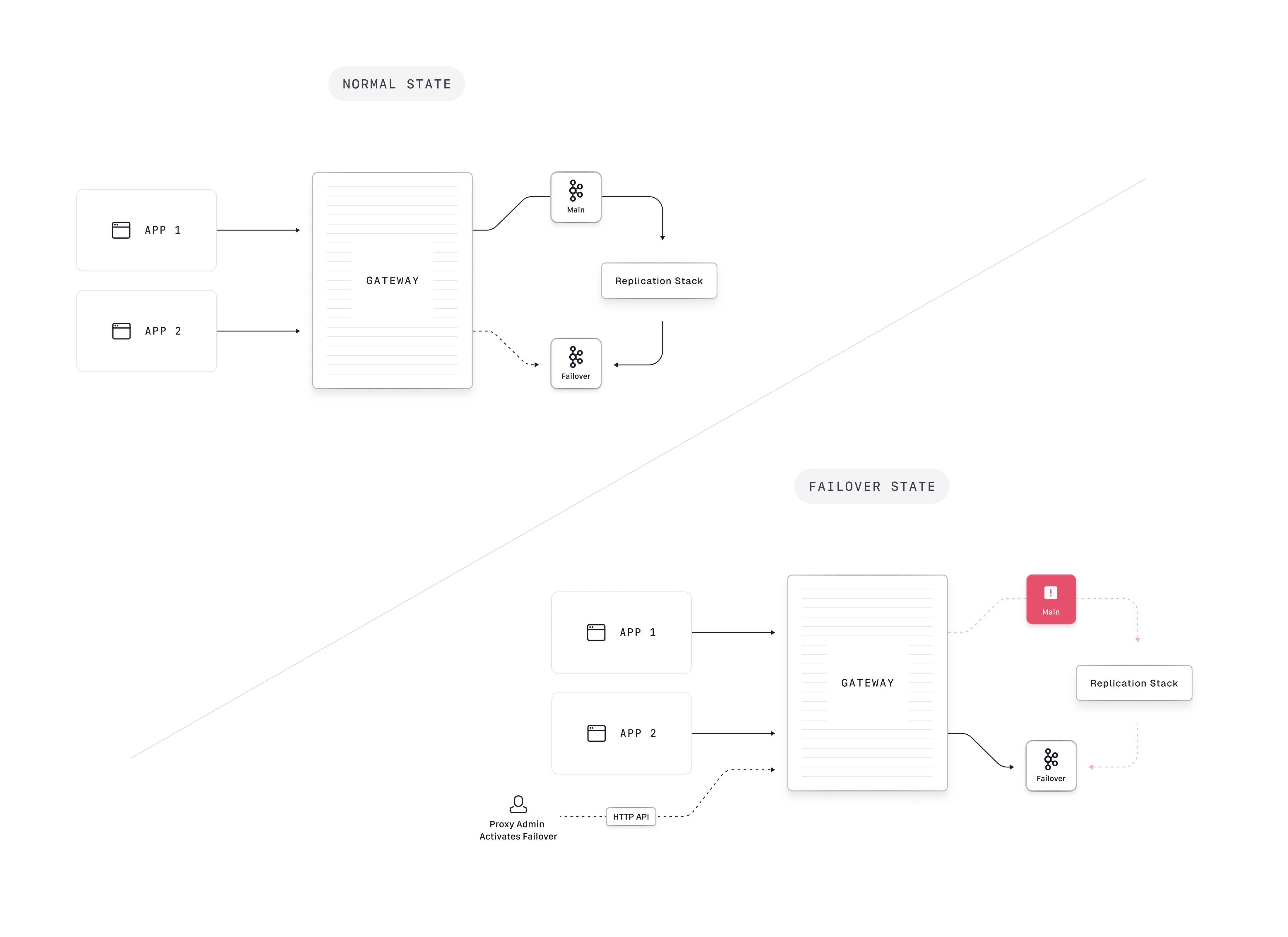
Set up Gateway
To set up Gateway for failover, you should configure the primary and secondary clusters along with their configuration properties. This can be achieved through a cluster-config file, or through environment variables.Configuring through a cluster-config file
Specify your primary and secondary cluster configurations, along with agateway.roles entry to mark the failover cluster - note that the API keys differ in the Confluent Cloud example below:
GATEWAY_BACKEND_KAFKA_SELECTOR:
Configuring through environment variables
Alternatively, you can configure your primary and secondary cluster through environment variables:Initiating failover
The cluster switch API updates which Kafka cluster the main connection points to.- fromPhysicalCluster: The physical cluster whose connection is being updated. In a failover setup, client traffic always goes through the main cluster slot, so this is always
main. - toPhysicalCluster: The physical cluster whose connection configuration is used (either
mainorfailover).
Switching back
To switch back from the secondary cluster to the primary cluster, set both parameters tomain and make the following request to all Gateway instances: