

The problem
As more teams adopt Kafka, every request for a topic, a connector or an access grant ends up in the same queue: the platform team’s.- Reviews don’t scale. With a handful of teams, the platform team reviews each pull request carefully. With dozens of teams, reviews get rushed and misconfigurations reach production.
- Developers wait. A team that needs a topic waits in a queue it can’t see before it can start the work that needed the topic.
- Rules live in wikis. Naming conventions, partition limits and required metadata exist as documents. Nobody enforces them consistently, and the quality of what lands in the cluster depends on who reviewed it.
- Scripts can’t handle exceptions. Linters and CI checks enforce the standard case. When one project legitimately needs more partitions than the limit allows, someone overrides the check by hand or creates the resource outside GitOps.
- Nobody knows who owns what. When a topic breaks, the first hour goes to finding its owner. When an auditor asks who has access to a sensitive topic, the answer takes days of cross-referencing ACLs, Git history and tickets. The platform team approves access requests without knowing what the data is.
From our blog: Who needs self-service? You do Why ticket-based Kafka provisioning fails at scale and how governed self-service unblocks your teams.From our blog: No Kafka data platform without ownership Why ownership is the foundation self-service, autonomy and scale are built on.
How Self-service helps
Self-service adds a governance layer on top of your Kafka resources and helps the platform team delegate to application teams.- The platform team sets the frame, and each team works inside it. The platform team declares each application, its owners and the Kafka resources it can own. Application teams create and manage those resources directly, so nobody waits for the platform team.
- The platform team writes its rules once, as policies. Console checks every new resource against them and says what to fix when one fails. A bad request fails in seconds, not after days in a review queue. Policies set guardrails on what teams can request. They don’t decide who gets to work.
- Every change is traceable. In Git, you get a full history, you can review a change before it reaches Kafka and you can revert it. In Console, the audit log records who created, updated or deleted Self-service resources and who granted access, whichever way the change was made.
- Exceptions stay explicit. When a project needs to go beyond a rule, the platform team applies that one resource with an admin API key, usually through a reviewed pull request. The exception is visible and limited to that resource, and the rule stays the same for everyone else.
- Access decisions move to the people who know the data. Owners grant and review access to their own topics. Every grant is logged with who approved it and when, so “who can read this topic?” becomes a lookup instead of an investigation.
- Discovery comes built in. Kafka exists to open access to data. Teams find topics and their owners in the Topic Catalog, read their metadata and request access from there, without depending on the platform team.
Get started
1
Run the quick start
Follow the Self-service quick start to try a platform team and an application team on a local demo.
2
Write your rules
Turn your naming conventions and limits into resource policies, then link them to your applications.
3
Open access between teams
Let teams request and approve access to each other’s topics. See share access with another application.
Concepts
Self-service relies on a central concept, the Application, which dictates ownership of Kafka resources. The following diagram shows how Self-service resources relate to each other. Dark boxes are managed by the central platform team and light boxes by application teams.Create a resource
When an application team creates a topic, a connector or a subject, Console checks the request before it reaches Kafka: The checks are:- The resource name falls under a resource the application instance owns.
- The team is allowed to create it.
- The resource complies with every resource policy linked to the application instance, its application or the Kafka cluster.
Share access with another application
Teams find the topics they need by browsing the Topic Catalog. Access then goes through the team that owns the data, not through the platform team: A grant can give access to the people on the requesting team, in Console, and to their applications, in Kafka. It sets each level separately. Platform teams can restrict which grants are allowed with a resource policy that targets application instance permissions.Central platform team resources
Application
An application represents a streaming app or data pipeline that is responsible for producing, consuming or processing data from Kafka. Applications give business context to Kafka resources (topics, consumer groups and subjects) that directly relate to the functioning of that application or pipeline. Each application has an owner, a Console group.Application instance
Applications are generally deployed to one or more Kafka clusters, typically to align with the organization’s development cycle or environments. For example, “Payments in production” is one instance of the Payments application. We call this concept the application instance. It ties everything together. Each application instance:- is linked to a Kafka cluster and a
- has ownership of Kafka resources (topics, consumer groups, subjects)
- references the policies that validate those resources
- grants permissions for
- the service account, so the application can read and write the data it owns in Kafka
- the application owner group to create application groups in Console
- application group members, based on their assigned resource permissions and instance permissions
Resource policies
Resource policies turn your rules into checks. Console runs them every time a team creates or updates a resource. A policy can check Kafka configuration, names and business metadata on topics, connectors and subjects. It can also check application groups and access between applications. A policy only applies once you link it, so you choose where each rule applies. When a resource breaks a rule, the team sees the error message of that rule, so they know what to fix without asking the platform team. For an exception, the application team asks the platform team. The platform team applies the resource with an admin API key, which skips the policy checks. It can’t do this from Console, only from the CLI or the API. Watch how policy controls constrain topic configuration:Resource policies replace topic policies. Since Console 1.47.0, you can no longer create or update topic policies. To convert existing ones, see moving from TopicPolicy.
Resource templates
Templates give application teams a head start. Define a topic or connector template with the CLI and it shows up as a starting point in the Console creation form, pre-filling the configuration, labels and a suggested name. Teams pick a template, adjust the values for their case, then submit. Unlike policies, templates don’t enforce anything. They point teams at your defaults. Pair a template with a matching resource policy to both suggest a good starting point and enforce the boundaries. Watch a walkthrough of topic and connector templates, from the YAML spec to a developer’s pre-filled form:
Find out more in the topic template and connector template reference.
The same idea works for access. Application group templates give teams a ready-made set of permissions to start from when they create an application group. Find out more about application group templates.
Application team resources
Once an application and application instance are defined, application teams can organize and structure their applications as they see fit. There are two groups of resources where application teams are given autonomy:- Kafka-related resources: topics, subjects, connectors and the access they share with other applications.
- Console-related resources: in particular application groups, to define internally who can do what within the team.
Kafka resources
Application teams create the Kafka resources they need for their applications within the scope the platform team gave them. Names have to fall under the resources the application instance owns, and every resource is validated against the policies linked to the application instance, its application or the Kafka cluster. See the Kafka resources reference.Application instance permissions
Application instance permissions let teams collaborate with each other. An application instance permission grants another application instance access to a resource you own. Depending on the levels it sets, it gives access to that application instance’s:- applications, so they can read or write the topic in Kafka
- application team members, in Console
Application group
Create an application group to reflect how your application operates. You can create as many application groups as required to restrict or represent the different teams that use Console on your application. For example:- support team with read-only access in production
- DevOps team with extended access across all environments
- engineering team with higher permissions in dev environment
- Resource permissions: what members can do with Kafka resources, such as viewing, consuming or changing them.
- Instance permissions: what members can do for the whole application instance, such as managing access and API keys.
Upgrading from a previous version? On upgrade to Console 1.45.0, a mirror application group is automatically created for each existing application owner group, preserving all previous permissions. See the Console 1.45.0 release notes for details.
Enforce restrictions on application groups
Application teams manage their own application groups and decide which permissions to grant. An application group belongs to one application and can hold permissions on all of its instances, so platform teams restrict groups with a resource policy linked to the application. By default, teams can also create topics and approve access requests in Console. A common pattern is GitOps-only approval, where the platform team wants those actions to go through a reviewed pull request instead:- Restrict application groups to viewing resources and to requesting or proposing access. Members can still see everything. To approve an incoming request, they open it from the Access requests tab of the Application Catalog, copy the YAML from the GitOps (YAML) tab and submit it through their GitOps workflow.
- Keep API key management out of the groups. A member who can manage API keys can create a key for the application instance and apply changes from anywhere, within the limits of the policies and the ownership mode.
Resource labels
Labels are key-value pairs with no constraints that help you organize and surface business metadata in Console. We recommend that you annotate all resources that you create with the Conduktor CLI with labels, for example a description, a data classification, a documentation link or an application code. Combine labels with a resource policy to make sure every resource carries the metadata your organization requires. Find out which resources are currently supported.Limited ownership mode
By default, a team owns its resources fully: it creates, changes and deletes them. With limited ownership mode, the platform team keeps the right to create, change and delete some of them, for example in its existing pipeline, while the team can still use them. Use it to adopt Self-service step by step, without changing how topics are created today. Find out how to set the ownership mode and which permissions it denies.Self-service UI
GitOps is the main way to run Self-service. You can do almost everything from the CLI, including granting cross-team access, without opening Console. The one exception is the access request: a team asks for access to another team’s topic from Console, not from a pipeline. Pending requests are only listed in Console, in the Access requests tab of the Application Catalog.conduktor get ApplicationInstancePermission only returns access that has already been granted.
Console is a simpler alternative to the CLI. It mirrors what the CLI does and lets teams carry out common actions from the UI:
- find topics and their owners in the Topic Catalog, and the applications in the Application Catalog
- request access to another team’s topic, and approve or decline incoming requests
- manage their application groups and the permissions inside them
- generate the API keys their own GitOps pipeline uses
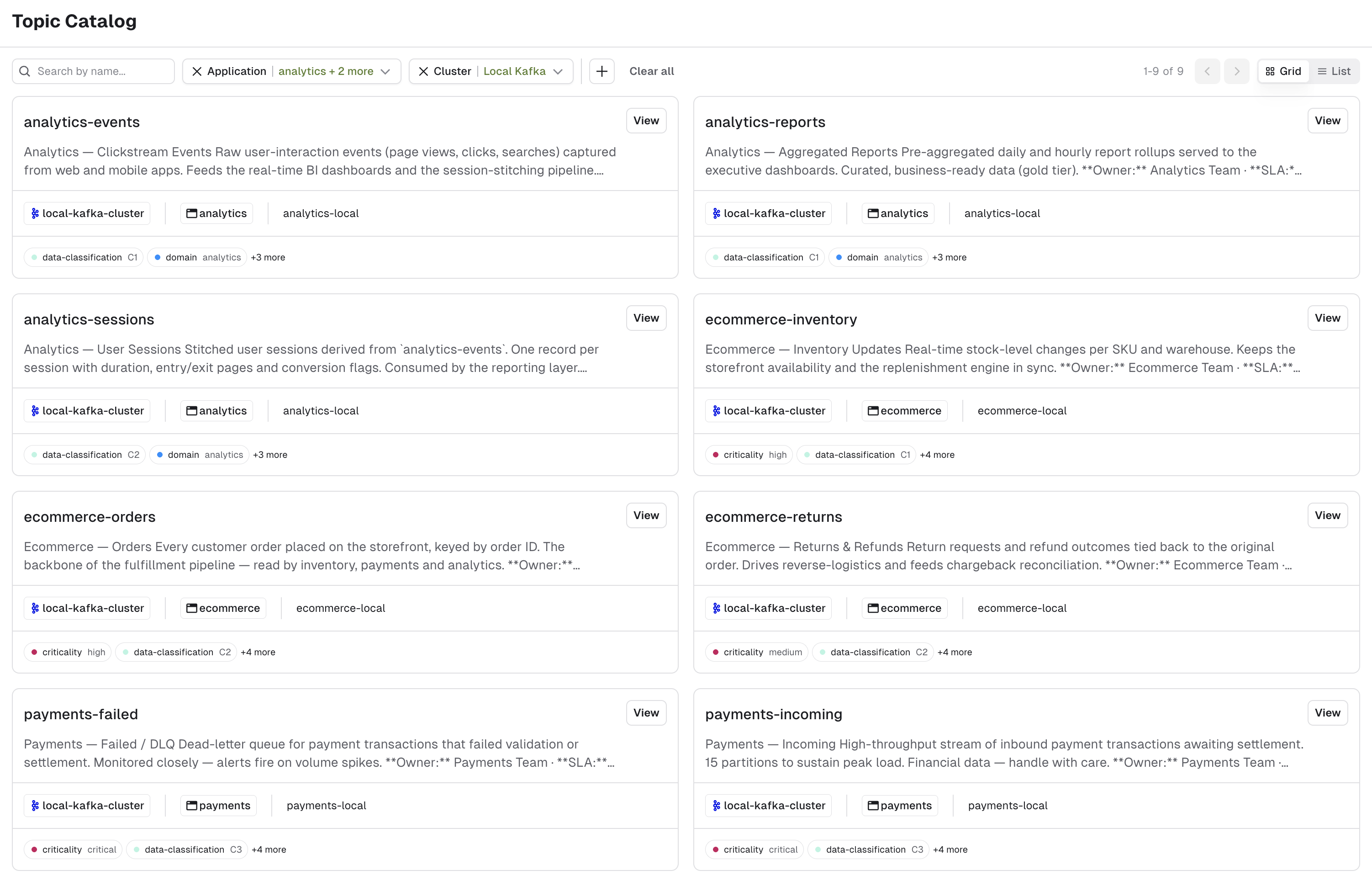
Topic Catalog page
In Console, the Topic Catalog page lets you search through the public topics that application instances own. Topics are public by default: a topic without its ownmetadata.catalogVisibility takes the spec.defaultCatalogVisibility of its application instance, which is PUBLIC unless you change it.
You can search by name and filter by application, Kafka cluster and labels.
Topic details page
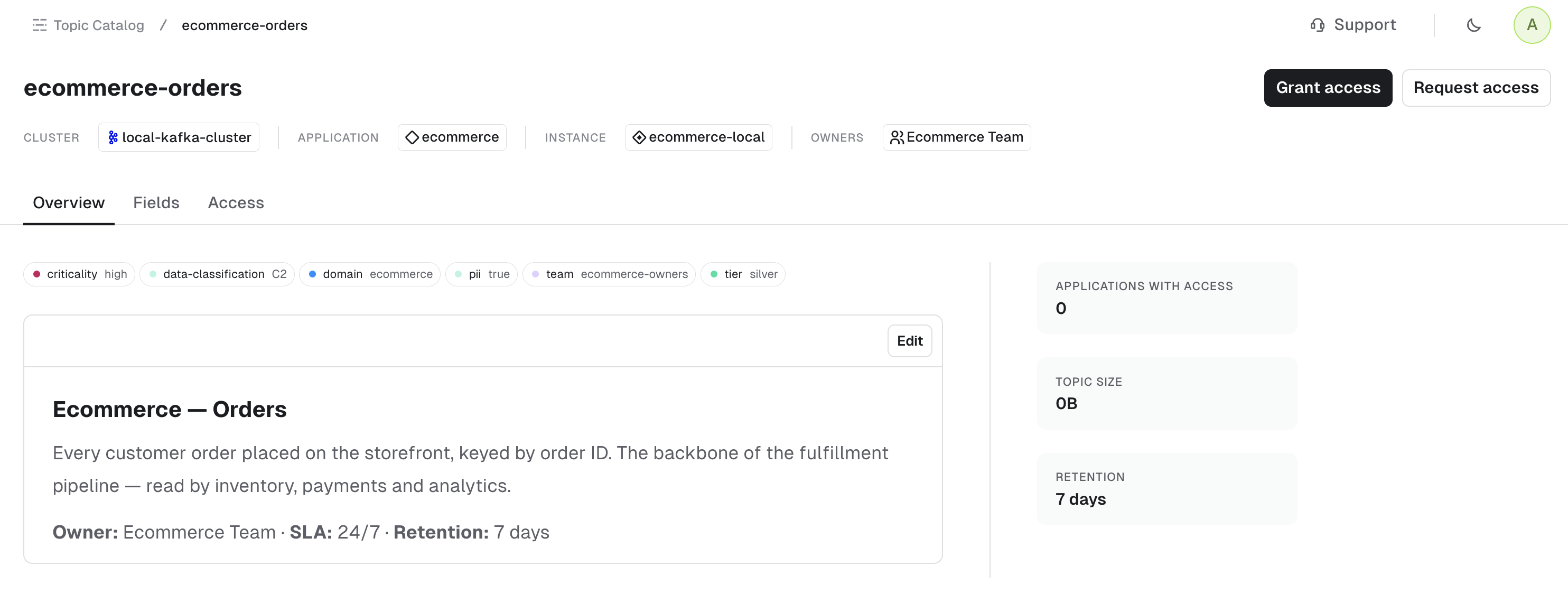
The Topic details page summarizes all the information related to this topic:- General topic information.
- Topic access information: displays all applications and application instances with access to this topic:
- You can remove access for your own applications.
- If you can manage access for this application instance, you can revoke access for other applications.
- The value schema, which describes the message structure, in the Fields tab.
Application Catalog page
In Console, the Application Catalog page lets you browse through your applications. See how the Application Catalog surfaces ownership across your applications: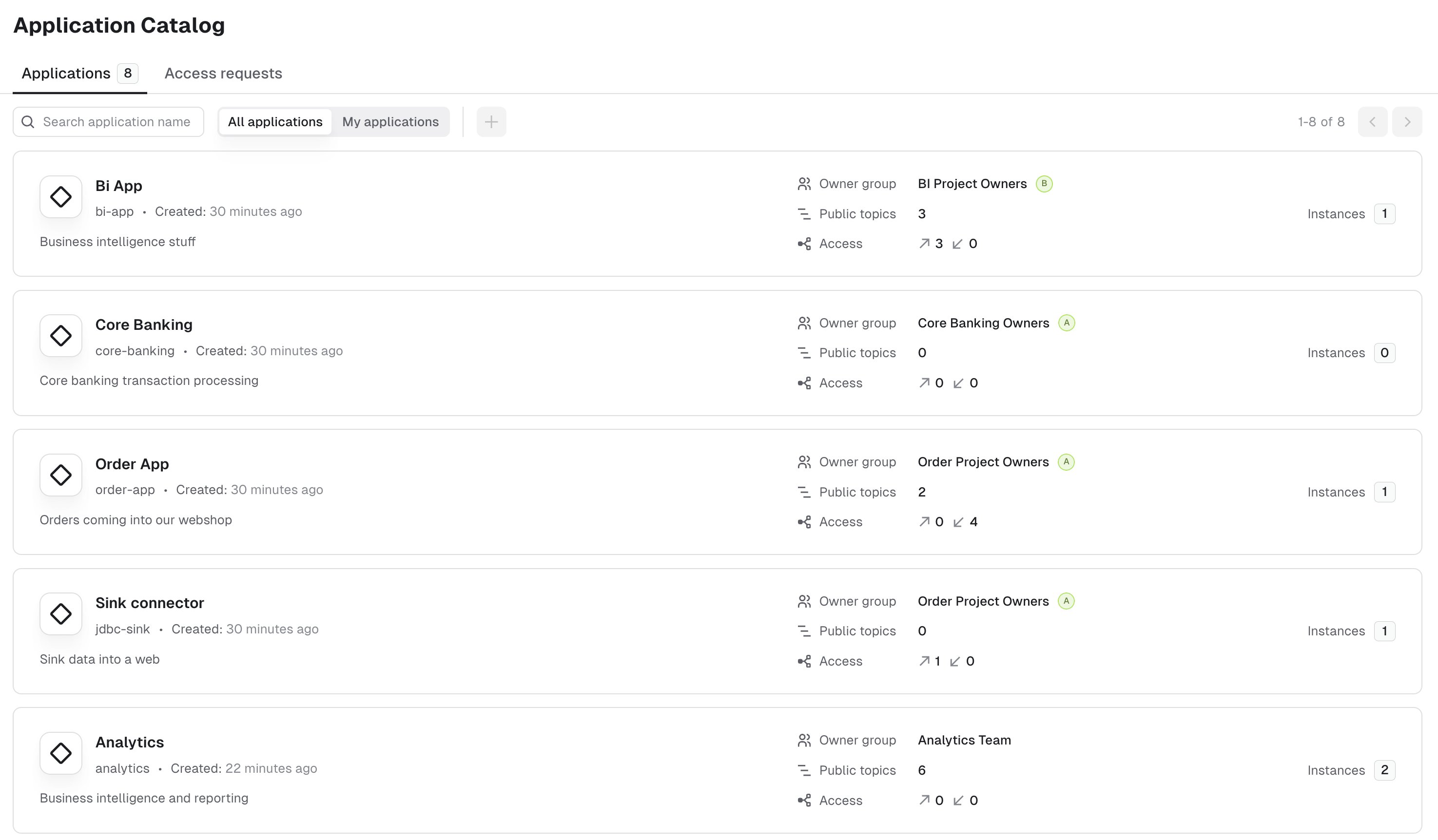
Application details
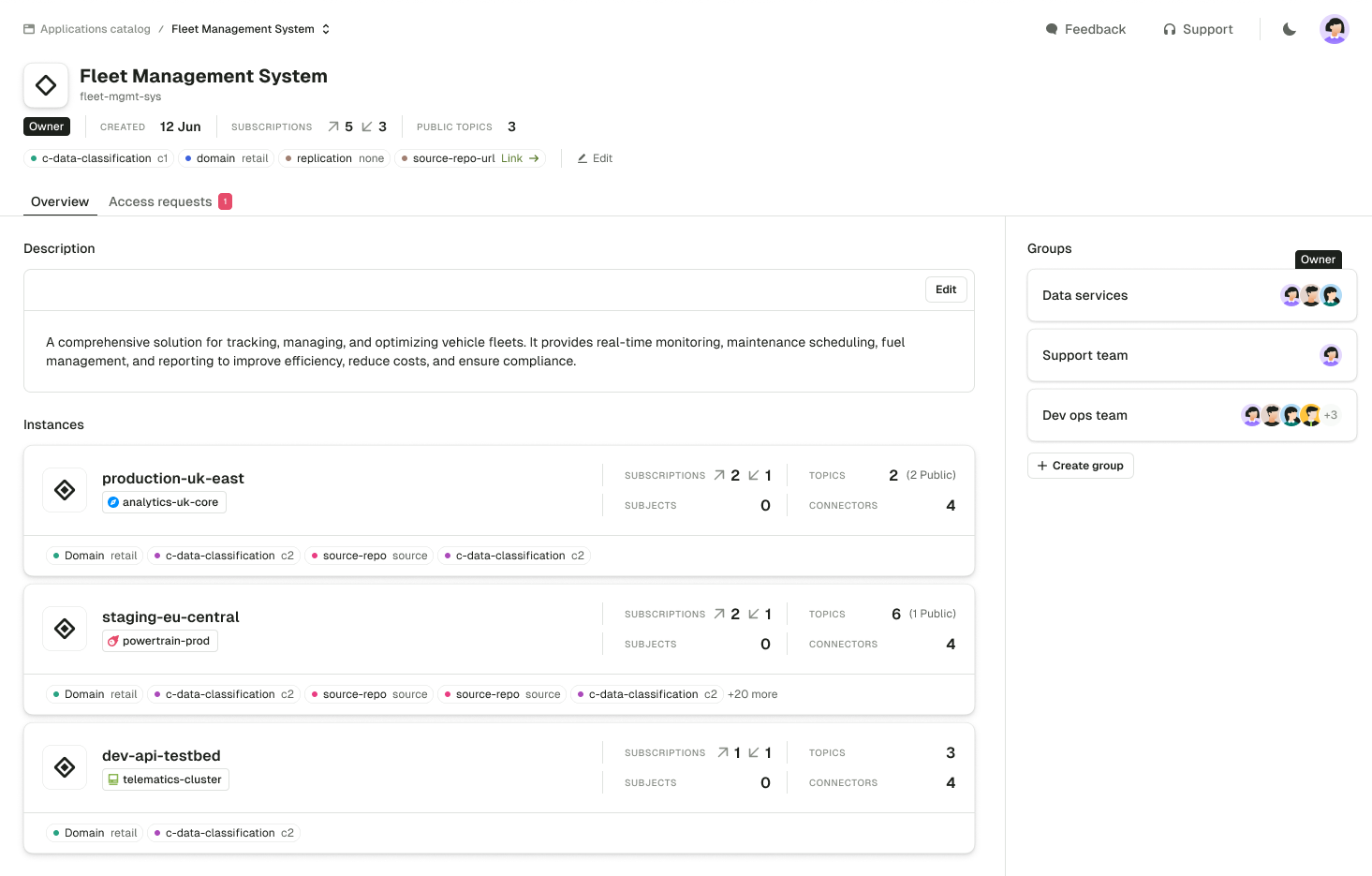
The application details page summarizes all the information that relates to that application:- general information, such as the description, labels and the number of public topics
- how many access grants it gives to other applications and receives from them
- application instances
- resource policies linked to the application
- the owner group and application groups
- incoming and outgoing access requests, in the Access requests tab, where you approve or decline them
Application instance
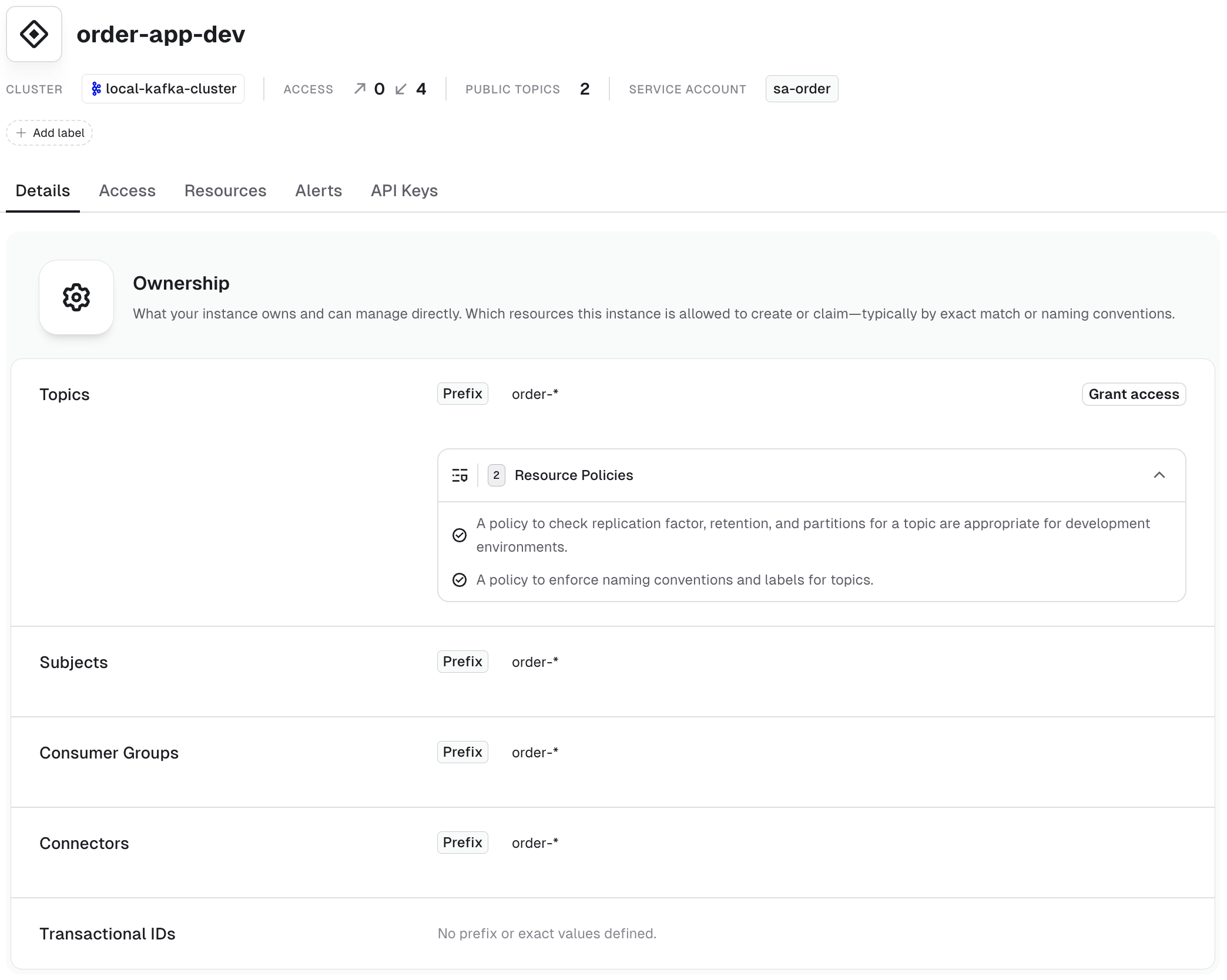
The application instance details page summarizes all the information relating to the specific application instance:- ownership and resource policies
- access information
- resources owned by the application instance
- alerts related to the application instance
- related API keys
Application groups
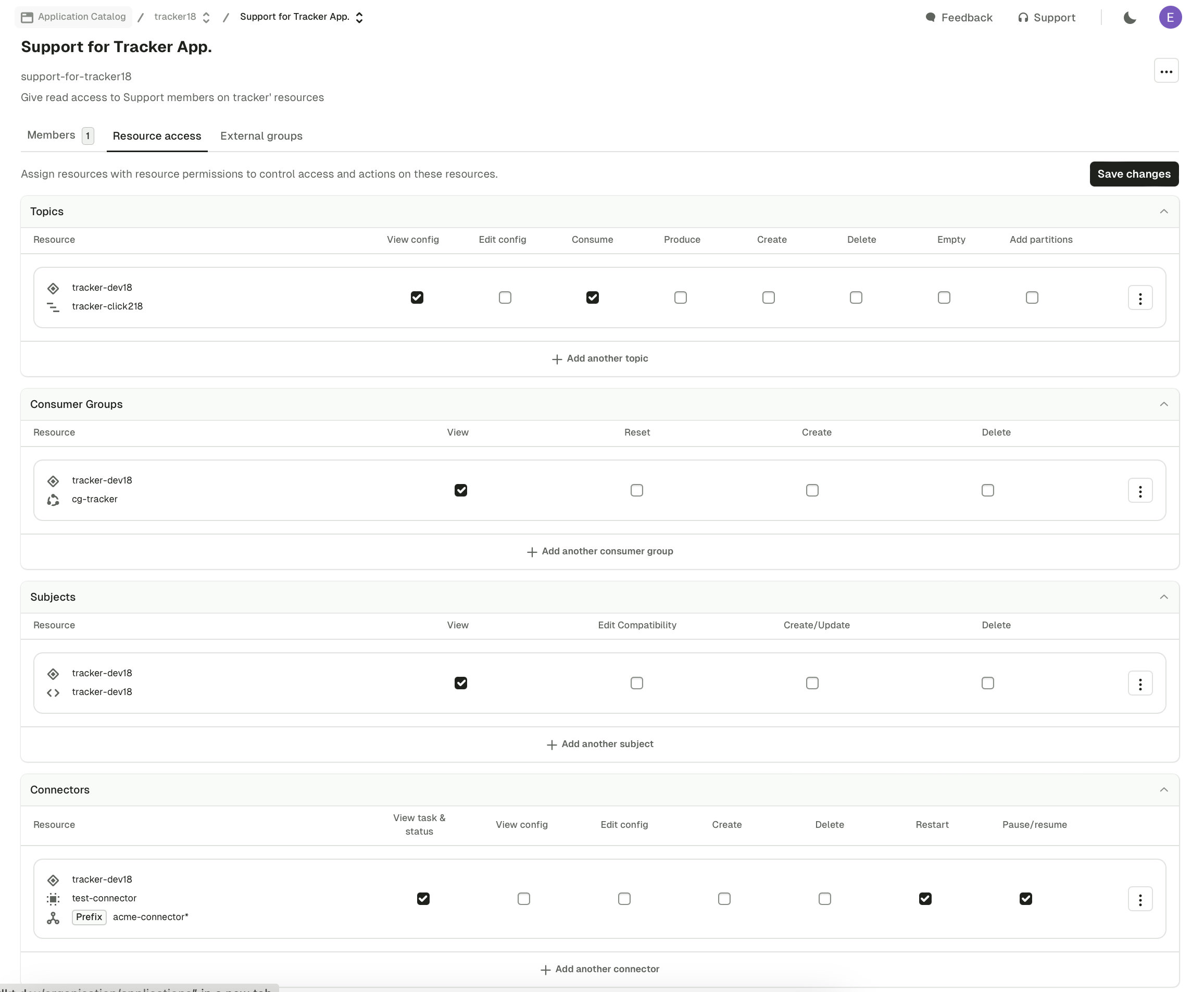
Click an application group from the application details to manage it:- Members tab: decide who belongs to this group and inherits this application’s permissions.
- Resource access tab: assign granular permissions over the application resources. The Application Instances section holds the instance permissions, which control what members can do for the whole application instance, such as managing access and API keys. Platform administrators can provide reusable application group templates that teams apply to one or all application instances before reviewing and saving the permissions.
- External groups tab: application groups can map to external groups for automatic assignment on login.
Useful links
- Self-service resource reference: find the YAML definition, checks and side effects of every Self-service resource
- Give us feedback or request a feature