

Overview
SNI routing reduces the number of Gateway ports exposed to clients.Per-listener configuration with
GATEWAY_LISTENER_<NAME>_* variables is available from Gateway 3.20.0. On earlier versions, networking is configured with the global variables described in Legacy network configuration. To move an existing deployment over, see Migrate to listener configuration.- Experiencing a high administrative overhead for managing multiple ports.
- Restricted by your security department in the number of ports you can expose.
Context about client connection
To understand the different steps required to set up SNI routing, let’s break it down into the connection steps each client would take:- Connect to Gateway advertised host
- Retrieve how to reach the right broker for each topic partition in the metadata returned by Gateway
- Directly connect to the desired broker through Gateway
- Define which ports we need to configure for Gateway to listen on and return in the metadata.
- Make sure Gateway handles the TLS termination.
- Prepare the keystore certificate for Gateway to include the Gateway hostname as well as a SAN for each broker in the cluster. Alternatively, wildcards
*can be used in the SAN, if supported by your issuer and security team. - Add the same entries to the DNS server to allow the clients to be properly routed to the Gateway advertised host and Kafka brokers through Gateway.
- Configure Gateway to use the SNI routing mechanism.
In order to keep Gateway as stateless as possible, we do not store the metadata internally. We simply pass it on to the client. This means that the metadata will be refreshed every time a client asks for it (e.g. when a new client connects or when the connection refreshes).
Set up SNI routing
1. Define ports
With Gateway using SNI routing, you only expose a single port for all your brokers. However, depending on your infrastructure, you may want to differentiate between the port the Gateway container listens on and the port returned in the metadata for clients to connect. This could be the case if you’re using a load balancer: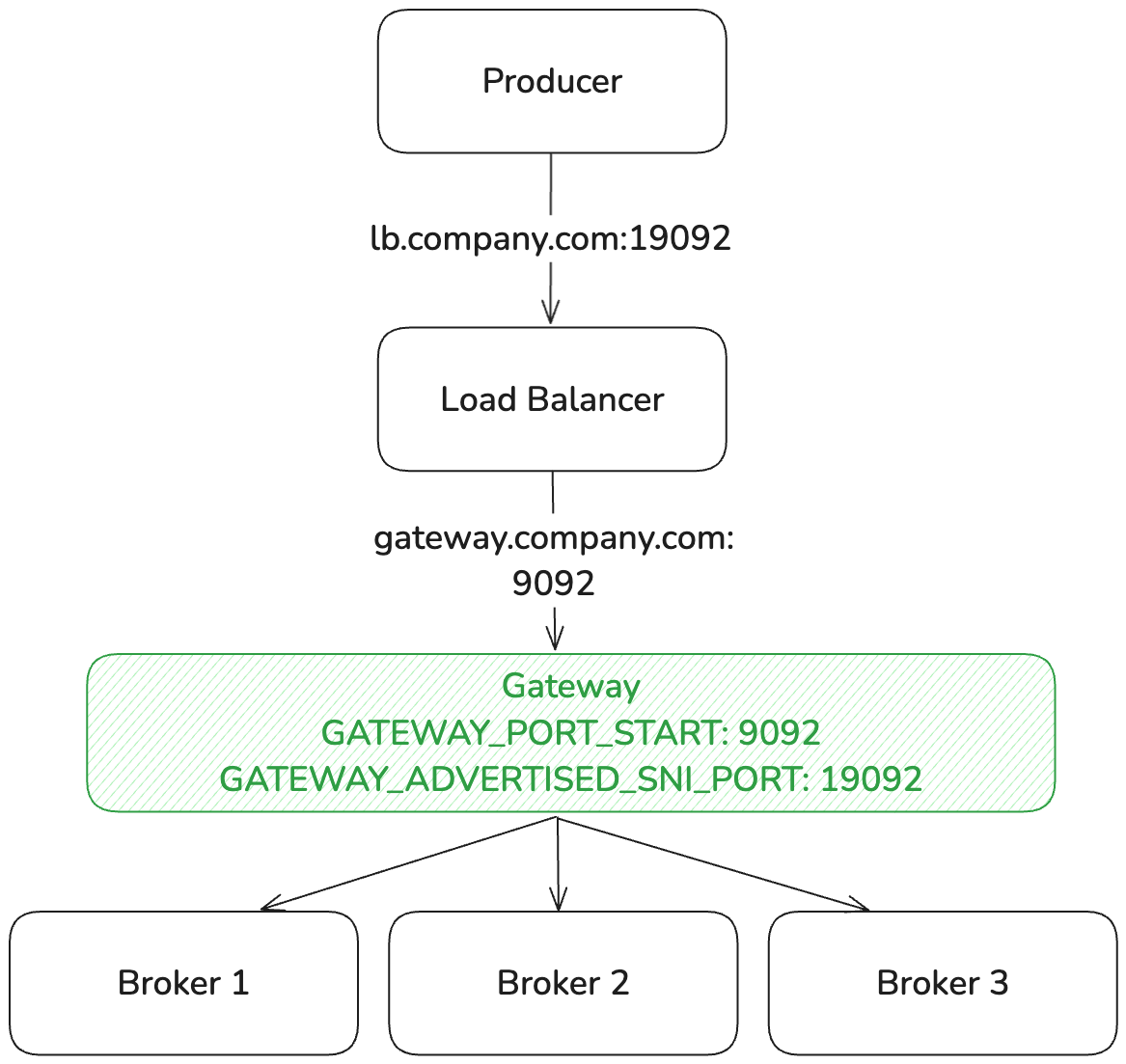
GATEWAY_LISTENER_<NAME>_PORTS environment variable. With SNI routing, the same single port serves all brokers — the advertised:local format lets you decouple what Gateway listens on locally from what it returns in metadata.
For example, to listen locally on 9192 and advertise port 443 to clients (the load balancer’s port):
2. TLS termination
When Gateway is set up to act as the SNI router, it has to terminate (i.e., decrypt) the incoming TLS connections because:-
SNI information requires TLS handling: this information is transmitted in the TLS
ClientHellohandshake. To forward network requests based on TLS SNI, Gateway has to participate in the TLS handshake to extract the server name indication. If TLS is terminated upstream of Gateway, the SNI information is no longer available. - Kafka protocol inspection requires decryption: even though SNI information is available in the un-encrypted portion of the TLS handshake, Gateway has to decrypt the traffic to apply its functionality, which operates on the Kafka protocol layer. Since Gateway needs to inspect, modify or route based on Kafka protocol messages (API keys, topics, etc.), TLS passthrough is not possible.
- handle the TLS handshake with the client and
- have a valid keystore certificate for the advertised host (and all the brokers in the cluster).
3. Prepare Gateway’s keystore certificate
The keystore certificate for Gateway with SNI routing has to include the Gateway bootstrap host, as well as a SAN for each broker in the cluster. Alternatively, wildcards* can be used in the SAN, if supported by your issuer and security team.
Gateway derives broker hostnames from GATEWAY_LISTENER_<NAME>_ADVERTISED_HOST_PATTERN using template variables:
If you don’t set the pattern, Gateway uses the default broker pattern
broker-{{physicalCluster}}-{{nodeId}}.{{advertisedHost}} and the default bootstrap pattern bootstrap-{{physicalCluster}}.{{advertisedHost}}. If you set ADVERTISED_HOST_PATTERN but not BOOTSTRAP_HOST_PATTERN, Gateway derives the bootstrap hostname from your advertised pattern by removing the {{nodeId}} segment.
Example:
To advertise Gateway as gateway.conduktor.sni-demo.local with a Kafka cluster of three brokers (IDs 1, 2, 3) and the default pattern, the SANs for the certificate are:
4. Configure DNS
Next, create DNS entries to allow clients to be properly routed to the Gateway advertised host and Kafka brokers through Gateway. All entries have to point to the Gateway IP (or load balancer). On AWS, use Route 53. You can either list each hostname individually, or use a wildcard record if your DNS provider supports it. Per-broker entries:5. Configure Gateway
Here’s the minimum configuration required, depending on the security protocol you want clients to use when connecting to Gateway. The examples below define a single listener namedDEFAULT.
This is in addition to the
KAFKA_ properties required for Gateway to connect to the Kafka cluster.Check the full reference for Gateway SSL configuration and listener environment variables.- SASL_SSL
- Kafka-managed (SASL_SSL)
- TLS
- mTLS
Debug and troubleshoot
I added a new broker to my Kafka cluster: what do I need to update?
I added a new broker to my Kafka cluster: what do I need to update?
When you add a new broker, clients receive its SNI hostname (e.g.
brokermain4-gateway.conduktor.sni-demo.local) in the metadata returned by Gateway. For clients to connect successfully, that hostname has to resolve to Gateway and be covered by Gateway’s TLS certificate.Redeploying the certificate (without wildcard):Gateway reads the keystore from the file path set in
GATEWAY_SSL_KEY_STORE_PATH. How you update it depends on your secrets management setup:- Kubernetes secret mounted as a volume: update the secret and Kubernetes will sync the file on disk (typically within one to two minutes). Gateway picks it up on its next reload cycle, within the configured interval.
- Vault Agent injecting a file: Vault Agent writes the renewed certificate to disk when it detects a rotation. Gateway picks it up on its next reload cycle, within the configured interval.
I use chained Gateways (Kafka <> Gateway 1 <> Gateway 2): what do I need to update when I add a broker or a Gateway pod?
I use chained Gateways (Kafka <> Gateway 1 <> Gateway 2): what do I need to update when I add a broker or a Gateway pod?
Adding a new Kafka broker propagates through the entire chain automatically. Each Gateway updates its in-memory broker topology on every metadata response, discovers the new broker, and generates its SNI hostname without any configuration change.However, DNS and certificate coverage have to be in place at every layer for connections to succeed.
Adding a new Gateway 1 pod has no impact. Gateway instances are stateless with respect to broker topology: broker IDs come from the upstream Kafka cluster and are identical across all pods. Adding a pod does not introduce new broker IDs or hostnames.
How do I verify my advertised listeners are correct?
How do I verify my advertised listeners are correct?
You can use Console’s Brokers tab to view the advertised listeners of a Gateway once the initial connection and authentication are successful: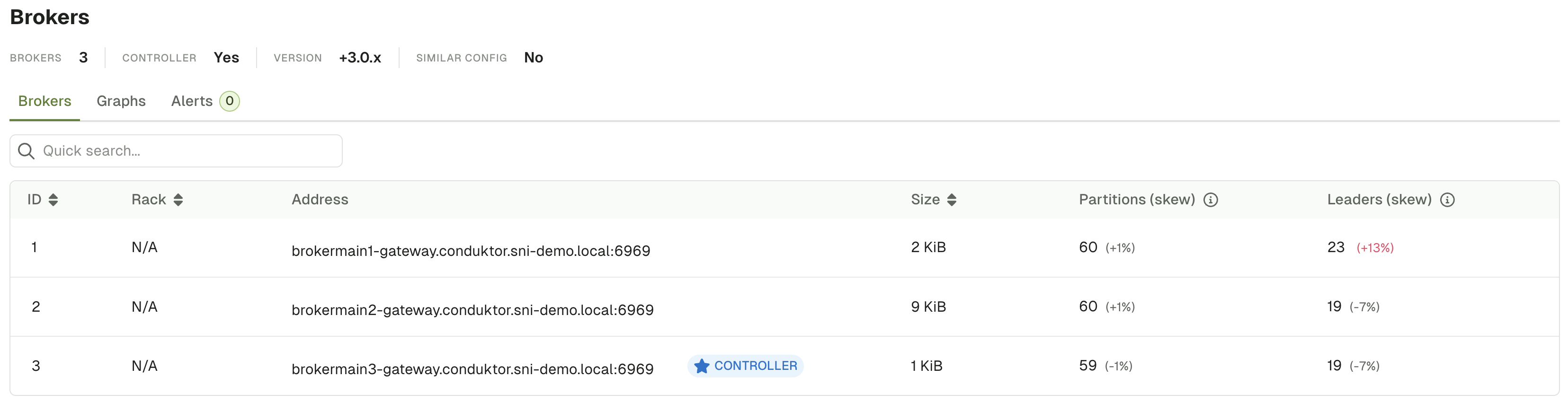
LOG4J2_IO_CONDUKTOR_PROXY_NETWORK_LEVEL to DEBUG might be helpful when debugging issues.