

From our blog: How to isolate non-prod Kafka with Virtual Clusters Replace VPC-per-environment sprawl with one physical cluster and virtual isolation that satisfies security teams.
When to use Virtual Clusters?
External data sharing
A Virtual Cluster can be used as a segregated secured namespace for your partners or external applications to connect to. It will allow you to:- Isolate the Topics you want to expose to specific applications, with its related set of ACLs to restrict their permissions
- Prefix the Consumer Groups they might use, helping with troubleshooting and auditing
- Use it as an scope to easily manage Traffic Control Policy or Encryption at this level
- Expose internal Topics to external partners with business-friendly names while keeping your internal naming conventions private
- Potentially expose Topics from multiple physical Kafka clusters, while hiding this complexity from the client
spec.type to Partner.
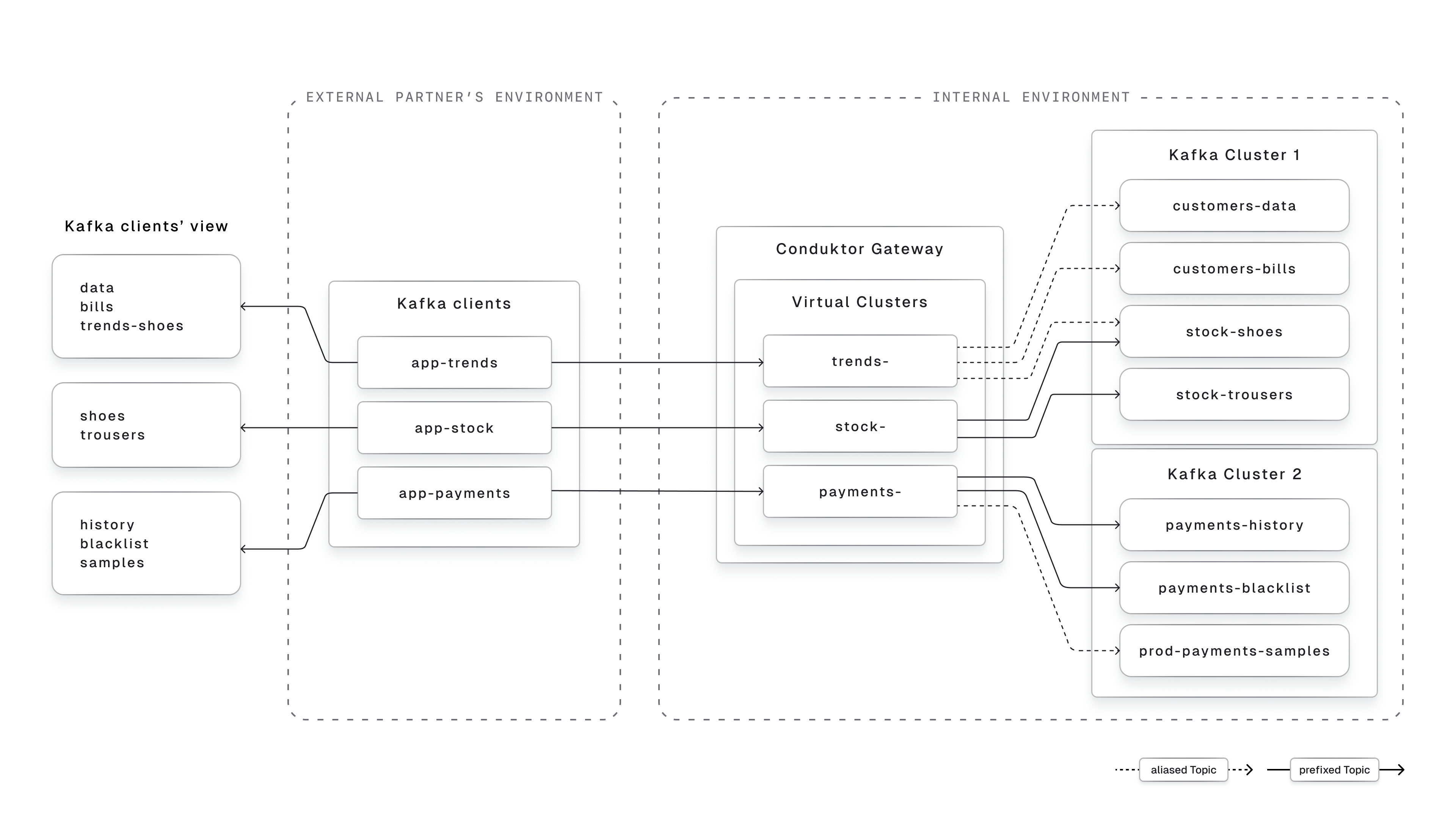
Internal environments segregation
A Virtual Cluster can be used to simulate multiple logical environments on the same physical cluster. That way, you can:- Merge your lower environments (like dev & QA) into the same Kafka cluster, and separate the Topics from each environment in a dedicated Virtual Cluster
- Strongly isolate the business units that never interacts with each other and that should be completely separated from each other, like multiple subsidiaries, or different lines of business.
- Ease the environment upgrade as the Topics can have the same name in the different Virtual Cluster, as they will exist with different names on the physical Kafka Cluster
- Create as many developers sandboxes as you want, with a quick API call
- Use Topic Concentration to allow your developers to create as many topics as they want, for testing purpose, while storing the data on the same physical Topic.
spec.type to Standard.
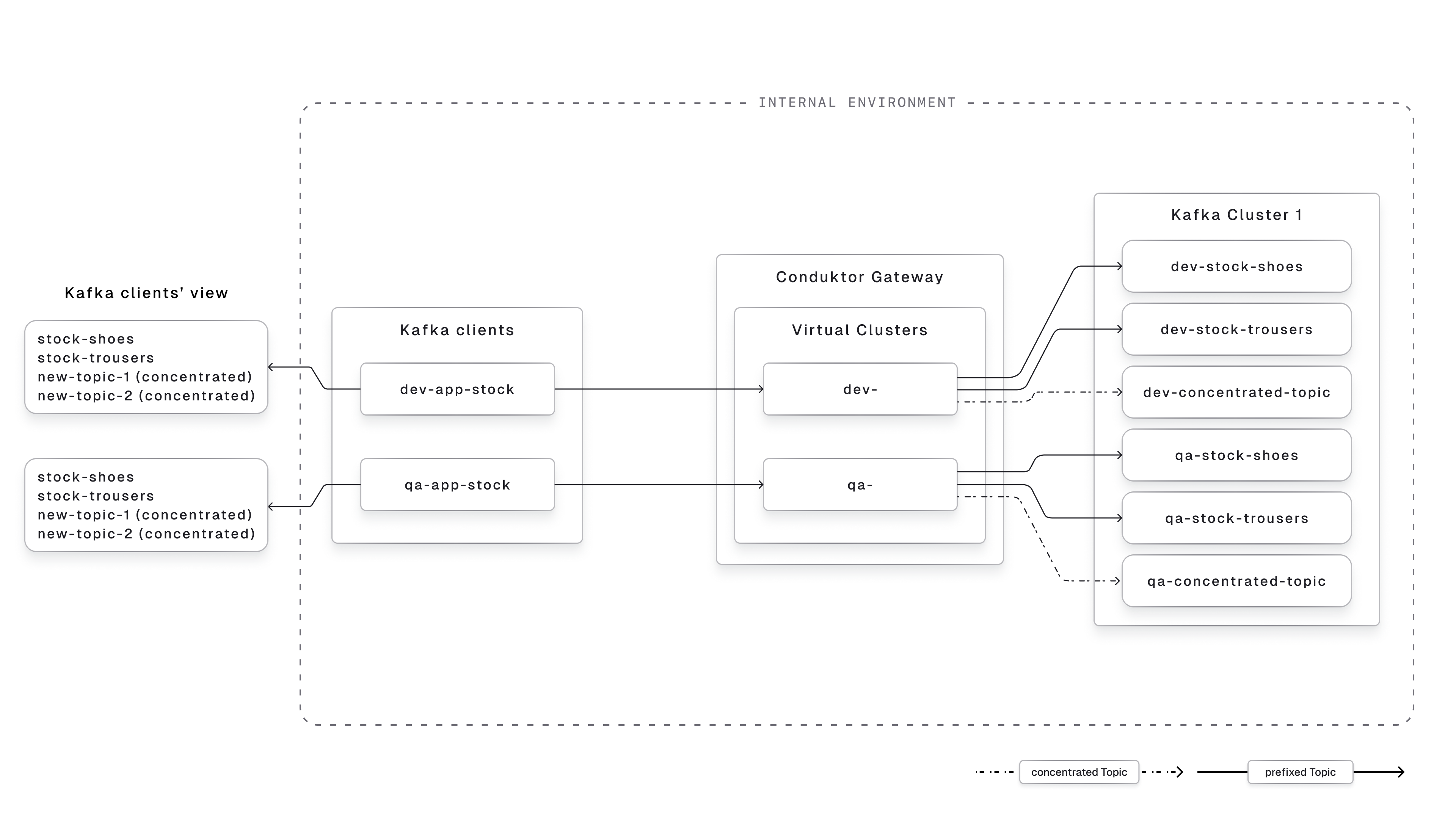
Virtual Clusters are not designed for multi-tenancy (one Virtual Cluster per internal team). For that, use our Console Self-service feature instead.
Get started with Virtual Clusters
1
Creation
The creation of a Virtual Cluster is done via our API / CLI / Terraform Provider. It requires the Gateway to be up and running, and the Gateway API to be accessible.You can refer to the Virtual Cluster reference to customize its name, type, super users, and ACLs.
2
Management
Once the Virtual Cluster is created, all the Consumer Groups and Topics prefixed by its name will be automatically visible in it.To add Topics that aren’t prefixed by the Virtual Cluster name, you need to define Topics Aliases and include them in the Virtual Cluster using the
metadata.vCluster field.3
Assignment of a Service Account
An application can have its Service Account attached to only one Virtual Cluster. For that, you need to set its
metadata.vCluster to the name of your Virtual Cluster.4
Connection to a Virtual Cluster
Once your application has been attached to a Virtual Cluster, it will be able to interact with the Topics attached to this Virtual Cluster.
Troubleshooting
My application doesn't see any Topics, why?
My application doesn't see any Topics, why?
- Make sure the Topics have been mapped in this Virtual Cluster, either using Topic Aliases or their prefix.
- Try to connect and list Topics using the Virtual Cluster super user defined, to confirm the Topic is in there.
- Confirm the Virtual Cluster has the right Kafka ACLs attached to it