

Pre-requisite Docker Compose
Overview
Once deployed, you’ll have access to a fully functional Kafka stack integrated with Conduktor’s UI and backend services. This environment is ideal for trying out Conduktor’s features before deploying to a production environment.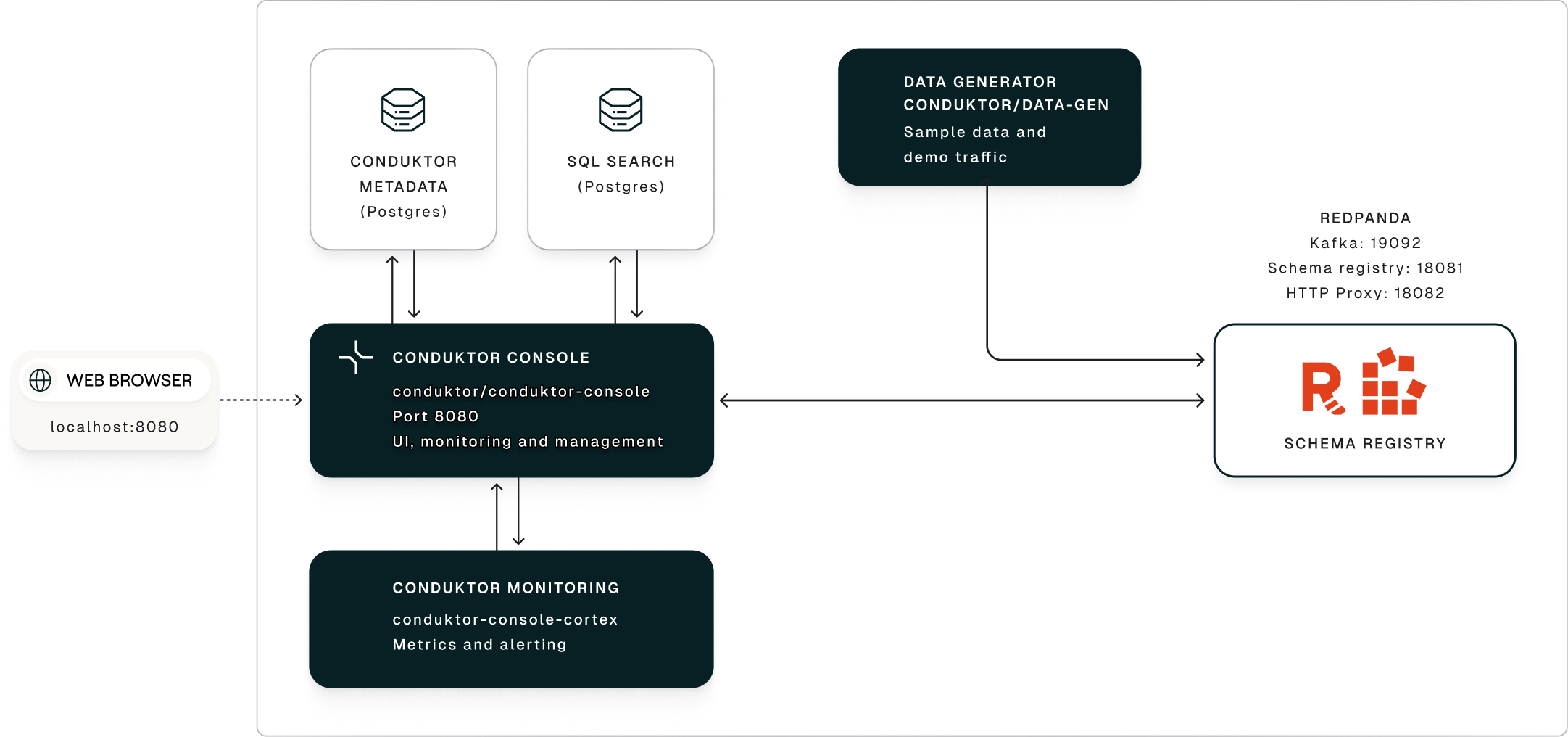
1
The data generation service publishes a continuous stream of synthetic events that simulate an e-commerce business.
2
The generated data lands in a Redpanda Kafka cluster with a schema registry enforcing structure and compatibility across topics.
3
Conduktor Console provides a centralized UI-based control plane to manage the Redpanda Kafka cluster, allowing you to:
- monitor topics, schemas, consumer groups and connectors
- trace message flows
- audit activity across the entire stack
Run Conduktor
Explore Console
Console runs onhttp://localhost:8080. This walkthrough covers cluster health, topic management, live tail, access workflows and Insights.