

- Gateway internal load balancing or
- an external load balancing
Internal load balancing
Gateway’s ability to distribute the client connections between the different Gateway nodes in the same cluster is what we refer to as internal load balancing. This is done automatically by Gateway and is the default behavior. To deploy multiple Gateway nodes as part of the same Gateway cluster, you have to set the sameGATEWAY_CLUSTER_ID in each node’s deployment configuration, so that the nodes recognize each other. See cluster membership.
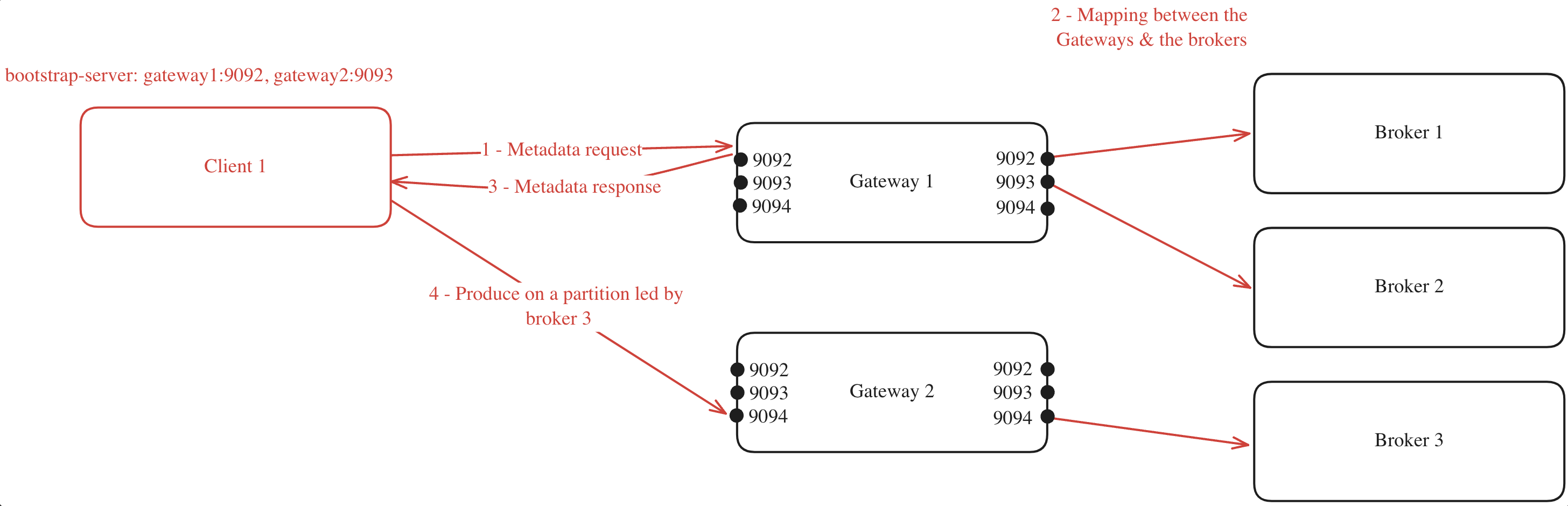
When a client connects to one of the Gateway nodes to request metadata, the following process occurs (assuming GATEWAY_FEATURE_FLAGS_INTERNAL_LOAD_BALANCING is set to true, which is the Gateway default; the Helm chart sets it to false):
- The client chooses one of the bootstrap servers to ask for metadata.
- The Gateway node generates a mapping between its cluster nodes and the Kafka brokers.
- The Gateway node returns this mapping to the client.
- With the mapping in hand, the client can efficiently route its requests. For instance, if the client needs to produce to a partition where broker 3 is the leader, it knows to forward the request to Gateway 2 on port 9094.
If you have specified a
GATEWAY_RACK_ID, then the mapping will take this into consideration and a Gateway node in the same rack as the Kafka broker will be assigned.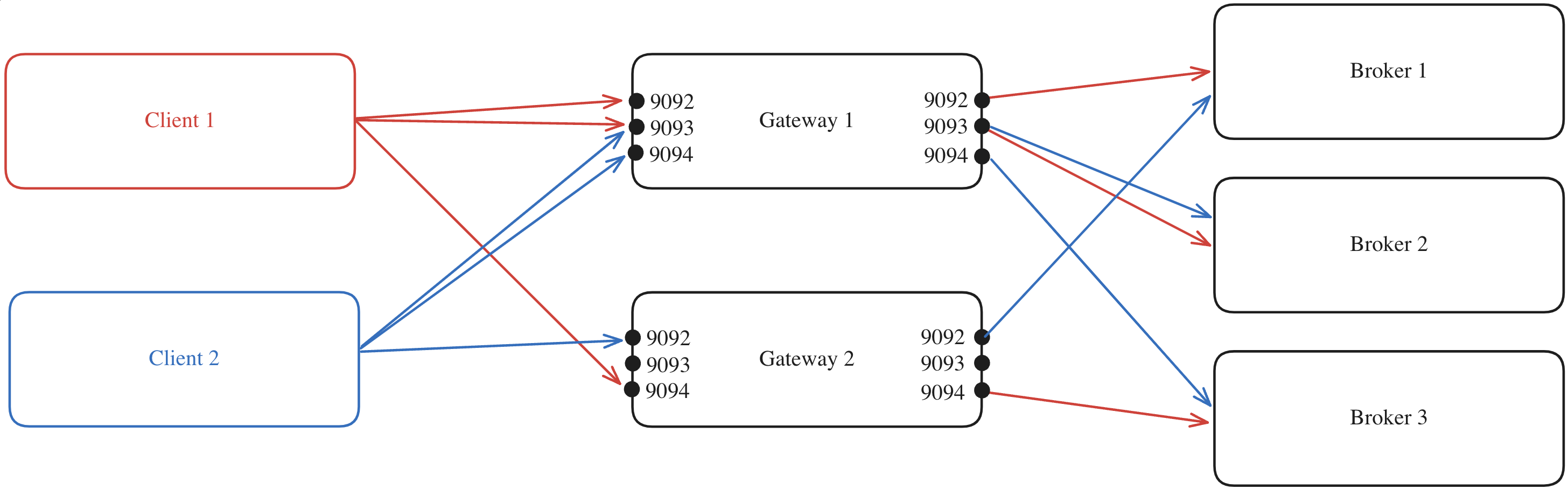
The Gateway Helm chart sets
GATEWAY_FEATURE_FLAGS_INTERNAL_LOAD_BALANCING to false unless you set it yourself. In that case, the Kubernetes Service spreads client connections across Gateway pods.Internal load balancing limitations
In a Kubernetes environment, your ingress must point at a single service, which could be an external load balancer as detailed below.External load balancing
Alternatively, you can disable the internal load balancing by settingGATEWAY_FEATURE_FLAGS_INTERNAL_LOAD_BALANCING: false.
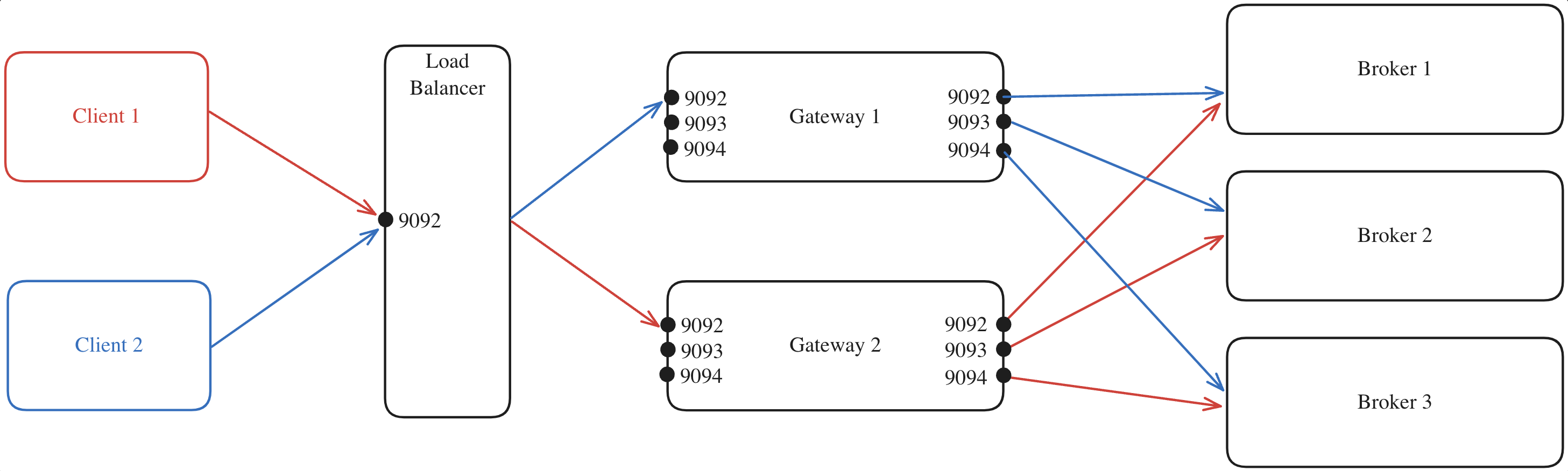
Here’s an example where:
- All client requests are directed to the external load balancer which acts as the entry point to your Gateway cluster.
- The load balancer forwards each request to one of the Gateway nodes, regardless of the port.
- The selected Gateway node, which knows which broker is the leader of each partition, forwards the request to the appropriate Kafka broker.
The advertised host is set per listener from Gateway 3.20.0. On earlier versions, the global
GATEWAY_ADVERTISED_HOST serves the same purpose — see Legacy network configuration.Pass TLS through a network load balancer
When you use SNI routing or authenticate clients with mTLS, configure your network load balancer as a TCP pass-through and let Gateway terminate TLS: don’t add a TLS certificate to the load balancer listener. SNI routing reads the hostname from the TLS handshake, so Gateway has to receive the encrypted connection, and mTLS also requires TLS all the way to Gateway. With the Helm chart, pass provider settings such as AWS Network Load Balancer annotations throughservice.external.annotations.
Capturing the client IP address
When running Conduktor Gateway behind a load balancer, the load balancer replaces the client IP address with its own, therefore audit log and error messages do not report the actual client IP address. This makes it difficult to identify the actual client IP address if there is an issue, for example, when a client fails during SSL handshake. Conduktor Gateway supports two ways to capture the original client IP address, depending on how your load balancer is set up:- You configure the load balancer yourself (HA Proxy, Nginx, an AWS or Azure load balancer, etc.) — use HAProxy Protocol.
- Kubernetes provisions the load balancer for you as a
LoadBalancer-type Service — use KubernetesexternalTrafficPolicy.
Using HAProxy Protocol
In order to capture the original client IP address behind an external load balancer, Conduktor Gateway supports HAProxy Protocol. To enable HAProxy Protocol support, setGATEWAY_FEATURE_FLAGS_HAPROXY_PROTOCOL to true. At the same time, you must also configure the external load balancer to send HAProxy Protocol header to Conduktor Gateway.
If HAProxy Protocol is enabled, Conduktor Gateway reads the client IP address from the HAProxy Protocol header and reports it as connection.proxyConnection on every audit event type that carries a connection block, alongside the load balancer’s address. See the audit event connection block for the field details.
Connection-path log messages, such as a TLS handshake failure, also include the original client address next to the load balancer’s. For example:
Rejections that happen before Gateway reads any bytes from the connection (such as connections rejection due to connection limit or shutdown) only show the load balancer’s address (
socket_peer), even with HAProxy Protocol enabled because the PROXY header has not arrived yet at that point.{{userIp}} header injection variable resolve to the real client address instead of the load balancer’s.
For reference, this is the external documentation on enabling HAProxy Protocol header:
Using Kubernetes externalTrafficPolicy
By default, the Kubernetes load balancer changes the client IP address to its own.
If you need Gateway to log the actual client IP address, add externalTrafficPolicy to the Gateway Helm chart:
externalTrafficPolicy preserves the client’s address at the socket level as the connection’s source IP address. It doesn’t send a PROXY protocol header, so it doesn’t populate connection.proxyConnection on audit events. The client-IP-based policies use the source IP address as the client IP.External load balancing limitations
This requires you to handle load balancing manually, as you won’t have the advantage of the automatic load balancing offered by Gateway’s internal load balancing feature.Is Gateway a single point of failure?
Is Gateway a single point of failure?
No. Gateway is not a Single Point of Failure (SPOF).It works the same way that Kafka does: deploy many instances, spread the load, restart them - clients continue without impact.StatelessGateway doesn’t store local data, so a restart never affects traffic. The backing Kafka cluster stores all the states.Kafka-awareClients use their normal retry and metadata refresh flows (same as with brokers). When a Gateway instance becomes unavailable, clients re-connect to another instance using standard Kafka client behavior.Scale horizontallyRun several pods to handle load and keep latency steady. You can add or remove instances based on throughput needs as Gateway scales horizontally.Safe restartsRoll restart any pod and clients re-connect on their own. Standard Kafka client retry mechanisms handle temporary unavailability, which makes Gateway restarts transparent to applications.
For production deployments, we recommend at least three Gateway instances to ensure an effective load distribution handling and availability during restarts.
Cluster membership
All nodes sharing aGATEWAY_CLUSTER_ID join the same membership group on your Kafka cluster, which is how they recognize each other as members of the same Gateway cluster. The group is named conduktor_${GATEWAY_CLUSTER_ID}-fleet, unless you set GATEWAY_GROUP_ID yourself. If your Kafka cluster restricts group access with ACLs, grant the Gateway principal Read on that group.
Before Gateway 3.22.0, nodes only joined a group when internal load balancing was enabled and used the
conduktor_${GATEWAY_CLUSTER_ID} group id.