

Learn about Kafka brokers and clusters in eight minutes Kafka brokers are the servers that store your data and serve client requests. Understanding how brokers work is essential for designing and operating Kafka clusters. What you’ll learn:Documentation Index
Fetch the complete documentation index at: https://docs.conduktor.io/llms.txt
Use this file to discover all available pages before exploring further.
- What a Kafka broker is and how it runs
- How brokers form a Kafka cluster
- How topics and partitions are distributed across brokers
- How clients discover and connect to brokers
What is a Kafka broker?
A single Kafka server is called a Kafka broker. That Kafka broker is a program that runs on the Java Virtual Machine (Java version 11+) and usually a server that is meant to be a Kafka broker will solely run the necessary program and nothing else. Key responsibilities of a broker:- Store data for topic partitions on disk
- Handle read and write requests from producers and consumers
- Manage partition replication
- Coordinate with other brokers in the cluster
What is Kafka cluster?
An ensemble of Kafka brokers working together is called a Kafka cluster. Some clusters may contain one broker or others may contain three or potentially hundreds of brokers. Companies like Netflix and Uber run hundreds or thousands of Kafka brokers to handle their data. A broker in a cluster is identified by a unique numeric ID. In the figure below, the Kafka cluster is made up of three Kafka brokers.
Kafka brokers and topics
Kafka brokers store data in a directory on the server disk they run on. Each topic-partition receives its own sub-directory with the associated name of the topic. To achieve high throughput and scalability on topics, Kafka topics are partitioned. If there are multiple Kafka brokers in a cluster, then partitions for a given topic will be distributed among the brokers evenly, to achieve load balancing and scalability.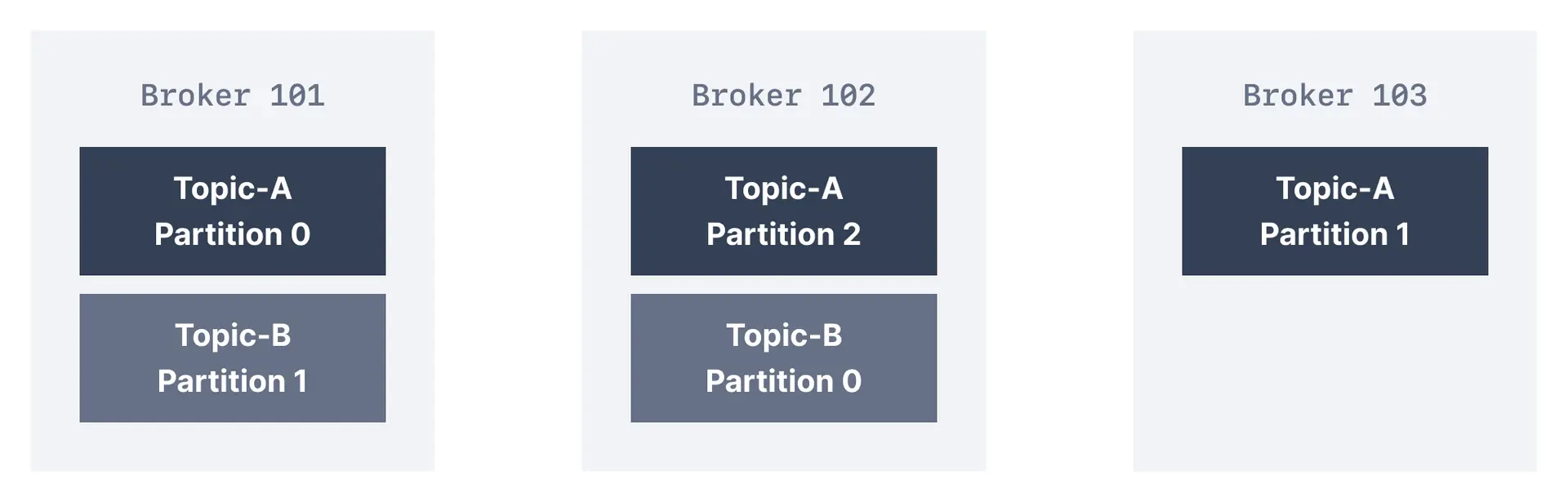
How do clients connect to a Kafka cluster (bootstrap server)?
A client that wants to send or receive messages from the Kafka cluster may connect to any broker in the cluster. Every broker in the cluster has metadata about all the other brokers and will help the client connect to them as well, and therefore any broker in the cluster is also called a bootstrap server. The bootstrap server will return metadata to the client that consists of a list of all the brokers in the cluster. Then, when required, the client will know which exact broker to connect to to send or receive data, and accurately find which brokers contain the relevant topic-partition.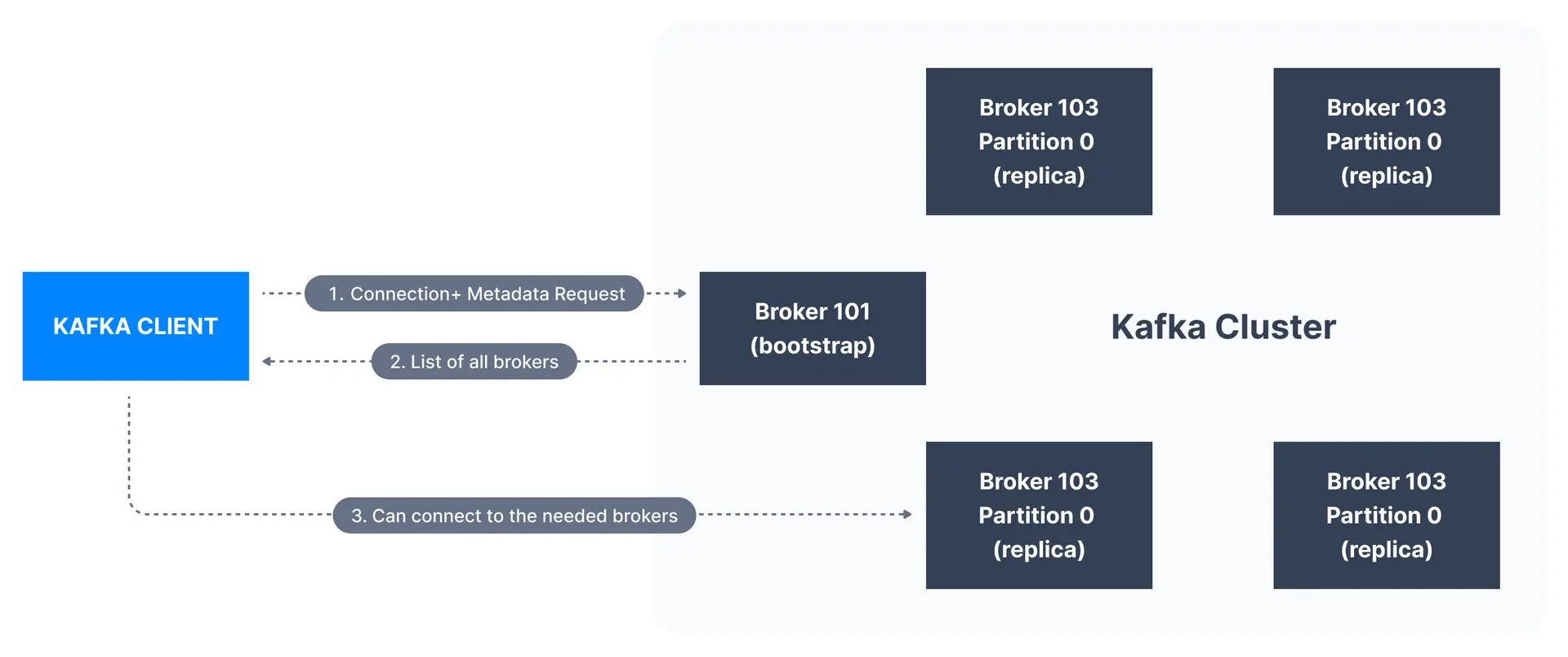
See it in practice with ConduktorConduktor Console provides a visual dashboard to monitor broker health, partition distribution, and cluster metrics. View which brokers are online, their disk usage, and how partitions are balanced across the cluster.
Next steps
- Understand topic replication to see how brokers replicate data for fault tolerance
- Learn about KRaft mode to understand modern broker coordination
- Explore cluster administration for production deployment guidance