

Learn how Kafka replication provides fault tolerance in 15 minutes Replication copies each partition to multiple brokers so data survives broker failures. This section explains how leaders, followers, ISR and producer acknowledgments work together to keep your data safe. What you’ll learn:Documentation Index
Fetch the complete documentation index at: https://docs.conduktor.io/llms.txt
Use this file to discover all available pages before exploring further.
- How replication protects against data loss
- What leaders, followers, and in-sync replicas (ISR) are
- How producer acknowledgment settings affect durability
- Trade-offs between availability and consistency
Kafka topic replication factor
One of the main reasons for Kafka’s popularity, is the resilience it offers in the face of broker failures. Machines fail, and often we cannot predict when that is going to happen or prevent it. Kafka is designed with replication as a core feature to withstand these failures while maintaining uptime and data accuracy. In Kafka, replication means that data is written down not just to one broker, but many. The replication factor is a topic setting and is specified at topic creation time.- A replication factor of
1means no replication. It is mostly used for development purposes and should be avoided in test and production Kafka clusters - A replication factor of
3is a commonly used replication factor as it provides the right balance between broker loss and replication overhead.
2. When a message is written down into Partition 0 of Topic-A in Broker 101, it is also written down into Broker 102 because it has Partition 0 as a replica.
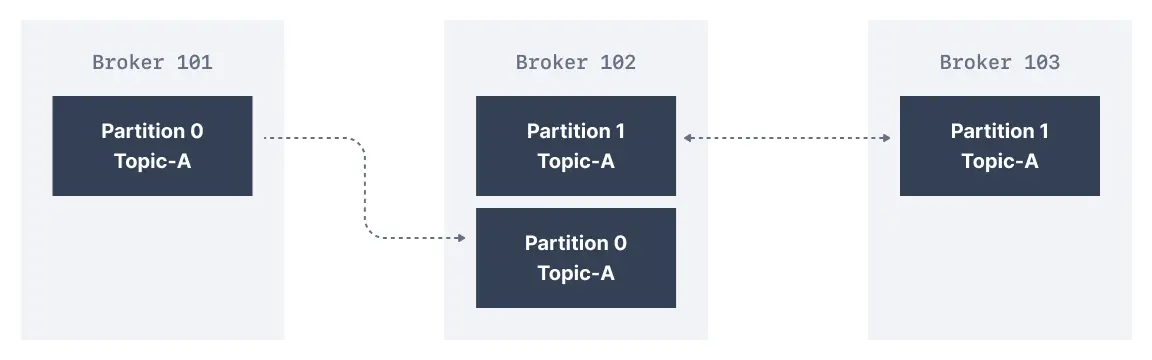
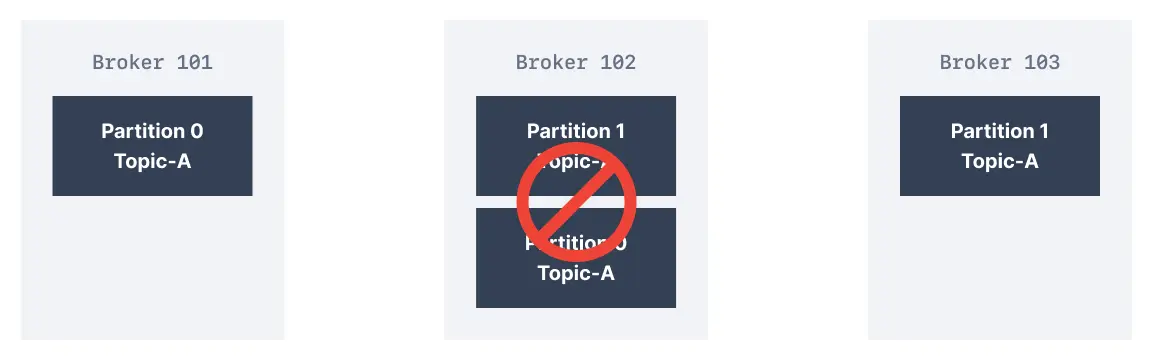
Replication factor guidelines
| Environment | Replication factor | Rationale |
|---|---|---|
| Development | 1 | Saves resources, data loss acceptable |
| Testing | 2 | Basic fault tolerance |
| Production | 3 | Industry standard, tolerates 2 failures |
| Critical data | 5 | Maximum durability |
What are Kafka partitions leader and replicas?
For a given topic-partition, one Kafka broker is designated by the cluster to be responsible for sending and receiving data to clients. That broker is known as the leader broker of that topic partition. Any other broker that is storing replicated data for that partition is referred to as a replica. Therefore, each partition has one leader and multiple replicas.What are in-sync replicas (ISR)?
An ISR is a replica that is up to date with the leader broker for a partition. Any replica that is not up to date with the leader is out of sync.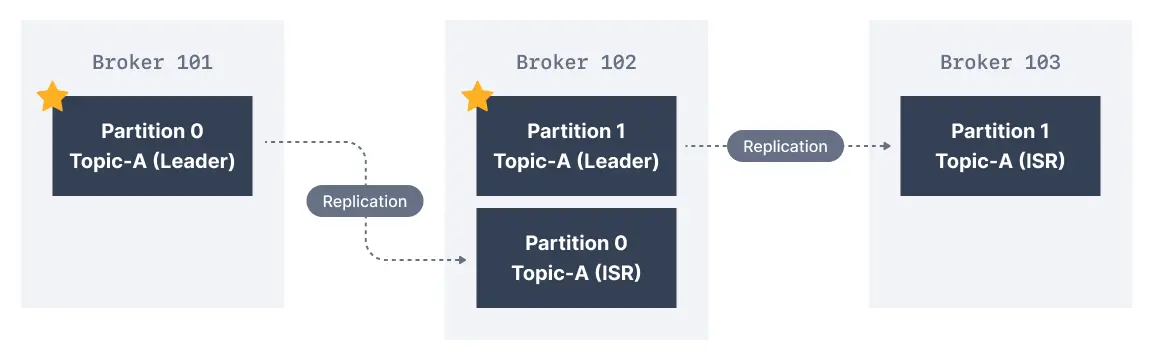
Kafka producers acks setting
Kafka producers only write data to the current leader broker for a partition. Kafka producers also have to specify a level of acknowledgmentacks to specify if the message has to be written to a minimum number of replicas before being considered a successful write.
acks=0
Whenacks=0 producers consider messages as “written successfully” the moment the message was sent without waiting for the broker to accept it at all.

acks = 1
Whenacks=1, producers consider messages as “written successfully” when the message was acknowledged by only the leader.

acks = all
Whenacks=all, producers consider messages as “written successfully” when the message is accepted by all in-sync replicas (ISR).
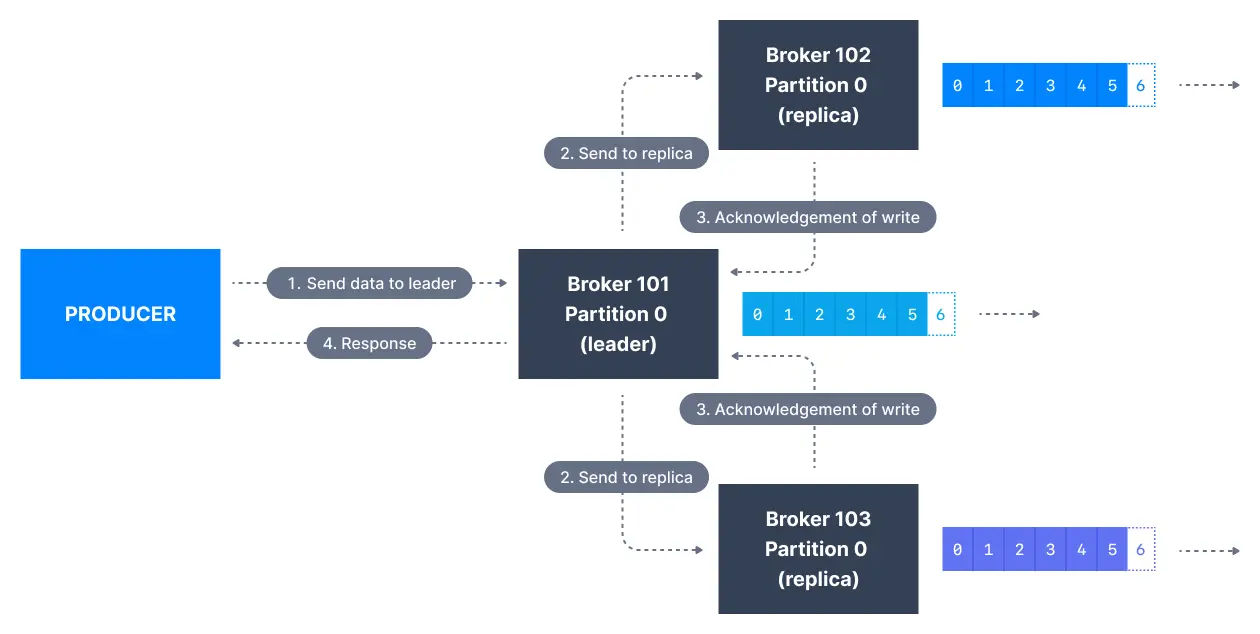
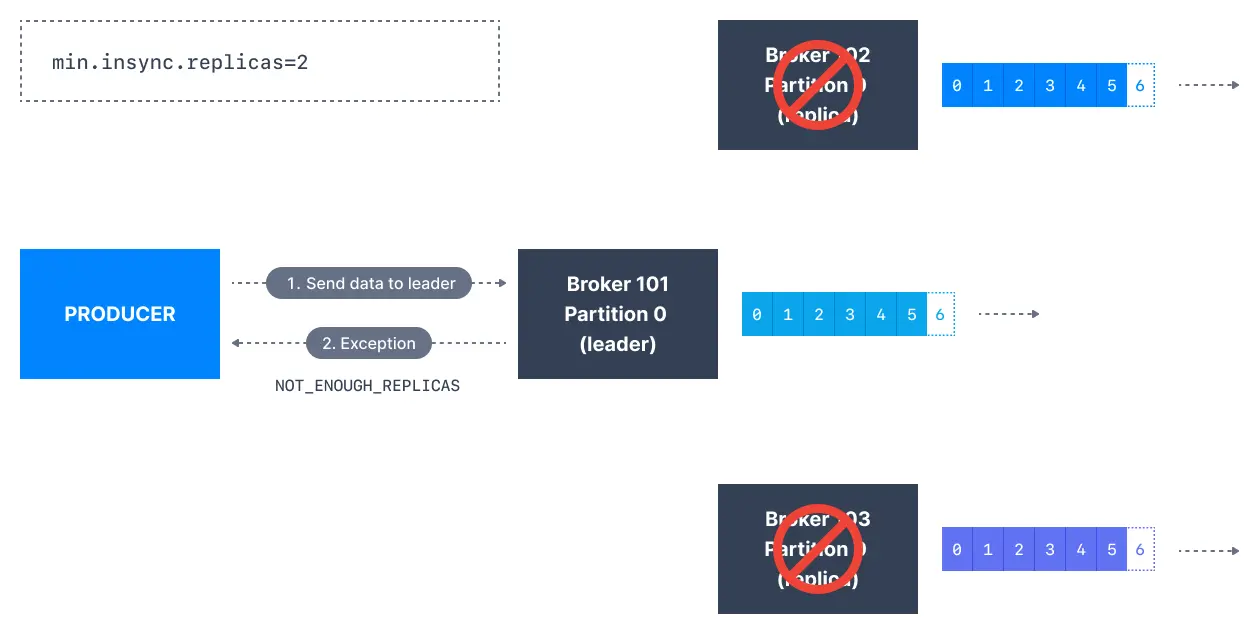
min.insync.replicas). The request will be stored in a buffer until the leader observes that the follower replicas replicated the message, at which point a successful acknowledgement is sent back to the client.
The min.insync.replicas can be configured both at the topic and the broker-level. The data is considered committed when it is written to all in-sync replicas - min.insync.replicas. A value of 2 implies that at least 2 brokers that are ISR (including leader) have to respond that they have the data.
If you would like to be sure that committed data is written to more than one replica, you need to set the minimum number of in-sync replicas to a higher value. If a topic has three replicas and you set min.insync.replicas to 2, then you can only write to a partition in the topic if at least two out of the three replicas are in-sync. When all three replicas are in-sync, everything proceeds normally. This is also true if one of the replicas becomes unavailable. However, if two out of three replicas are not available, the brokers will no longer accept produce requests. Instead, producers that attempt to send data will receive NotEnoughReplicasException.
Acks comparison
| Setting | Durability | Throughput | Latency | Use case |
|---|---|---|---|---|
acks=0 | None | Highest | Lowest | Metrics, logs |
acks=1 | Leader only | High | Low | Most applications |
acks=all | Full | Lower | Higher | Critical data |
Kafka topic durability and availability
For a topic replication factor of 3, topic data durability can withstand the loss of 2 brokers. As a general rule, for a replication factor ofN, you can permanently lose up to N-1 brokers and still recover your data.
Regarding availability, it is a little bit more complicated… To illustrate, let’s consider a replication factor of 3:
- Reads: As long as one partition is up and considered an ISR, the topic will be available for reads
- Writers:
acks=0&acks=1: as long as one partition is up and considered an ISR, the topic will be available for writes.acks=all:min.insync.replicas=1(default): the topic has to have at least 1 partition up as an ISR (that includes the reader) and so we can tolerate two brokers being downmin.insync.replicas=2: the topic has to have at least 2 ISR up, and therefore we can tolerate at most one broker being down (in the case of replication factor of 3), and we have the guarantee that for every write, the data will be at least written twice.min.insync.replicas=3: this wouldn’t make much sense for a corresponding replication factor of 3 and we couldn’t tolerate any broker going down.- in summary, when
acks=allwith areplication.factor=Nandmin.insync.replicas=Mwe can tolerateN-Mbrokers going down for topic availability purposes
Kafka consumers replicas fetching
Kafka consumers read by default from the partition leader.
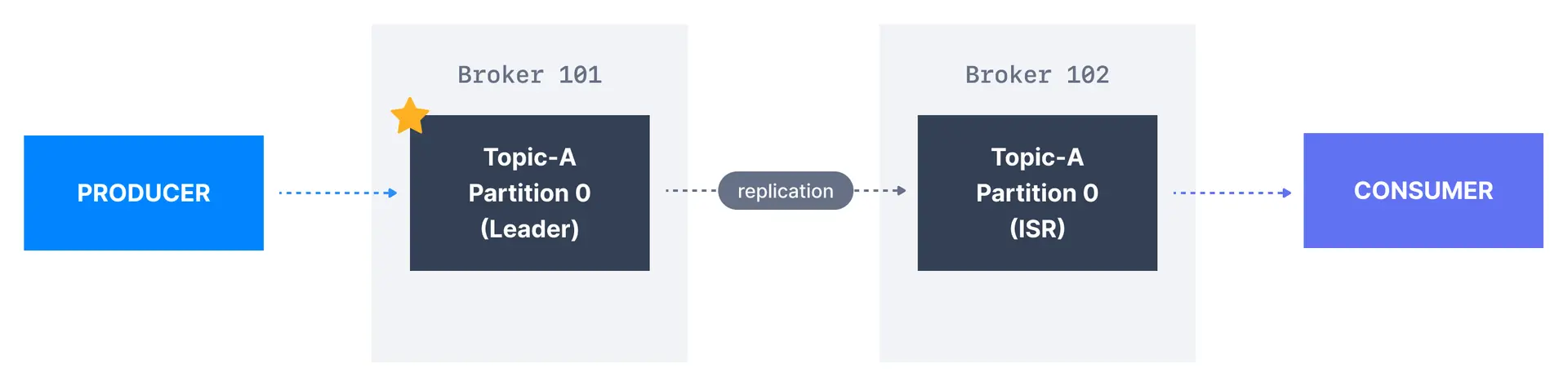
Preferred leader
The preferred leader is the designated leader broker for a partition at topic creation time (as opposed to being a replica). When the preferred leader goes down, any partition that is an ISR (in-sync replica) is eligible to become a new leader (but not a preferred leader). Upon recovering the preferred leader broker and having its partition data back in sync, the preferred leader will regain leadership for that partition.See it in practice with ConduktorConduktor Console displays replication status for all topics, showing which partitions are under-replicated and ISR status. Monitor leader distribution and identify imbalanced clusters at a glance.
Next steps
- Configure min in-sync replicas for write durability
- Understand unclean leader election trade-offs
- Choose replication factor and partitions for your topics
- Producer acks explained for reliability tuning