

Learn how Kafka consumers read data from topics in 10 minutes Consumers are applications that read data from Kafka topics. Understanding how consumers work, including deserialization and the pull model, is essential for building reliable data processing applications. What you’ll learn:Documentation Index
Fetch the complete documentation index at: https://docs.conduktor.io/llms.txt
Use this file to discover all available pages before exploring further.
- How consumers read messages from Kafka topics
- How message deserialization works
- The consumer pull model and its benefits
- Best practices for message format compatibility
Kafka consumers
Once a topic has been created in Kafka and data has been placed in the topic, we can start to build applications that make use of this data stream. Applications that pull event data from one or more Kafka topics are known as Kafka consumers. Applications that read data from Kafka topics are known as consumers. Applications integrate a Kafka client library to read from Apache Kafka. Excellent client libraries exist for almost all programming languages that are popular today including Python, Java, Go, and others. Consumers can read from one or more partitions at a time in Apache Kafka, and data is read in order within each partition as shown below.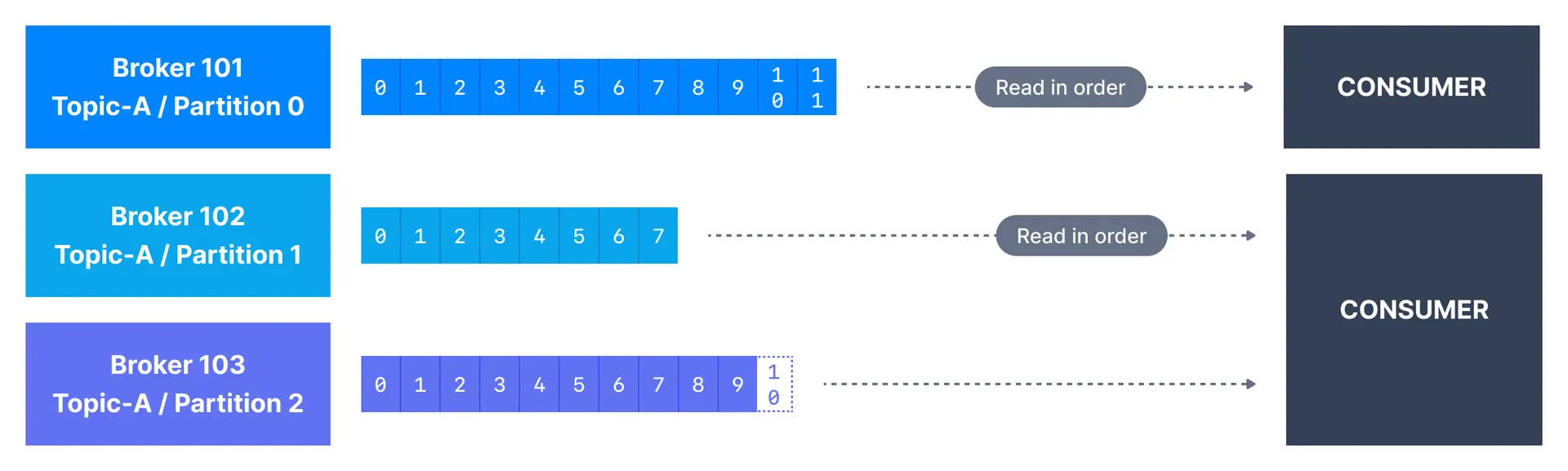
How consumers read data
A consumer always reads data from a lower offset to a higher offset and cannot read data backwards (due to how Apache Kafka and clients are implemented). If the consumer consumes data from more than one partition, the message order is not guaranteed across multiple partitions because they are consumed simultaneously, but the message read order is still guaranteed within each individual partition. By default, Kafka consumers will only consume data that was produced after it first connected to Kafka. Which means that to read historical data in Kafka, one has to specify it as an input to the command, as we will see in the practice section.Consumer pull model
Kafka consumers are also known to implement a “pull model”. This means that Kafka consumers have to request data from Kafka brokers in order to get it (instead of having Kafka brokers continuously push data to consumers). This implementation was made so that consumers can control the speed at which the topics are being consumed. Benefits of the pull model:- Consumers control their own consumption rate
- Slow consumers don’t affect broker performance
- Consumers can batch process messages efficiently
- Natural backpressure handling
Kafka message deserializers
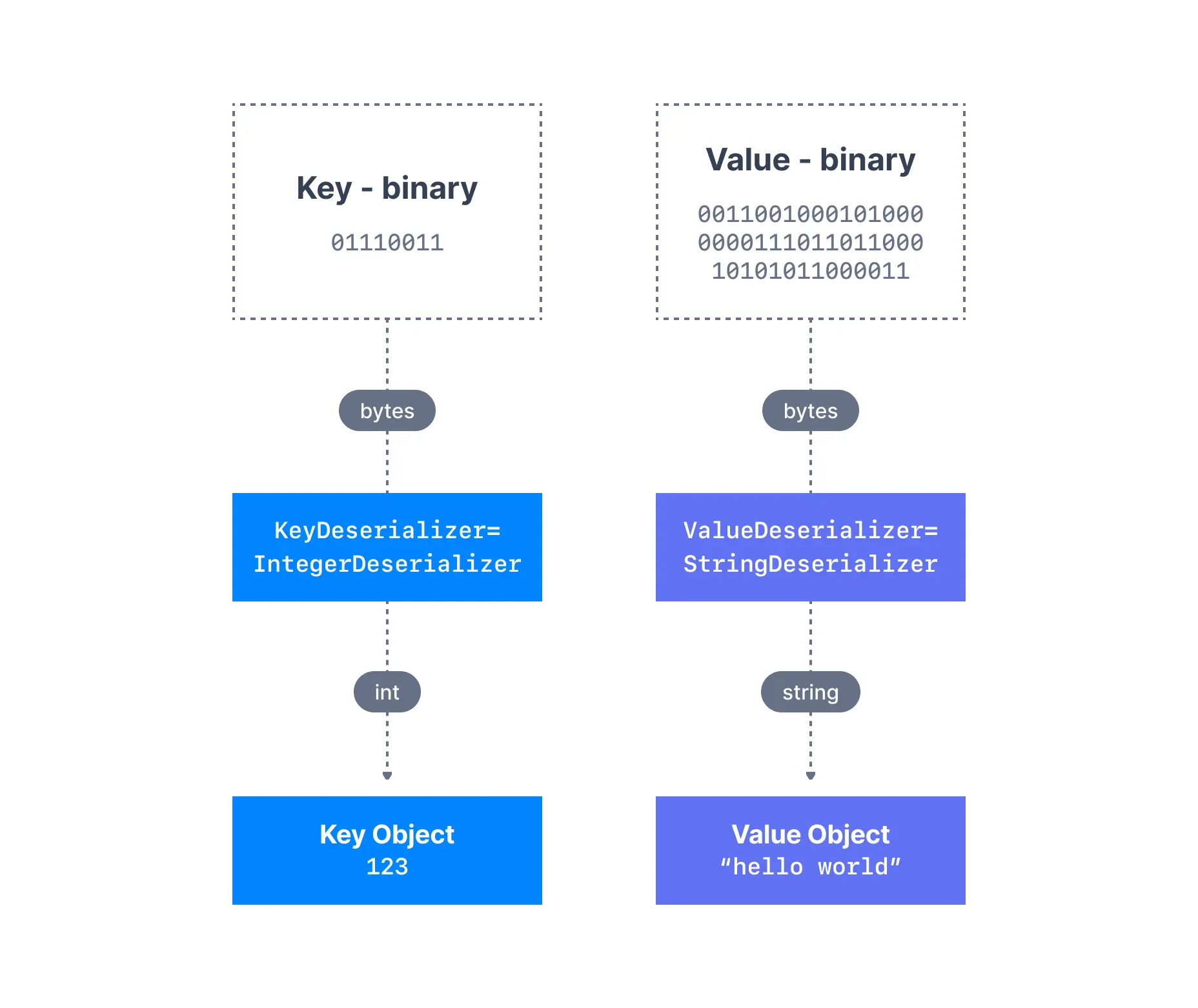
As we have seen before, the data sent by the Kafka producers is serialized. This means that the data received by the Kafka consumers has to be correctly deserialized in order to be useful within your application. Data being consumed has to be deserialized in the same format it was serialized in. For example:- if the producer serialized a
StringusingStringSerializer, the consumer has to deserialize it usingStringDeserializer - if the producer serialized an
IntegerusingIntegerSerializer, the consumer has to deserialize it usingIntegerDeserializer
Serialization compatibility
The serialization and deserialization format of a topic should not change during a topic lifecycle. If you intend to switch a topic data format (for example from JSON to Avro), it is considered best practice to create a new topic and migrate your applications to leverage that new topic. Failure to correctly deserialize may cause crashes or inconsistent data being fed to the downstream processing applications. This can be tough to debug, so it is best to think about it as you’re writing your code the first time.Handling deserialization errors
| Strategy | When to use |
|---|---|
| Fail fast | Development, testing |
| Log and skip | Non-critical data, metrics |
| Dead letter queue | Production, data recovery needed |
| Schema validation | Prevent bad data at producer |
See it in practice with ConduktorConduktor Console lets you consume and browse messages from topics directly in the UI. View message keys, values, headers, and timestamps with automatic deserialization support for common formats.
Next steps
- Learn about consumer groups to understand parallel consumption
- Explore delivery semantics for exactly-once processing
- Configure consumer settings for optimal performance
- Write a Java consumer with hands-on code examples