

Learn how to secure Kafka clusters with encryption, authentication, and authorization in 20 minutes By default, Kafka has no security - anyone can read from or write to any topic. For production deployments with sensitive data or shared clusters, you need encryption, authentication, and authorization. What you’ll learn:Documentation Index
Fetch the complete documentation index at: https://docs.conduktor.io/llms.txt
Use this file to discover all available pages before exploring further.
- The three pillars of Kafka security (encryption, authentication, authorization)
- How to implement SSL/TLS encryption
- Authentication options (SSL, SASL/PLAIN, SASL/SCRAM, Kerberos)
- How to configure Access Control Lists (ACLs)
Kafka security overview
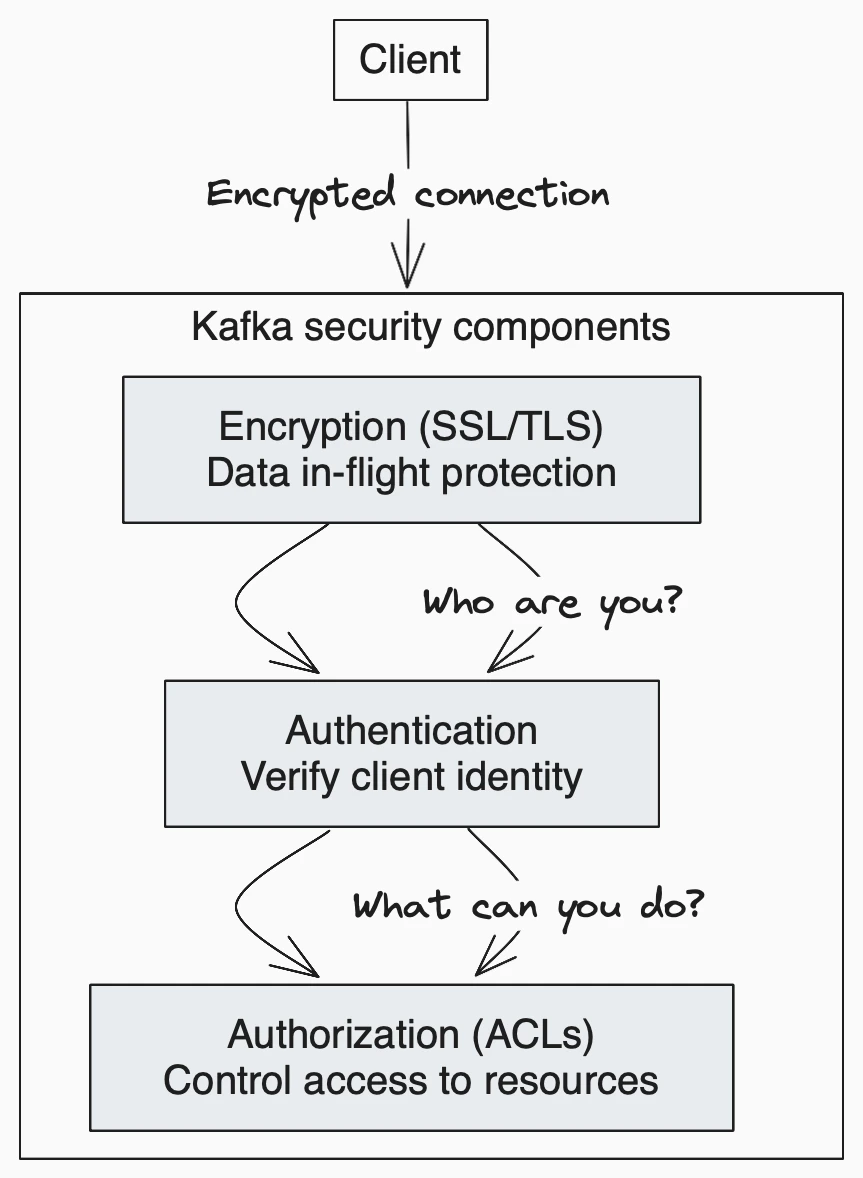
| Component | Purpose | Options |
|---|---|---|
| Encryption | Protect data in transit | SSL/TLS |
| Authentication | Verify identity | SSL certs, SASL (PLAIN, SCRAM, Kerberos, OAuth) |
| Authorization | Control access | ACLs |
Problems Kafka security is solving
Kafka Security has three components:- Encryption of data in-flight using SSL/TLS: this allows your data to be encrypted between your producers and Kafka and your consumers and Kafka. This is a very common pattern everyone has used when going on the web. That’s the “S” of HTTPS (that beautiful green lock you see everywhere on the web).
- Authentication using SSL or SASL: this lets your producers and consumers authenticate to your Kafka cluster which verifies their identity. It’s also a secure way to enable your clients to endorse an identity.
- Authorization using ACLs: once your clients are authenticated, your Kafka brokers can run them against access control lists (ACLs) to determine whether or not a particular client would be authorized to write or read to some topic (or any Kafka resource in general).
Encryption (SSL)
Encryption solves the problem of the man in the middle (MITM) attack. That’s because your packets, while being routed to your Kafka cluster, travel your network and hop from machines to machines. If your data is PLAINTEXT (by default in Kafka), any of these routers could read the content of the data you’re sending: With encryption enabled and carefully setup SSL certificates, your data is now encrypted and securely transmitted over the network. With SSL, only the first and the final machine have the ability to decrypt the packet being sent. This encryption comes at a cost: CPU is now leveraged for both the Kafka Clients and the Kafka Brokers in order to encrypt and decrypt packets. SSL Security comes at the cost of performance, but it’s low to negligible. If you’re using Java JDK 11, you will get a substantial performance improvement on SSLThe encryption is only in-flight and the data still sits un-encrypted on your broker’s disk.
Authentication (SSL & SASL)
There are two ways to authenticate your Kafka clients to your brokers: SSL and SASL. Let’s go over both.SSL authentication
SSL Auth is basically leveraging a capability from SSL called two ways authentication. The idea is to also issue certificates to your clients, signed by a certificate authority, which will allow your Kafka brokers to verify the identity of the clients.SASL authentication
SASL stands for Simple Authorization Service Layer. The idea is that the authentication mechanism is separated from the Kafka protocol (which is a nice idea). It’s very popular with Big Data systems and Big Data setups for example Hadoop would probably already leverage Kerberos. SASL takes many shapes and forms and the following are supported by Kafka- SASL PLAINTEXT: This is a classic username/password combination. These usernames and passwords have to be stored on the Kafka brokers in advance and each change needs to trigger a rolling restart. It’s very annoying and not the recommended kind of security. If you use SASL/PLAINTEXT, make sure to also enable SSL encryption so that credentials aren’t sent as PLAINTEXT on the network
- SASL SCRAM: This is a username/password combination alongside a challenge (salt), which makes it more secure. On top of this, username and password hashes are stored in Zookeeper (and will be stored in a Kafka topic when Zookeeper is removed), which allows you to scale security without rebooting brokers. If you use SASL/SCRAM, make sure to enable SSL encryption so that credentials aren’t sent as PLAINTEXT on the network
- SASL GSSAPI (Kerberos): This is based on Kerberos ticket mechanism, a very secure way of providing authentication. Microsoft Active Directory is the most common implementation of Kerberos. SASL/GSSAPI is a great choice for big enterprises as it allows the companies to manage security from within their Kerberos Server. Additionally, communications are encrypted to SSL encryption is optional with SASL/GSSAPI. Needless to say, setting up Kafka with Kerberos is the most difficult option, but worth it in the end.
- SASL OAUTHBEARER: This will allow you to leverage OAUTH2 token for authentication, read more in the Kafka documentation. Currently it is said not to be ready for production due to the usage of Unsecured JSON Web Tokens.
Authorization (ACLs)
Once your Kafka clients are authenticated, Kafka needs to be able to decide what they can and cannot do. This is where Authorization comes in, controlled by Access Control Lists (ACLs). ACLs are what you expect them to be: User A can(‘t) do Operation B on Resource C from Host D. Rules now support prefixes thanks to the newAclAuthorizer.
ACL are great because they can help you prevent disasters. For example, you may have a topic that needs to be writeable from only a subset of clients or hosts. You want to prevent your average user from writing anything to these topics, hence preventing any data corruption or deserialization errors. ACLs are also great if you have some sensitive data and you need to prove to regulators that only certain applications or users can access that data.
To add ACLs, you can use the kafka-acls command (documentation here). It also even has some facilities and shortcuts to add producers or consumers.
zookeeper.set.acl=true). Otherwise any user could come in and edit ACLs, hence defeating the point of security.
Authentication options comparison
| Method | Complexity | Best for |
|---|---|---|
| SSL (mTLS) | Medium | Small deployments, certificate infrastructure exists |
| SASL/PLAIN | Low | Development, testing |
| SASL/SCRAM | Medium | Production without Kerberos |
| SASL/GSSAPI (Kerberos) | High | Enterprise with Active Directory |
| SASL/OAUTHBEARER | Medium | OAuth2 environments |
See it in practice with ConduktorConduktor Console supports all Kafka authentication methods and provides a visual interface for managing ACLs. Test your security configuration and audit access permissions across your cluster.
Next steps
- Set up monitoring to track authentication failures
- Plan upgrades to enable security on existing clusters