

Learn how producer acknowledgments affect data durability in 10 minutes The producer acknowledgment (acks) setting is one of the most critical configurations for balancing durability, performance, and availability in Kafka. Understanding each option helps you make the right trade-offs for your use case. What you’ll learn:Documentation Index
Fetch the complete documentation index at: https://docs.conduktor.io/llms.txt
Use this file to discover all available pages before exploring further.
- The three acks settings and their guarantees
- How acks interacts with replication
- Performance implications of each setting
- How to choose the right setting for your use case
Acks overview
Kafka producers only write data to the current leader broker for a partition and have to specify an acknowledgment (acks) level to determine when a message is considered successfully written.
acks=0 (fire and forget)
Whenacks=0, producers consider messages “written successfully” immediately after sending, without waiting for broker acceptance.

- Highest possible throughput
- Lowest latency
- No durability guarantees
- Potential for data loss if broker fails
- Metrics collection where some data loss is acceptable
- High-volume logging where speed is more important than reliability
- Scenarios where losing some messages won’t impact business logic
acks=1 (leader acknowledgment)
Whenacks=1, producers consider messages “written successfully” when the leader broker acknowledges receipt.

- Balanced throughput and durability
- Leader response required before considering message sent
- Replication happens asynchronously in background
- Risk of data loss if leader fails before replication completes
- Most common configuration for general-purpose applications
- Good balance between performance and reliability
- Suitable when some data loss is acceptable but should be minimized
acks=all (full acknowledgment)
Whenacks=all, producers consider messages “written successfully” when all in-sync replicas (ISR) accept the message.
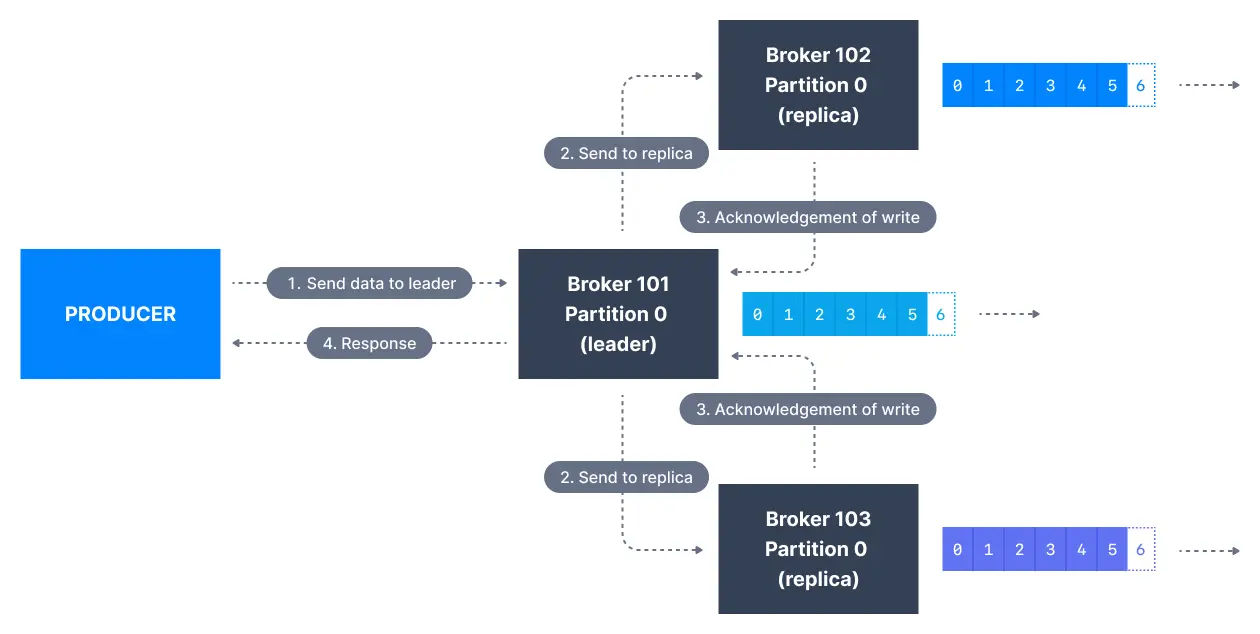
- Highest durability guarantees
- Lower throughput due to replication requirements
- Works with
min.insync.replicassetting - No data loss as long as at least one ISR remains
- Critical business data that cannot be lost
- Financial transactions
- Audit logs and compliance data
- Any scenario where data durability is paramount
Interaction with min.insync.replicas
Themin.insync.replicas setting works together with acks=all to control durability:
| min.insync.replicas | Meaning | Broker failures tolerated (RF=3) |
|---|---|---|
| 1 | Only leader needs to be in-sync | 2 |
| 2 | Leader + 1 follower must acknowledge | 1 (recommended) |
| 3 | Leader + 2 followers must acknowledge | 0 |
Performance comparison
| Setting | Throughput | Latency | Durability | Data loss risk |
|---|---|---|---|---|
acks=0 | Highest | Lowest | None | High |
acks=1 | High | Low | Leader only | Medium |
acks=all | Lower | Higher | Full ISR | Low |
Configuration examples
High durability (recommended for critical data)
Balanced performance and reliability
Maximum throughput (use with caution)
acks=0, data is lost if the producer fails to send or the broker is down; with acks=1, data is lost if the leader fails before replication; with acks=all, data is only lost if all ISRs fail simultaneously.
See it in practice with ConduktorConduktor Console lets you view topic configurations including replication factor and min.insync.replicas. Monitor ISR status to ensure your acks settings provide the intended durability guarantees.
Next steps
- Configure idempotent producers for exactly-once semantics
- Understand producer retries for error handling
- Optimize producer batching for throughput