Kafka producer batching groups multiple messages together before sending them to brokers, dramatically improving throughput at the cost of slightly increased latency.
How batching works
Instead of sending messages individually, the Kafka producer accumulates messages in memory and sends them in batches:
- Message accumulation: Producer collects messages in memory buffers per partition
- Batch creation: Messages are grouped into batches based on size or time limits
- Network transmission: Complete batches are sent to brokers in single network requests
- Broker processing: Brokers process entire batches more efficiently than individual messages
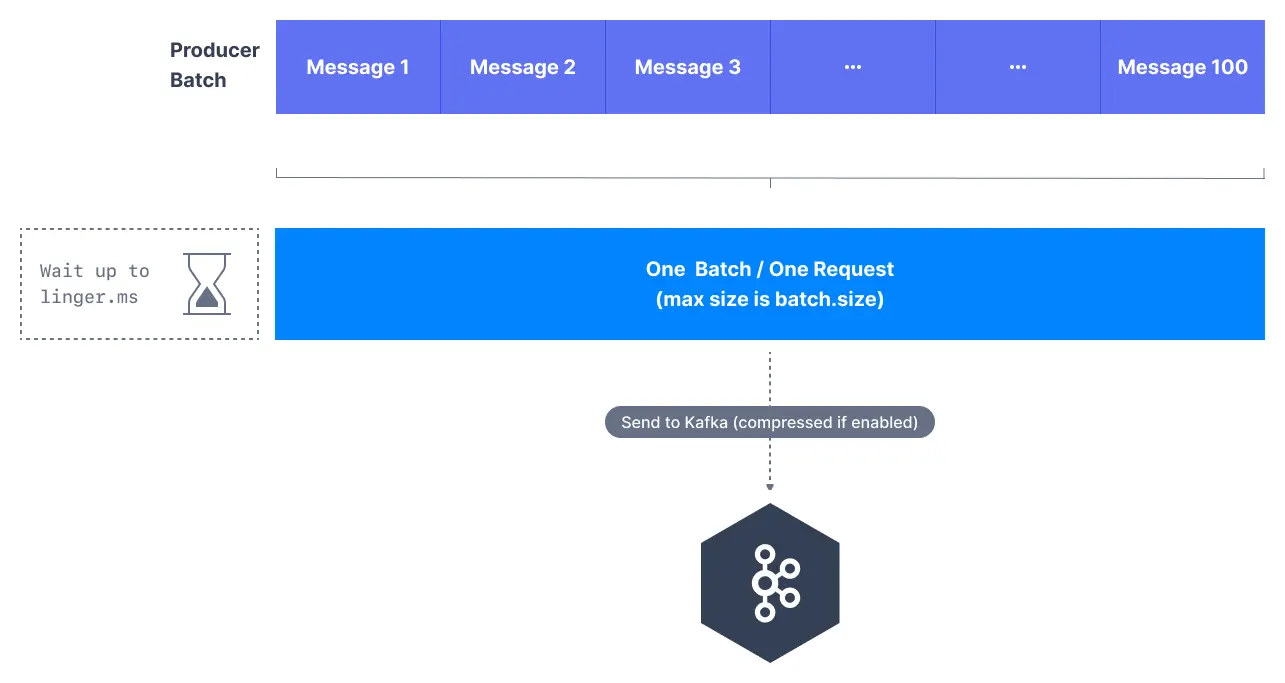
Batching is automaticKafka producers handle batching automatically - you only need to configure the parameters that control when batches are sent.
Key batching parameters
batch.size
Controls the maximum size of a batch in bytes.
# Default: 16384 (16KB)
batch.size=32768 # 32KB batches
Characteristics:
- Larger batches improve throughput but increase memory usage
- Batches are sent when they reach this size, regardless of time
- Each partition has its own batch buffer
- Does not enforce a hard limit on message size
linger.ms
Controls how long to wait for additional messages before sending a batch.
# Default: 0 (send immediately)
linger.ms=10 # Wait up to 10ms for more messages
Characteristics:
- Adds artificial delay to allow batches to fill up
- Improves throughput by creating larger batches
- Increases end-to-end latency slightly
- Balances throughput vs latency trade-off
buffer.memory
Total memory available for batching across all partitions.
# Default: 33554432 (32MB)
buffer.memory=67108864 # 64MB total buffer
Characteristics:
- Shared across all partitions and topics
- Producer blocks when buffer is full
- Must accommodate batch.size x number of active partitions
- Affects producer’s ability to handle traffic spikes
Batching behavior
When batches are sent
Batches are sent when ANY of these conditions are met:
- Batch size reached: Batch reaches
batch.size bytes
- Linger time elapsed:
linger.ms milliseconds have passed since first message
- Buffer full: Producer needs space for new messages
- Producer flush: Explicit
flush() call or producer close
- Metadata update: Topic metadata changes require sending pending batches
Batch size dynamics
Batch sizes are dynamic and depend on:
- Message arrival rate: High rates create fuller batches
- Message size: Large messages fill batches faster
- Partition distribution: Messages spread across partitions reduce batch efficiency
- Linger time: Longer waits allow larger batches to form
Throughput optimization
Maximizing throughput
For maximum throughput, optimize batching parameters:
# Large batches for high throughput
batch.size=65536 # 64KB batches
linger.ms=20 # Wait longer for full batches
buffer.memory=134217728 # 128MB buffer for more batches
compression.type=lz4 # Compress batches for efficiency
Throughput benefits
Batching improves throughput through:
- Reduced network overhead: Fewer network requests
- Better compression: Larger batches compress more efficiently
- Broker efficiency: Brokers process batches more efficiently
- Reduced per-message overhead: Amortized protocol overhead
Measuring throughput impact
Monitor these metrics to measure batching effectiveness:
Records per batch = total_records_sent / total_batches_sent
Batch utilization = average_batch_size / batch_size_config
Network efficiency = bytes_sent / network_requests_sent
Latency considerations
Latency trade-offs
Batching affects latency in different ways:
Increased latency:
- Batching delay: Messages wait in batches before sending
- Processing time: Larger batches take longer to process
Reduced latency:
- Network efficiency: Fewer network round-trips
- Broker processing: More efficient batch processing
Minimizing latency
For low-latency scenarios:
# Minimize batching delay
linger.ms=0 # Send immediately
batch.size=16384 # Moderate batch size
buffer.memory=33554432 # Default buffer size
Latency measurement
Track end-to-end latency components:
Total latency = produce_time + network_time + broker_processing_time
Batching delay = time_in_batch + linger_ms_delay
Memory management
Memory allocation
Producer memory is allocated as:
Total memory = buffer.memory
Per-partition memory = batch.size (when active)
Available partitions = buffer.memory / batch.size
Memory pressure handling
When buffer memory is exhausted:
- Block producer:
send() calls block until memory available
- Exception: After
max.block.ms, throw TimeoutException
- Batch completion: Existing batches complete and free memory
Memory optimization
# Balance memory usage with performance
buffer.memory=67108864 # 64MB buffer
batch.size=32768 # 32KB batches
max.block.ms=60000 # 1 minute block timeout
Advanced batching scenarios
High partition count
For topics with many partitions:
# More memory needed for many partitions
buffer.memory=134217728 # 128MB for more partitions
batch.size=16384 # Smaller batches to spread memory
linger.ms=10 # Longer wait for batch filling
Variable message sizes
For mixed message sizes:
# Accommodate large messages
batch.size=65536 # Larger batches for big messages
buffer.memory=67108864 # More memory for size variation
linger.ms=5 # Moderate wait time
Bursty traffic patterns
For irregular traffic:
# Handle traffic bursts
buffer.memory=134217728 # Large buffer for bursts
batch.size=32768 # Moderate batch size
linger.ms=15 # Longer wait for batch efficiency
max.block.ms=30000 # Reasonable block timeout
Key metrics to track
Batch efficiency metrics:
batch-size-avg: Average batch size in bytes
batch-size-max: Maximum batch size observed
records-per-request-avg: Average records per batch
requests-in-flight: Number of active batches
Performance metrics:
record-send-rate: Messages sent per second
byte-rate: Bytes sent per second
request-rate: Batches sent per second
request-latency-avg: Average batch send latency
JMX monitoring
kafka.producer:type=producer-metrics,client-id=<client-id>
- batch-size-avg
- batch-size-max
- records-per-request-avg
- request-rate
- byte-rate
- record-send-rate
Configuration examples
High-throughput configuration
# Optimize for maximum throughput
batch.size=65536 # Large 64KB batches
linger.ms=20 # Wait for full batches
buffer.memory=134217728 # 128MB buffer
compression.type=lz4 # Fast compression
acks=1 # Balance durability/speed
Low-latency configuration
# Optimize for minimum latency
batch.size=16384 # Moderate batch size
linger.ms=0 # Send immediately
buffer.memory=33554432 # Default buffer
compression.type=none # No compression delay
acks=1 # Fast acknowledgment
Balanced configuration (recommended)
# Balance throughput and latency
batch.size=32768 # 32KB batches
linger.ms=5 # Short wait time
buffer.memory=67108864 # 64MB buffer
compression.type=snappy # Fast compression
acks=1 # Reasonable durability
Memory-constrained configuration
# Minimize memory usage
batch.size=8192 # Smaller 8KB batches
linger.ms=10 # Wait for efficiency
buffer.memory=16777216 # 16MB buffer
compression.type=lz4 # Compress to save space
Best practices
Production recommendations
- Start with defaults: Default settings work well for most use cases
- Monitor batch utilization: Ensure batches are reasonably full
- Adjust based on traffic patterns: Tune for your specific workload
- Consider memory constraints: Don’t over-allocate buffer memory
- Test latency impact: Measure end-to-end latency changes
Tuning methodology
- Establish baseline: Measure current throughput and latency
- Adjust one parameter: Change batch.size OR linger.ms, not both
- Monitor impact: Watch throughput, latency, and memory usage
- Iterate gradually: Make incremental adjustments
- Load test: Validate under production-like conditions
Common pitfalls
Mistakes to avoid:
- Setting
linger.ms too high (increases latency unnecessarily)
- Making
batch.size too large (wastes memory for small messages)
- Insufficient
buffer.memory for partition count
- Not monitoring batch utilization rates
- Changing multiple parameters simultaneously
Troubleshooting batching issues
Poor batch utilization:
- Increase
linger.ms to allow batches to fill
- Check if messages are spread across too many partitions
- Monitor message arrival patterns
High memory usage:
- Reduce
batch.size or buffer.memory
- Check for inactive partitions consuming memory
- Monitor buffer pool utilization
Increased latency:
- Reduce
linger.ms to decrease batching delay
- Monitor end-to-end latency components
- Consider compression impact on processing time
Memory blockingWhen buffer memory is exhausted, the producer will block send() calls. Monitor buffer-available-bytes to prevent blocking in production systems.
Batch size vs message sizeThe batch.size parameter is a target, not a strict limit. Batches can exceed this size if single messages are larger, and will be smaller if linger.ms timeout occurs first.