

Learn how to configure producer retries for reliable message delivery in 14 minutes Kafka producers can automatically retry failed requests to improve reliability and handle transient failures in distributed systems. What you’ll learn:Documentation Index
Fetch the complete documentation index at: https://docs.conduktor.io/llms.txt
Use this file to discover all available pages before exploring further.
- How producer retries work and when they’re triggered
- The difference between retriable and non-retriable errors
- How to configure retry behavior for idempotent producers
- Best practices for retry timeout and backoff settings
Why retries matter
In distributed systems, temporary failures are common:- Network connectivity issues
- Broker leadership changes
- Temporary resource constraints
- Replication delays
Retry configuration
Basic retry settings
Kafka version differences
Kafka < 3.0:retries=0(no retries by default)- Must explicitly enable retries
retries=Integer.MAX_VALUE(unlimited retries)- Retries enabled by default with idempotent producers
Types of errors
Retriable errors
These errors can potentially be resolved by retrying:- TimeoutException: Request timed out
- NotEnoughReplicasException: Not enough in-sync replicas
- NotEnoughReplicasAfterAppendException: Replication issues
- RetriableException: Generic retriable error
- LeaderNotAvailableException: Leader election in progress
- NetworkException: Network connectivity issues
Non-retriable errors
These errors indicate permanent failures that won’t be resolved by retrying:- RecordTooLargeException: Message exceeds size limits
- SerializationException: Message serialization failed
- OffsetMetadataTooLarge: Offset metadata too large
- InvalidTopicException: Topic doesn’t exist or is invalid
- UnknownTopicOrPartitionException: Topic or partition invalid
- AuthorizationException: Authentication/authorization failure
Error handling decision tree
This decision tree helps you understand how to handle different types of producer errors: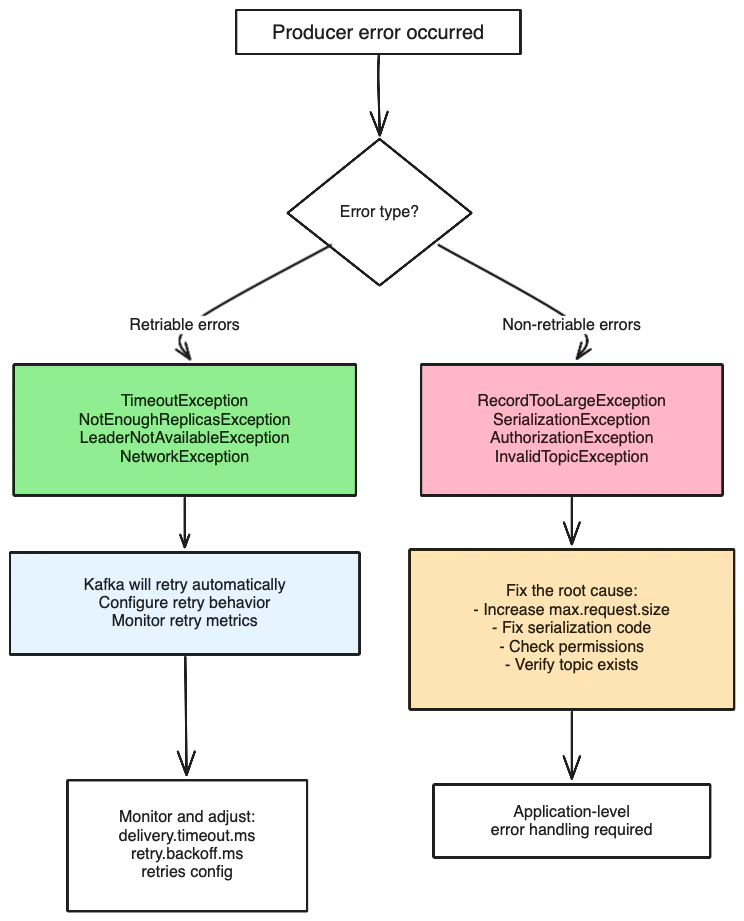
Retry decision flowchart
This flowchart shows how the producer decides whether to retry a failed request: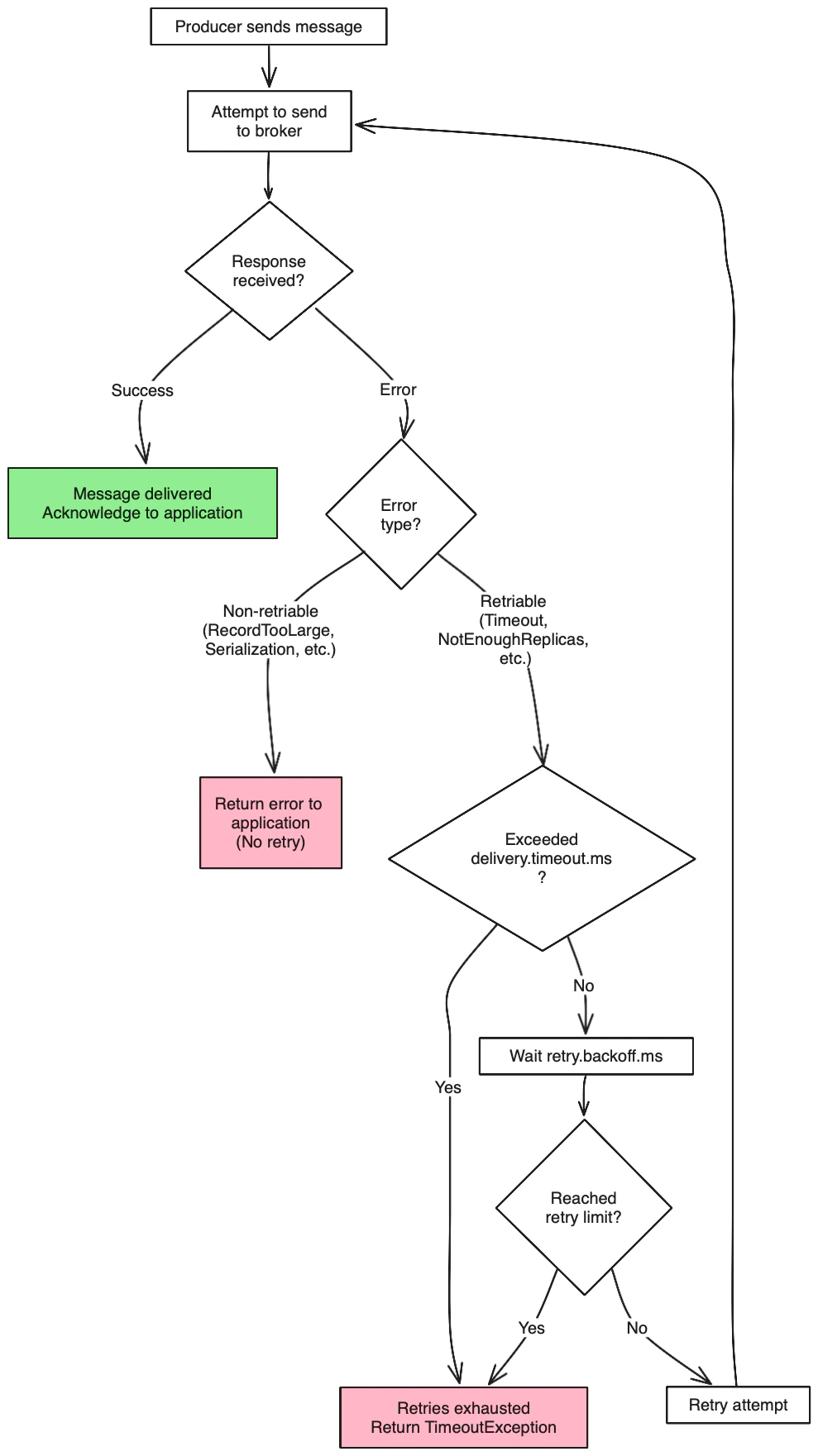
Idempotent producers (Kafka 2.4+): With
enable.idempotence=true and acks=all, you get unlimited retries by default without risk of duplicates, making retry configuration much simpler.Retry backoff strategies
Fixed backoff (default)
Waits a fixed amount of time between retries:Exponential backoff
Not natively supported by Kafka producer, but can be implemented at the application level:Impact on message ordering
With retries enabled
Retries can affect message ordering within a partition:Preserve order
To maintain strict ordering, configure:Delivery timeout vs request timeout
Request timeout
Time to wait for a single request attempt:Delivery timeout
Total time limit for delivering a message (including all retries):Configuration examples
High reliability (recommended)
Fast failure
No retries (not recommended for production)
Monitor retry behavior
Key metrics to track
- retry-rate: Rate of retry attempts
- retry-total: Total number of retries
- error-rate: Rate of failed requests (after all retries)
- request-latency: Time taken for requests (including retries)
JMX metrics
Error handling strategies
Synchronous error handling
Asynchronous error handling
Best practices
Production recommendations
- Enable unlimited retries: Set
retries=Integer.MAX_VALUE - Use delivery timeout: Set
delivery.timeout.msto control total time - Enable idempotency: Prevents duplicates during retries
- Monitor retry metrics: Track retry rates and error patterns
- Handle non-retriable errors: Implement proper error handling for permanent failures
Configuration checklist
- ✅
retries=Integer.MAX_VALUE(unlimited retries) - ✅
delivery.timeout.ms=120000(reasonable total timeout) - ✅
request.timeout.ms=30000(reasonable per-request timeout) - ✅
retry.backoff.ms=100(reasonable delay between retries) - ✅
enable.idempotence=true(prevent duplicates)
Common mistakes to avoid
- Setting
retries=0in production - Not handling non-retriable errors
- Setting delivery timeout too low
- Ignoring retry metrics and error rates
enable.idempotence=true or max.in.flight.requests.per.connection=1 if strict ordering is required.
See it in practice with ConduktorConduktor Console displays producer retry metrics and error rates in real-time. Monitor retry attempts, successful retries, and failed messages to validate your retry configuration and identify patterns in transient versus permanent failures.
Next steps
- Configure idempotent producers for exactly-once semantics
- Understand acknowledgment settings for delivery guarantees
- Optimize producer batching for throughput
- Monitor producer metrics using CLI tools