

Learn how Kafka partitioners affect message distribution in 15 minutes Kafka producer partitioners determine which partition receives each message, affecting load distribution, ordering guarantees, and overall system performance. Understanding partitioning strategies helps you optimize for your specific use case. What you’ll learn:Documentation Index
Fetch the complete documentation index at: https://docs.conduktor.io/llms.txt
Use this file to discover all available pages before exploring further.
- How partitioners route messages to partitions
- The difference between sticky and round-robin partitioning
- When to use key-based vs keyless partitioning
- How to implement custom partitioners
How partitioning works
When a producer sends a message, the partitioner decides which partition receives it based on:- Message key: If present, used to determine partition assignment
- Partition specification: Explicit partition number in ProducerRecord
- Partitioner logic: Default or custom partitioning algorithm
Default partitioner behavior
With message keys
When messages have keys, the default partitioner uses a hash-based approach:- Same key always goes to same partition (within same topic configuration)
- Provides ordering guarantees per key
- Distributes load based on key distribution
- Changes when partition count changes
Without message keys
For messages without keys, behavior depends on Kafka version:| Kafka version | Partitioner | Behavior |
|---|---|---|
| < 2.4 | Round-robin | Cycles through partitions sequentially |
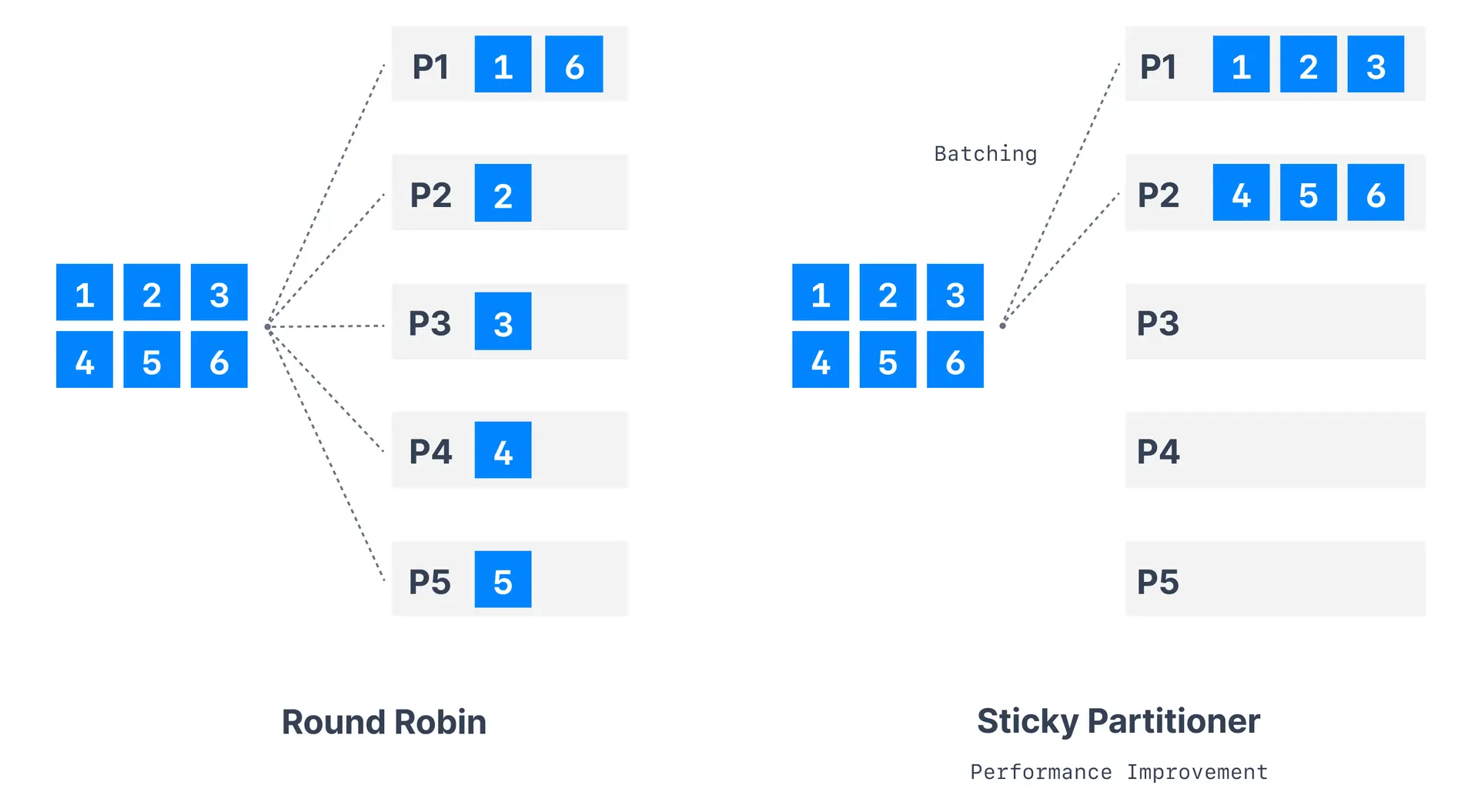
| >= 2.4 | Sticky | Sticks to one partition until batch is full |
Sticky partitioner
The sticky partitioner, introduced in Kafka 2.4, improves performance for messages without keys.How sticky partitioner works
- Partition selection: Choose random available partition
- Batch filling: Send all messages to chosen partition until batch fills
- Partition switching: Switch to different partition for next batch
- Repeat process: Continue cycle for optimal batching
Benefits of sticky partitioner
| Benefit | Description |
|---|---|
| Improved throughput | Better batch utilization (more messages per batch) |
| Fewer network requests | Reduced overhead from larger batches |
| Better compression | Larger batches compress more efficiently |
| Even distribution | Over time, messages distribute evenly across partitions |
Configuration
Sticky partitioner is enabled by default in Kafka 2.4+:Round-robin partitioner
The original default partitioner (pre-2.4) that cycles through partitions.Partitioning strategies decision guide
Custom partitioner implementation
Create custom partitioners for specific business requirements:Partition count considerations
Impact of adding partitions
- Same key may go to different partition
- Breaks ordering guarantees temporarily
- May create temporary hotspots
Best practices
| Scenario | Recommendation |
|---|---|
| Need ordering per entity | Use message keys |
| Maximum throughput | Use sticky partitioner (no keys) |
| Custom routing logic | Implement custom partitioner |
| Even distribution | Monitor for hot keys |
See it in practice with ConduktorConduktor Console displays partition distribution and message counts per partition. Monitor how your partitioning strategy affects load balance across your topic partitions.
Next steps
- Configure producer batching to optimize throughput
- Understand message keys for ordering
- Explore topic partitioning decisions