

Learn how log compaction retains only the latest value per key in 20 minutes Log compaction is Kafka’s alternative cleanup policy that keeps only the most recent value for each key, making it ideal for changelog-style topics. This guide covers both the theory and hands-on practice of log compaction. What you’ll learn:Documentation Index
Fetch the complete documentation index at: https://docs.conduktor.io/llms.txt
Use this file to discover all available pages before exploring further.
- The difference between delete and compact cleanup policies
- How log compaction works internally
- Log compaction guarantees and common misconceptions
- How to configure and test log-compacted topics
Kafka log cleanup policies
Kafka stores messages for a set amount of time and purges messages older than the retention period. This expiration happens due to a policy calledlog.cleanup.policy. There are two cleanup policies:
| Policy | Default for | Behavior |
|---|---|---|
delete | User topics | Deletes events older than retention time |
compact | __consumer_offsets | Keeps only the most recent value per key |
Purpose of log cleanup
Kafka was not initially meant to keep data forever (although now some people are going in that direction with large disks or Tiered Storage), nor does it wait for all consumers to read a message before deleting it. By configuring a retention policy for each topic, it allows administrators to:- Control the size of the data on the disk and delete obsolete data
- Limit maintenance work on the Kafka Cluster
- Limit the amount of historical data a consumer may have to consume to catch up on the topic
Kafka log compaction theory
Kafka supports use cases by allowing the retention policy on a topic to be set tocompact, with the property to only retain at least the most recent value for each key in the partition. It is very useful if we just require a SNAPSHOT instead of full history.
Log compaction example
We want to keep the most recent salary for our employees. We create a topic namedemployee-salary for the purpose. We don’t want to know about the old salaries of the employees.
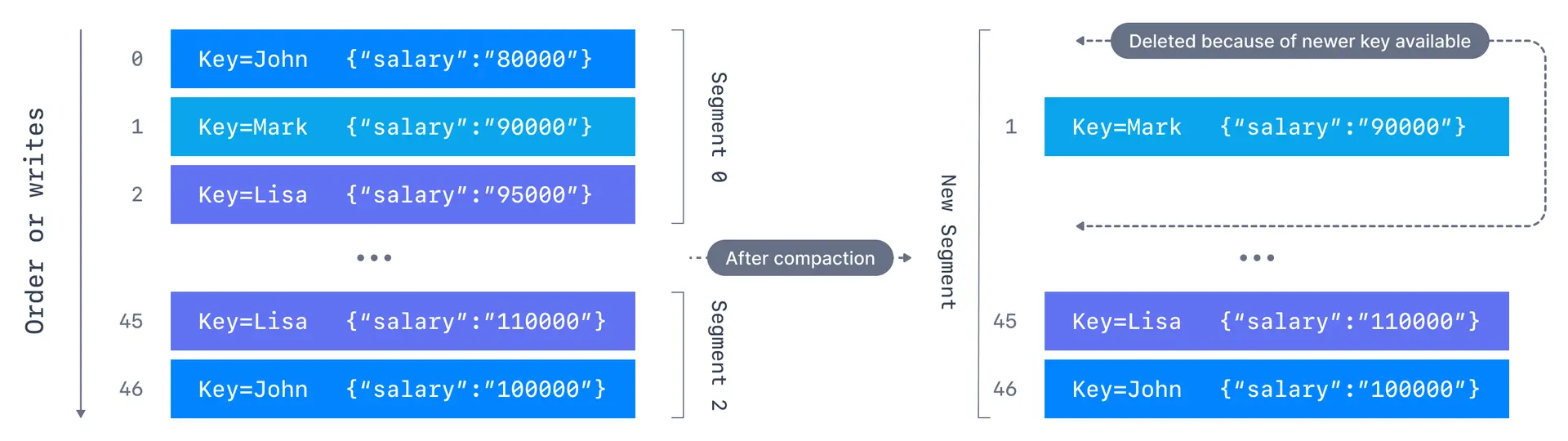
Log compaction guarantees
There are some important guarantees that Kafka provides for messages produced on the log-compacted topics:- Tail consumers see all messages: Any consumer that is reading from the tail of a log, i.e., the most current data, will still see all the messages sent to the topic
- Ordering preserved: Ordering of messages at the key level and partition level is kept, log compaction only removes some messages, but does not re-order them
- Offsets are immutable: The offset of a message never changes. Offsets are just skipped if a message is missing
- Deleted records visible briefly: Deleted records can still be seen by consumers for a period of
log.cleaner.delete.retention.ms(default is 24 hours)
Log compaction myth busting
Let us look at some of the misconceptions around log compaction and clear them. What log compaction does NOT do:- It doesn’t prevent duplicate data: De-duplication is done after a segment is committed. Your consumers will still read from the tail as soon as data arrives
- It doesn’t prevent reading duplicates: If a consumer re-starts, it may see duplicate data based on at-least-once semantics
How log compaction works
If compaction is enabled when Kafka starts, each broker will start a compaction manager thread and a number of compaction threads. These are responsible for performing the compaction tasks.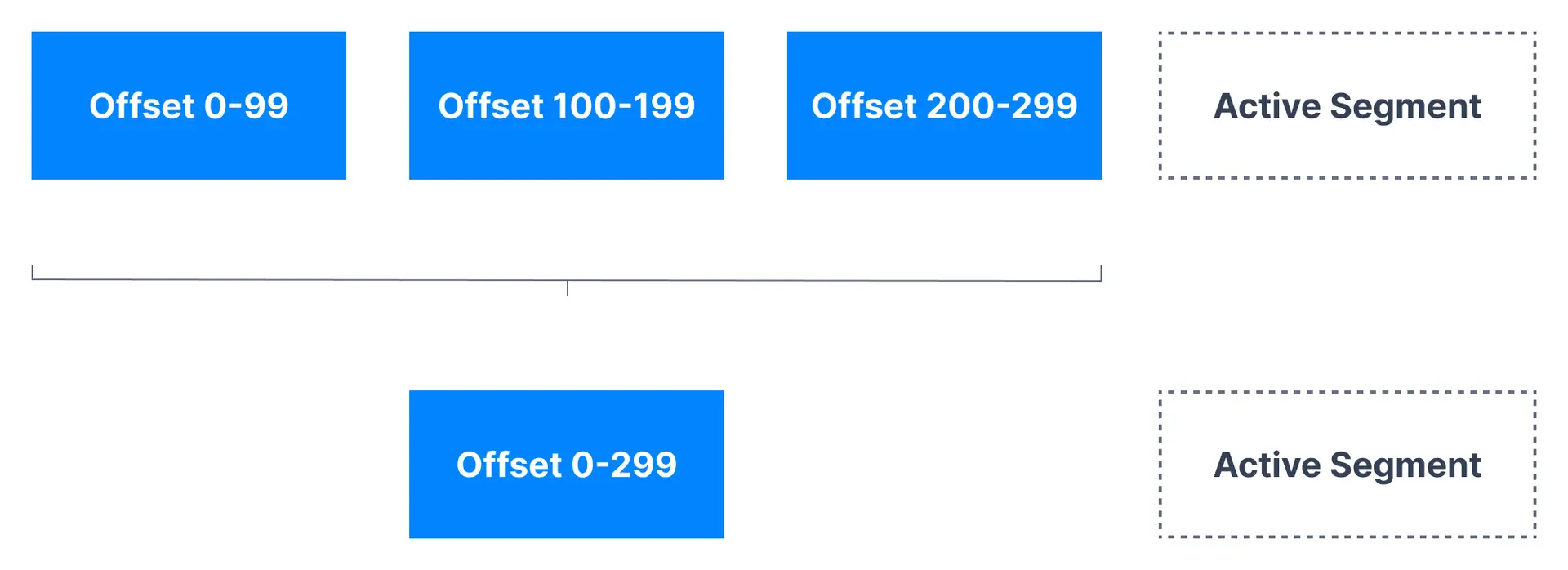
- Cleaner threads start with the oldest segment and check their contents. The active segments are left untouched
- If the message it has just read is still the latest for a key, it copies over the message to a replacement segment. Otherwise it omits the message
- Once the cleaner thread has copied over all the messages that still contain the latest value for their key, we swap the replacement segment for the original
- At the end of the process, we are left with one message per key - the one with the latest value
Log compaction configurations
| Configuration | Default | Description |
|---|---|---|
log.cleaner.enable | true | Enable/disable log compaction |
log.cleaner.threads | 1 | Background threads for log cleaning |
log.segment.ms | 7 days | Max time before closing active segment |
log.segment.bytes | 1GB | Max size of a segment |
log.cleaner.delete.retention.ms | 24 hours | How long tombstones are visible |
log.cleaner.backoff.ms | 15 seconds | Sleep time when no logs to clean |
min.cleanable.dirty.ratio | 0.5 | Minimum dirty ratio to trigger cleaning |
Log compaction tombstones
Compaction also allows for deletes. A message with a key and anull payload will be treated as a delete from the log. Such a record is sometimes referred to as a tombstone. This delete marker will cause any prior message with that key to be removed.
Tombstones are themselves cleaned out of the log after delete.retention.ms to free up space.
Log compaction practice
Create a log-compacted topic
Create a log-compacted topic namedemployee-salary with a single partition and a replication factor of 1:
cleanup.policy=compact: Enables log compactionmin.cleanable.dirty.ratio=0.001: Ensures log cleanup is triggered frequently (for testing)segment.ms=5000: New segment every 5 seconds (compaction only happens on closed segments)
Produce messages with keys
Start a Kafka console producer with key parsing enabled:Consume and verify compaction
Start a consumer to read all messages:See it in practice with ConduktorConduktor Console lets you browse compacted topics and see the latest value for each key. Monitor compaction progress and verify your cleanup policy configuration is working as expected.
Next steps
- Configure log retention for time-based cleanup
- Learn about log segments for deeper understanding
- Explore topic configuration CLI for more options