

Learn how min.insync.replicas ensures data durability in 12 minutes TheDocumentation Index
Fetch the complete documentation index at: https://docs.conduktor.io/llms.txt
Use this file to discover all available pages before exploring further.
min.insync.replicas setting works with producer acknowledgments to control when writes are considered successful. Understanding this configuration is essential for balancing data durability with availability in production Kafka deployments.
What you’ll learn:
- How min.insync.replicas works with producer acks
- The relationship between replication factor, ISR, and availability
- How to configure min.insync.replicas at topic and broker level
- Common configuration patterns for production
How min.insync.replicas works
Themin.insync.replicas setting specifies the minimum number of replicas that have to acknowledge a write for it to be considered successful when using acks=all.
Producer acks review
acks=0
Whenacks=0 producers consider messages as “written successfully” the moment the message was sent without waiting for the broker to accept it at all.

acks=1
Whenacks=1 , producers consider messages as “written successfully” when the message was acknowledged by only the leader.

acks=all
Whenacks=all, producers consider messages as “written successfully” when the message is accepted by all in-sync replicas (ISR).
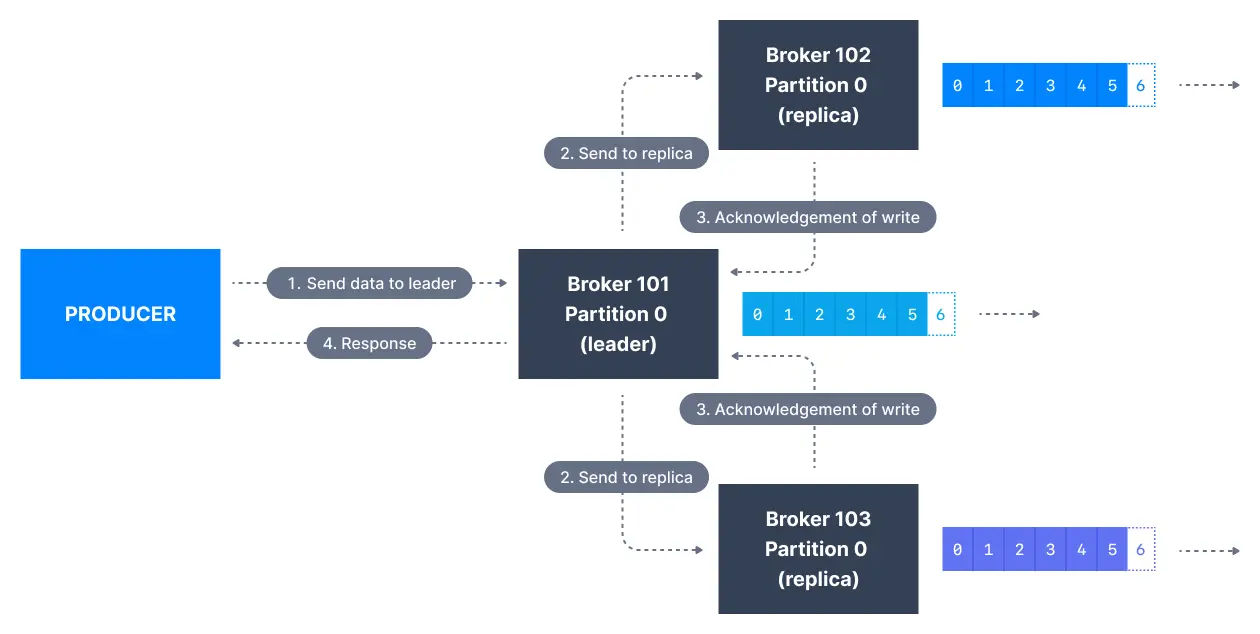
min.insync.replicas). The request will be stored in a buffer until the leader observes that the follower replicas replicated the message, at which point a successful acknowledgement is sent back to the client.
Themin.insync.replicas can be configured both at the topic and the broker-level. The data is considered committed when it is written to all in-sync replicas - min.insync.replicas. A value of 2 implies that at least 2 brokers that are ISR (including leader) have to respond that they have the data.
If you would like to be sure that committed data is written to more than one replica, you need to set the minimum number of in-sync replicas to a higher value. If a topic has three replicas and you set min.insync.replicas to 2, then you can only write to a partition in the topic if at least two out of the three replicas are in-sync. When all three replicas are in-sync, everything proceeds normally. This is also true if one of the replicas becomes unavailable. However, if two out of three replicas are not available, the brokers will no longer accept produce requests. Instead, producers that attempt to send data will receive NotEnoughReplicasException.
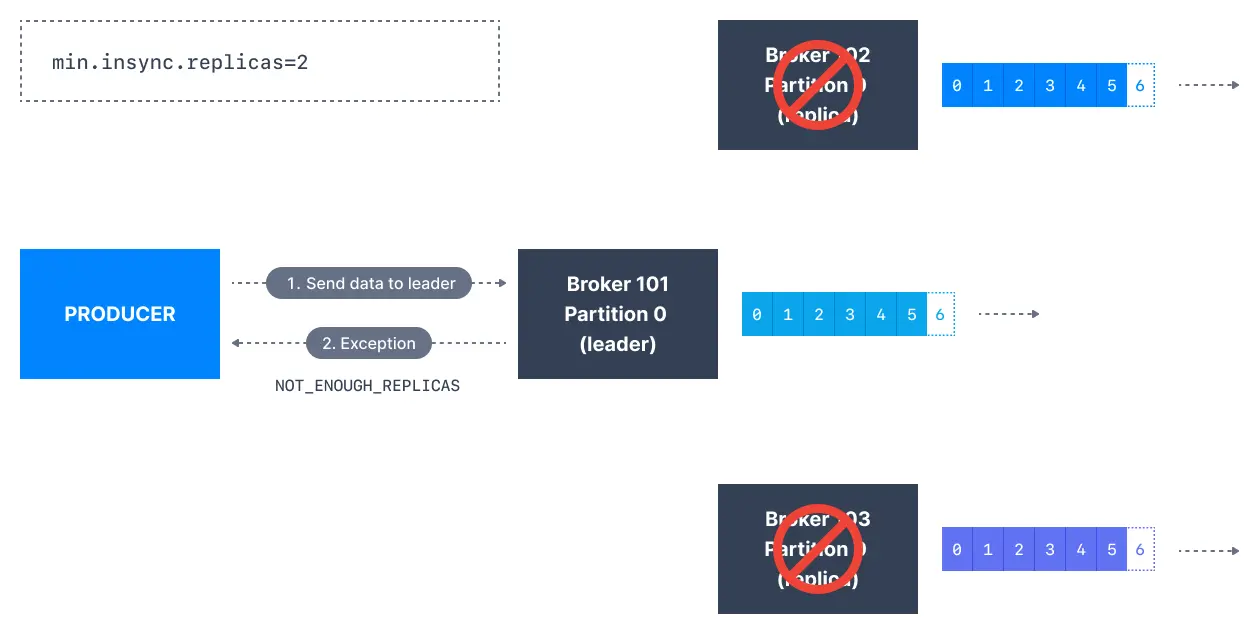
Durability vs availability trade-offs
For a topic replication factor of 3, topic data durability can withstand 2 brokers loss. As a general rule, for a replication factor ofN, you can permanently lose up to N-1 brokers and still recover your data.
Availability matrix
| Configuration | Broker failures tolerated | Use case |
|---|---|---|
| RF=3, acks=all, min.insync=1 | 2 | Default, low durability |
| RF=3, acks=all, min.insync=2 | 1 | Recommended for production |
| RF=3, acks=all, min.insync=3 | 0 | Maximum durability, no fault tolerance |
Availability rules
- Reads: As long as one partition is up and considered an ISR, the topic will be available for reads
- Writes with acks=0 or acks=1: As long as one partition is up and ISR, writes succeed
- Writes with acks=all: Must have at least
min.insync.replicasISRs available
acks=all, replication.factor=N, and min.insync.replicas=M, you can tolerate N-M brokers going down for topic availability purposes.
Configure min.insync.replicas at topic level
Before running Kafka CLIs make sure that you have started Kafka successfully. First, create a topic named configured-topic with 3 partitions and a replication factor of 1:min.insync.replicas value for the topic configured-topic to 2:
min.insync.replicas=2.
You can delete the configuration override by passing --delete-config in place of the --add-config flag:
Configure min.insync.replicas at broker level
Through a configuration file change
The default value of this configuration is1. However, this can be changed at the broker level. Open the broker configuration file config/server.properties and append the following at the end of the file:
kafka-configs which can change configuration while the broker is running, this, however, requires a broker restart for the configuration change to take effect.
Dynamic broker configuration change using kafka-configs CLI
Thekafka-configs CLI can also update broker configuration dynamically without requiring a broker restart:
See it in practice with ConduktorConduktor Console displays topic configurations including min.insync.replicas and replication status. Monitor ISR counts across partitions to ensure your durability settings are effective.The Insights dashboard automatically identifies topics at risk of data loss based on their replication factor and min.insync.replicas configuration, helping you prioritize remediation.
Next steps
- Configure log retention for data lifecycle management
- Understand unclean leader election trade-offs
- Explore replication and partition decisions